
 Ошибка Android EndLayoutGroup: BeginLayoutGroup must be call
Начал компелировать проект на Android и выдает ошибки.
Вот картинка с организацией canvas-ов:
https://drive.google.com/file/d/1Rf81yeyGWX7B0-aB1NMhbat7ekCTkRFV/view?usp=sharing
==========================================================
File C:Usersilya.androidrepositories.cfg could not be loaded.
0x0000000140AEB92C (Unity) StackWalker::GetCurrentCallstack
0x0000000140AEF951 (Unity) StackWalker::ShowCallstack
0x0000000141D74715 (Unity) GetStacktrace
0x0000000142C3A65E (Unity) DebugStringToFile
0x0000000140BDCF55 (Unity) DebugLogHandler_CUSTOM_Internal_Log
0x000000006D2F94BB (Mono JIT Code) (wrapper managed-to-native) UnityEngine.DebugLogHandler:Internal_Log (UnityEngine.LogType,UnityEngine.LogOption,string,UnityEngine.Object)
0x000000006D2F940B (Mono JIT Code) UnityEngine.DebugLogHandler:LogFormat (UnityEngine.LogType,UnityEngine.Object,string,object[])
0x000000006D2F91A0 (Mono JIT Code) UnityEngine.Logger:Log (UnityEngine.LogType,object)
0x000000006D2F9068 (Mono JIT Code) UnityEngine.Debug:LogWarning (object)
0x000000006D2F8CEB (Mono JIT Code) UnityEditor.Android.AndroidSDKTools:DetectErrorsAndWarnings (string,string,string[])
0x000000006D2F8ABB (Mono JIT Code) UnityEditor.Android.AndroidSDKTools:RunAndroidSdkTool (string,string,bool,string,string,string[])
0x000000006D2F87E3 (Mono JIT Code) UnityEditor.Android.AndroidSDKTools:ListComponentsVersions ()
0x000000006D2F853B (Mono JIT Code) UnityEditor.Android.SDKManager:UpdatePackagesList ()
0x000000006D2F8353 (Mono JIT Code) UnityEditor.Android.SDKManager:HighestVersionInstalled (UnityEditor.Android.SDKManager/Component)
0x000000006D2F57AB (Mono JIT Code) UnityEditor.Android.AndroidPlatformIconProvider:GetCurrentSetAndroidSDKVersion ()
0x000000006D2F5683 (Mono JIT Code) UnityEditor.Android.AndroidPlatformIconProvider:UpdateSDKVersion ()
0x000000006D2F559B (Mono JIT Code) UnityEditor.Android.AndroidPlatformIconProvider:get_targetSDKSupportsAdaptiveIcons ()
0x000000006D2F44F3 (Mono JIT Code) UnityEditor.Android.PlayerSettingsEditorExtension:IconSectionGUI ()
0x000000006D0C3612 (Mono JIT Code) UnityEditor.PlayerSettingsEditor:IconSectionGUI (UnityEditor.BuildTargetGroup,UnityEditor.Modules.ISettingEditorExtension,int)
0x000000006D0ADBC3 (Mono JIT Code) UnityEditor.PlayerSettingsEditor:OnInspectorGUI ()
0x000000006D0AD029 (Mono JIT Code) UnityEditor.AssetSettingsProvider:OnGUI (string)
0x000000006D0ACCDF (Mono JIT Code) UnityEditor.SettingsWindow:DrawControls ()
0x000000006D0A67CB (Mono JIT Code) UnityEditor.SettingsWindow:DrawSettingsPanel ()
0x00000000658619F0 (Mono JIT Code) UnityEngine.UIElements.IMGUIContainer:DoOnGUI (UnityEngine.Event,UnityEngine.Matrix4x4,UnityEngine.Rect,bool,UnityEngine.Rect,System.Action,bool)
0x0000000065860BE3 (Mono JIT Code) UnityEngine.UIElements.IMGUIContainer:HandleIMGUIEvent (UnityEngine.Event,UnityEngine.Matrix4x4,UnityEngine.Rect,System.Action,bool)
0x00000000672C6563 (Mono JIT Code) UnityEngine.UIElements.IMGUIContainer:DoIMGUIRepaint ()
0x00000000672C520B (Mono JIT Code) UnityEngine.UIElements.UIR.RenderChainCommand:ExecuteNonDrawMesh (UnityEngine.UIElements.UIR.DrawParams,single,System.Exception&)
0x00000000672C38EB (Mono JIT Code) UnityEngine.UIElements.UIR.UIRenderDevice:EvaluateChain (UnityEngine.UIElements.UIR.RenderChainCommand,UnityEngine.Material,UnityEngine.Material,UnityEngine.Texture,UnityEngine.Texture,UnityEngine.Texture,single,Unity.Collections.NativeSlice`1<UnityEngine.UIElements.UIR.Transform3x4>,Unity.Collections.NativeSlice`1<UnityEngine.Vector4>,UnityEngine.MaterialPropertyBlock,bool,System.Exception&)
0x00000000672C0CEB (Mono JIT Code) UnityEngine.UIElements.UIR.RenderChain:Render ()
0x00000000665F3053 (Mono JIT Code) UnityEngine.UIElements.UIRRepaintUpdater:Update ()
0x000000006584506E (Mono JIT Code) UnityEngine.UIElements.VisualTreeUpdater:UpdateVisualTreePhase (UnityEngine.UIElements.VisualTreeUpdatePhase)
0x00000000667C2EFB (Mono JIT Code) UnityEngine.UIElements.Panel:UpdateForRepaint ()
0x00000000667C2B63 (Mono JIT Code) UnityEngine.UIElements.Panel:Repaint (UnityEngine.Event)
0x0000000065844947 (Mono JIT Code) UnityEngine.UIElements.UIElementsUtility:DoDispatch (UnityEngine.UIElements.BaseVisualElementPanel)
0x000000006584469B (Mono JIT Code) UnityEngine.UIElements.UIElementsUtility:UnityEngine.UIElements.IUIElementsUtility.ProcessEvent (int,intptr,bool&)
0x000000006584449F (Mono JIT Code) UnityEngine.UIElements.UIEventRegistration:ProcessEvent (int,intptr)
0x00000000658443DB (Mono JIT Code) UnityEngine.UIElements.UIEventRegistration/<>c:<.cctor>b__1_2 (int,intptr)
0x0000000065844233 (Mono JIT Code) UnityEngine.GUIUtility:ProcessEvent (int,intptr,bool&)
0x00000000658442EE (Mono JIT Code) (wrapper runtime-invoke) <Module>:runtime_invoke_void_int_intptr_intptr& (object,intptr,intptr,intptr)
0x000007FEC26ADB10 (mono-2.0-bdwgc) [mini-runtime.c:2809] mono_jit_runtime_invoke
0x000007FEC2632902 (mono-2.0-bdwgc) [object.c:2921] do_runtime_invoke
0x000007FEC263B95F (mono-2.0-bdwgc) [object.c:2968] mono_runtime_invoke
0x000000014098C8A4 (Unity) scripting_method_invoke
0x00000001409863EB (Unity) ScriptingInvocation::Invoke
0x00000001409800B5 (Unity) ScriptingInvocation::Invoke<void>
0x000000013F24035D (Unity) Scripting::UnityEngine::GUIUtilityProxy::ProcessEvent
0x00000001414BDF08 (Unity) GUIView::ProcessRetainedMode
0x0000000141D9C5ED (Unity) GUIView::OnInputEvent
0x00000001414BDDD9 (Unity) GUIView::ProcessInputEvent
0x0000000141D92D09 (Unity) GUIView::DoPaint
0x0000000141D9EB3D (Unity) GUIView::RepaintAll
0x0000000141588A22 (Unity) Application::TickTimer
0x0000000141D9B914 (Unity) MainMessageLoop
0x0000000141DA4CCE (Unity) WinMain
0x0000000143A8D726 (Unity) __scrt_common_main_seh
0x000000007768556D (kernel32) BaseThreadInitThunk
0x00000000777E372D (ntdll) RtlUserThreadStart
==========================================================
EndLayoutGroup: BeginLayoutGroup must be called first.
0x0000000140AEB92C (Unity) StackWalker::GetCurrentCallstack
0x0000000140AEF951 (Unity) StackWalker::ShowCallstack
0x0000000141D74715 (Unity) GetStacktrace
0x0000000142C3A65E (Unity) DebugStringToFile
0x0000000140BDCF55 (Unity) DebugLogHandler_CUSTOM_Internal_Log
0x000000006D2F94BB (Mono JIT Code) (wrapper managed-to-native) UnityEngine.DebugLogHandler:Internal_Log (UnityEngine.LogType,UnityEngine.LogOption,string,UnityEngine.Object)
0x000000006D2F940B (Mono JIT Code) UnityEngine.DebugLogHandler:LogFormat (UnityEngine.LogType,UnityEngine.Object,string,object[])
0x000000006D2F91A0 (Mono JIT Code) UnityEngine.Logger:Log (UnityEngine.LogType,object)
0x000000006D481705 (Mono JIT Code) UnityEngine.Debug:LogError (object)
0x0000000065B38363 (Mono JIT Code) UnityEngine.GUILayoutUtility:EndLayoutGroup ()
0x0000000065B3F15B (Mono JIT Code) UnityEditor.GUIView:EndOffsetArea ()
0x0000000065AEA15B (Mono JIT Code) UnityEditor.HostView:InvokeOnGUI (UnityEngine.Rect,UnityEngine.Rect)
0x0000000065AE9D73 (Mono JIT Code) UnityEditor.DockArea:DrawView (UnityEngine.Rect,UnityEngine.Rect)
0x00000000659DCD23 (Mono JIT Code) UnityEditor.DockArea:OldOnGUI ()
0x00000000658619F0 (Mono JIT Code) UnityEngine.UIElements.IMGUIContainer:DoOnGUI (UnityEngine.Event,UnityEngine.Matrix4x4,UnityEngine.Rect,bool,UnityEngine.Rect,System.Action,bool)
0x0000000065860D1B (Mono JIT Code) UnityEngine.UIElements.IMGUIContainer:HandleIMGUIEvent (UnityEngine.Event,UnityEngine.Matrix4x4,UnityEngine.Rect,System.Action,bool)
0x000000006584FA6B (Mono JIT Code) UnityEngine.UIElements.IMGUIContainer:HandleIMGUIEvent (UnityEngine.Event,System.Action,bool)
0x000000006584F8F3 (Mono JIT Code) UnityEngine.UIElements.IMGUIContainer:HandleIMGUIEvent (UnityEngine.Event,bool)
0x000000006584F61B (Mono JIT Code) UnityEngine.UIElements.IMGUIContainer:SendEventToIMGUIRaw (UnityEngine.UIElements.EventBase,bool,bool)
0x000000006585FE7B (Mono JIT Code) UnityEngine.UIElements.IMGUIContainer:SendEventToIMGUI (UnityEngine.UIElements.EventBase,bool,bool)
0x00000000652BB90B (Mono JIT Code) UnityEngine.UIElements.IMGUIContainer:HandleEvent (UnityEngine.UIElements.EventBase)
0x00000000652A9A09 (Mono JIT Code) UnityEngine.UIElements.EventDispatchUtilities:PropagateEvent (UnityEngine.UIElements.EventBase)
0x0000000067C6385B (Mono JIT Code) UnityEngine.UIElements.MouseEventDispatchingStrategy:SendEventToRegularTarget (UnityEngine.UIElements.EventBase,UnityEngine.UIElements.BaseVisualElementPanel)
0x0000000067C6379B (Mono JIT Code) UnityEngine.UIElements.MouseEventDispatchingStrategy:SendEventToTarget (UnityEngine.UIElements.EventBase,UnityEngine.UIElements.BaseVisualElementPanel)
0x0000000067C631C3 (Mono JIT Code) UnityEngine.UIElements.MouseEventDispatchingStrategy:DispatchEvent (UnityEngine.UIElements.EventBase,UnityEngine.UIElements.IPanel)
0x00000000652A89EE (Mono JIT Code) UnityEngine.UIElements.EventDispatcher:ApplyDispatchingStrategies (UnityEngine.UIElements.EventBase,UnityEngine.UIElements.IPanel,bool)
0x00000000652A8583 (Mono JIT Code) UnityEngine.UIElements.EventDispatcher:ProcessEvent (UnityEngine.UIElements.EventBase,UnityEngine.UIElements.IPanel)
0x00000000652A7FF3 (Mono JIT Code) UnityEngine.UIElements.EventDispatcher:ProcessEventQueue ()
0x00000000652A7E93 (Mono JIT Code) UnityEngine.UIElements.EventDispatcher:OpenGate ()
0x00000000652A7DFB (Mono JIT Code) UnityEngine.UIElements.EventDispatcherGate:Dispose ()
0x00000000652A880B (Mono JIT Code) UnityEngine.UIElements.EventDispatcher:ProcessEvent (UnityEngine.UIElements.EventBase,UnityEngine.UIElements.IPanel)
0x00000000652A65C3 (Mono JIT Code) UnityEngine.UIElements.EventDispatcher:Dispatch (UnityEngine.UIElements.EventBase,UnityEngine.UIElements.IPanel,UnityEngine.UIElements.DispatchMode)
0x00000000652A645B (Mono JIT Code) UnityEngine.UIElements.BaseVisualElementPanel:SendEvent (UnityEngine.UIElements.EventBase,UnityEngine.UIElements.DispatchMode)
0x0000000065844BBB (Mono JIT Code) UnityEngine.UIElements.UIElementsUtility:DoDispatch (UnityEngine.UIElements.BaseVisualElementPanel)
0x000000006584469B (Mono JIT Code) UnityEngine.UIElements.UIElementsUtility:UnityEngine.UIElements.IUIElementsUtility.ProcessEvent (int,intptr,bool&)
0x000000006584449F (Mono JIT Code) UnityEngine.UIElements.UIEventRegistration:ProcessEvent (int,intptr)
0x00000000658443DB (Mono JIT Code) UnityEngine.UIElements.UIEventRegistration/<>c:<.cctor>b__1_2 (int,intptr)
0x0000000065844233 (Mono JIT Code) UnityEngine.GUIUtility:ProcessEvent (int,intptr,bool&)
0x00000000658442EE (Mono JIT Code) (wrapper runtime-invoke) <Module>:runtime_invoke_void_int_intptr_intptr& (object,intptr,intptr,intptr)
0x000007FEC26ADB10 (mono-2.0-bdwgc) [mini-runtime.c:2809] mono_jit_runtime_invoke
0x000007FEC2632902 (mono-2.0-bdwgc) [object.c:2921] do_runtime_invoke
0x000007FEC263B95F (mono-2.0-bdwgc) [object.c:2968] mono_runtime_invoke
0x000000014098C8A4 (Unity) scripting_method_invoke
0x00000001409863EB (Unity) ScriptingInvocation::Invoke
0x00000001409800B5 (Unity) ScriptingInvocation::Invoke<void>
0x000000013F24035D (Unity) Scripting::UnityEngine::GUIUtilityProxy::ProcessEvent
0x00000001414BDF08 (Unity) GUIView::ProcessRetainedMode
0x0000000141D9C5ED (Unity) GUIView::OnInputEvent
0x00000001414BDDD9 (Unity) GUIView::ProcessInputEvent
0x0000000141D9DC46 (Unity) GUIView::ProcessEventMessages
0x0000000141D968A2 (Unity) GUIView::GUIViewWndProc
0x0000000077589861 (USER32) TranslateMessageEx
0x0000000077589572 (USER32) TranslateMessage
0x0000000141D9B7D8 (Unity) MainMessageLoop
0x0000000141DA4CCE (Unity) WinMain
0x0000000143A8D726 (Unity) __scrt_common_main_seh
0x000000007768556D (kernel32) BaseThreadInitThunk
0x00000000777E372D (ntdll) RtlUserThreadStart
==========================================================

- silds
- UNец
- Сообщения: 2
- Зарегистрирован: 02 июн 2021, 22:39
Re: Ошибка Android EndLayoutGroup: BeginLayoutGroup must be call
 TeslaGan 03 июн 2021, 10:00
ошибка же говорит: EndLayoutGroup: BeginLayoutGroup must be called first. и тут все доходчиво и понятно…
вы где-то используете EndLayoutGroup, но это закрывающий тег…. как скобка в конце метода }. но если есть закрывающая скобка, значит должна быть и открывающая… т.е. BeginLayoutGroup…. смотрите свой код, и ищите куда вставить ее надо.
p.s. ни какие не глюки это, а ваши руки…
p.p.s. почему люди до сих пор пытаются учится писать на Юнити…. там же такой «крутой» UE5 вышел…
- TeslaGan
- UNITрон
- Сообщения: 315
- Зарегистрирован: 01 авг 2015, 18:00
Re: Ошибка Android EndLayoutGroup: BeginLayoutGroup must be call
Alkos26Rus 03 июн 2021, 10:09
TeslaGan писал(а):p.p.s. почему люди до сих пор пытаются учится писать на Юнити…. там же такой «крутой» UE5 вышел…
Это был упрек в сторону нового Анреала? А что там действительно все плохо?
Единица — ноль
-

Alkos26Rus - Адепт
- Сообщения: 1569
- Зарегистрирован: 26 ноя 2020, 17:52
- Откуда: Москва
Re: Ошибка Android EndLayoutGroup: BeginLayoutGroup must be call
TeslaGan 03 июн 2021, 10:17
Alkos26Rus писал(а):
TeslaGan писал(а):p.p.s. почему люди до сих пор пытаются учится писать на Юнити…. там же такой «крутой» UE5 вышел…
Это был упрек в сторону нового Анреала? А что там действительно все плохо?
да это так… эмоции. в целом там все не плохо. привлекают девелоперов… как могут. видно вобщем будет как оно на самом деле работает, пока мой удел это Юнити и МоноГейм 
- TeslaGan
- UNITрон
- Сообщения: 315
- Зарегистрирован: 01 авг 2015, 18:00
Re: Ошибка Android EndLayoutGroup: BeginLayoutGroup must be call
Alkos26Rus 03 июн 2021, 10:30
TeslaGan писал(а):
Alkos26Rus писал(а):
TeslaGan писал(а):p.p.s. почему люди до сих пор пытаются учится писать на Юнити…. там же такой «крутой» UE5 вышел…
Это был упрек в сторону нового Анреала? А что там действительно все плохо?
да это так… эмоции. в целом там все не плохо. привлекают девелоперов… как могут. видно вобщем будет как оно на самом деле работает, пока мой удел это Юнити и МоноГейм
Я только знаю что там ФПС жестко просел по сравнению с предыдущей версией, раза в 4 где то, в остальном вроде нормально.
Единица — ноль
-
Alkos26Rus - Адепт
- Сообщения: 1569
- Зарегистрирован: 26 ноя 2020, 17:52
- Откуда: Москва
Re: Ошибка Android EndLayoutGroup: BeginLayoutGroup must be call
TeslaGan 03 июн 2021, 10:39
Alkos26Rus писал(а):
TeslaGan писал(а):
Alkos26Rus писал(а):
TeslaGan писал(а):p.p.s. почему люди до сих пор пытаются учится писать на Юнити…. там же такой «крутой» UE5 вышел…
Это был упрек в сторону нового Анреала? А что там действительно все плохо?
да это так… эмоции. в целом там все не плохо. привлекают девелоперов… как могут. видно вобщем будет как оно на самом деле работает, пока мой удел это Юнити и МоноГейм
Я только знаю что там ФПС жестко просел по сравнению с предыдущей версией, раза в 4 где то, в остальном вроде нормально.
да норм там все… почти. просто показали прикольные демо сцены… фотореалистичные… можно загуглить тот же birch forest biom unreal engine…. только все, кто освещают данную новость, умалчивают что под капотом там крутится 3080 и при этом видны пролаги в видео… если нашей команде дадут пару миллионов(а лучше пожизненный про аккаунт юнити), мы тоже соберем не хуже сцену на юнити…
p.s.все это конечно офтоп… к теме данного вопроса не относится, прошу понять и простить
- TeslaGan
- UNITрон
- Сообщения: 315
- Зарегистрирован: 01 авг 2015, 18:00
Вернуться в Глюки
Кто сейчас на конференции
Сейчас этот форум просматривают: нет зарегистрированных пользователей и гости: 2
BeginLayoutGroup must be called first issue
Hello, I am new to Unity, and I’ve been following this Brackeys and Sebastian Lagues series (Making an RPG) and during doing part 3 (animations for the player), I’ve encountered that error:
EndLayoutGroup: BeginLayoutGroup must be called first.
UnityEngine.GUIUtility:ProcessEvent(Int32, IntPtr)
I tried to search it on the web, I even found possibly solution for that, but since I don’t know much about all of that yet, I don’t know how to access Editor’s OnInspectorGUI or even if I can access that 
I’ve got this error after I have quitted Rig>>Configure
В какой-то момент в редакторе Unity 2020.1.0f1 появляется такая ошибка:
EndLayoutGroup: BeginLayoutGroup must be called first.
При этом я уже не могу открыть ни один скрипт в редакторе Visual Studio Community просто щёлкнув мышкой на логе с ошибкой или уведомлением. При двойном клике на таком логе ничего не происходит.
Эта ошибка не связана с ошибками в скриптах проекта. Это какая-то внутренняя ошибка Unity. Я не смог найти решения в интернете и мне пришлось самому зарыться в логи.
Файл с логами редактора нашёлся здесь:
C:UsersDenisAppDataLocalUnityEditorEditor.log
В файле я наткнулся на примерно такую запись:
[C# Project] New C:/Users/<USER>/Documents/GitHub/<ProjectName>Assembly-CSharp.csproj:
[C# Project]   004:     latest
[C# Project]   005:     C:Program FilesUnityHubEditor2020.1.0f1EditorDataToolsRoslynScripts
[C# Project]   006:     unity_csc.bat
[C# Project]   007:
[C# Project]   008:
EditorHelper: Unable to use the external script editor. Trying the internal script editor now.
EndLayoutGroup: BeginLayoutGroup must be called first.
(Filename: C:buildslaveunitybuildRuntime/Export/Debug/Debug.bindings.h Line: 35)
Я обратил внимание на эту строчку:
Unable to use the external script editor
Для уточнения пришлось открыть настройки Unity:
▶ ▶
Там было выставлено Visual Studio 2019:
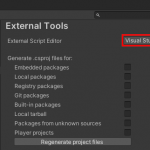
Если нажать на выпадающий список, то будут доступны другие значения:
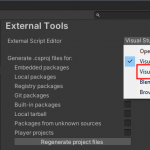
После выбора ничего особо не изменилось, и мне было непонятно, почему Unity «заблудился»:
EditorHelper: Looking for a running Visual Studio session.
EditorHelper: Checking for Visual Studio installations.
...
EditorHelper: Searching for Visual Studio 2019 installation using the VS160COMNTOOLS environment variable.
EditorHelper: No Visual Studio 2019 installation found, trying with the registry.
EditorHelper: No Visual Studio 2019 installation found at all
EditorHelper: Your preferences indicate Visual Studio should be found here: c:/program files (x86)/microsoft visual studio/2019/community/common7/ide/devenv.exe
EditorHelper: We did not find a matching Visual Studio installation. We will look for a default Visual Studio installation.
EditorHelper: We found for a running Visual Studio session with the solution open.
EditorHelper: We're not sure which version of Visual Studio was requested in the user preferences. We will use this running session.
EditorHelper: Using the existing Visual Studio session.
EditorHelper: Getting operations API from the Visual Studio session.
EditorHelper: Waiting for the Visual Studio session to open the file: C:buildslaveunitybuildRuntimeExportDebugDebug.bindings.h.
item_ops->OpenFile(bstrFileName, bstrKind, &window) result = 0x80070057
EditorHelper: Unable to use the external script editor. Trying the internal script editor now.
В списке системных переменных окружения у меня не было ни одной записи о Visual Studio:
VS90COMNTOOLS
VS100COMNTOOLS
VS110COMNTOOLS
VS120COMNTOOLS
VS140COMNTOOLS
VS150COMNTOOLS
VS160COMNTOOLS
Поэтому я создал самую последнюю:
Variable name = VS160COMNTOOLS
Variable value = C:Program Files (x86)Microsoft Visual Studio2019CommunityCommon7Tools
Не помогло!
Видимо это какой-то баг. На текущий момент решается только перезапуском Unity.
Пробовал понизить версию пакета Visual Studio Editor с версии 2.0.2 до предыдущей, 2.0.1 — также не помогло.
Такая же ошибка, причём в этом же проекте.
- Об авторе
- Недавние публикации

Search Issue Tracker
Fixed
Fixed in 2020.3.39f1, 2021.3.9f1, 2022.2.0b8
Found in
2020.3.33f1
2022.1.0a10
2022.1.0b16
2022.2.0a10
Reproduction steps:
1. Open the «Raw test» project
2. Select «Terrain» in the Hierarchy
3. In the Inspector go to Terrain Settings
4. Navigate to Texture Resolution (On Terrain Data) and press Import Raw
5. Chose «\Raw test\Assets\heightmap.raw» and press Open or Cancel
Expected result: Raw image gets imported or canceled
Actual result: Console error: EndLayoutGroup: BeginLayoutGroup must be called first.
Reproducible with: 2020.3.33f1, 2021.3.1f1, 2022.1.0a10, 2022.1.0b16, 2022.2.0a10
Not reproducible with: 2019.4.38f1, 2022.1.0a1, 2022.1.0a9
Note: Reproducible after pressing «Open» or «Cancel» in file explorer
Hi Bill,
Do not use package manager. With Github, you can see immediately what
changes have been made and it’s easy to understand what updates I need. I
think that timing is good for updating. Whether it is necessary for me or
not, it is important. I think that it is good that an unnecessary process
is not added to the editor from such a thing, and it is simple and light.
Unity does not want to increase work as we want Unity to continue its
wonderful work.
Thanks,
Kazuya Noguchi
2018年8月6日(月) 22:45 Bill <notifications@github.com>:
…