
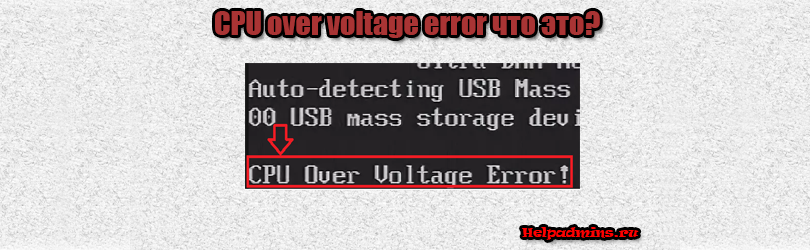
Что значит CPU over voltage error и как убрать эту надпись при включении компьютера?
С данным сообщением при включении компьютера чаще всего сталкивается тот, кто любит разгонять процессор с повышением или понижением напряжения. Но и обычный пользователь, никогда не занимающийся разгоном также не застрахован от CPU over voltage error при включении компьютера. Что это значит и что делать в подобной ситуации мы расскажем в данной статье.
Почему появляется данное сообщение?
В причинах появления CPU over voltage error можно разобраться, переведя сообщение на русский язык. Перевод звучит так – Ошибка перегрузки напряжения на центральном процессоре. Говоря простым языком напряжение, поступающее на процессор не соответствует рекомендуемому. Причем далеко не всегда оно завышено. Не редко случается, что напряжение падает.
Причины изменения напряжения на центральном процессоре
Причин может быть несколько:
- Разгон процессора;
- Неполадки с настройками BIOS;
- Проблемы с блоком питания;
- Проблемы с материнской платой;
- Некорректные показатели датчиков напряжения.
Что делать, чтобы исправить CPU over voltage error?
При появлении данного сообщения первым делом для его устранения нужно сбросить настройки BIOS на заводские. Сделать это можно как через сам BIOS, так и извлечением батарейки на некоторое время.
Если это не помогло и сообщение появляется все равно, то в случае когда ваш компьютер находится на гарантии, это является поводом для обращения в гарантийный отдел. Так как все остальные действия при попытке избавится от CPU over voltage error приведут к потере гарантии.
Следующим действием будет перепрошивка BIOS. Как это делается мы не будем расписывать в данной статье, так как если вы этого ни разу не делали, то лучше доверить данную процедуру опытному пользователю.
Замена блока питания также порой помогает в решении данной проблемы. Причем лучше не сразу покупать новый блок, а попробовать поставить другой, заведомо рабочий, одолжив его у друзей или знакомых чтобы проверить исчезнет ли с ним сообщение CPU over voltage error.
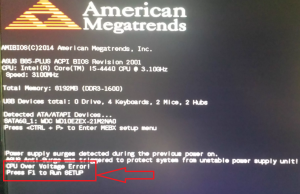
Пример экрана с сообщением CPU over voltage error
Если ничего не помогает, то скорее всего вы имеете физические проблемы с материнской платой или датчиками вольтажа на ней (процессоре) и здесь вам нужно решать менять ли плату или продолжать пользоваться компьютером, каждый раз нажимая кнопку F1/F2 при появлении сообщения CPU over voltage error. Ведь известно немало случаев, когда компьютеры работали годами с сообщением о неправильном напряжении на процессоре.
Лучшая благодарность автору — репост к себе на страничку:

Люди добрые, помогите! Не дайте умереть компьютеру!
Сам собрал компьютер:
Asus B85M-G
Pentium g3220
gt 730
Bp Corsair VS550 550W
..
С первого-же запуска появилась ошибка «Cpu over voltage error, нажмите ф1 для установки». Зашел в биос->монитор, там показывает «Cpu input voltage(VCCIN)=3.400-3.500v(скачает)» и ,естественно, выделено это поле красным цветом. Почитал в интернетах (и в мануале) об этом, написано, что нормальный промежуток 0.8-2.7v. Все настройки в биосе заводские! Понять не могу, почему такой подарок свалился на меня!? Прошерстил интернет,ничего дельного не нашел. В компьютерах разбираюсь не очень хорошо, просветите люди добрые!
По скрипту, При всем этом винда установилась, компьютер работает исправно, но немного потрескивает. Вобщем беда бедой. Но я не сдался.
От сильного огорчения, возомнил себя тру оверлокером и попробывал решить проблему так, поменял Cpu input voltage вручную, снизил до 1.250, сохранил, перезагрузил. Потрескивает меньше. Зашел в монитор, а там показывает 2.3-2.5v. Далее пробую запустить винду, но ничего. Черный мать его экран. Чтобы не произошло непоправимое, залез в материнку, вытащил батарейку и засунул ее снова на свое место, чтобы не рыпалась. Биос обнулился, все стало также как и было раньше. Задумался..
Свойства датчика
Тип датчика Nuvoton NCT6791D/5538D (ISA A00h)
Тип датчика ГП Diode (NV-Diode)
Системная плата Asus B85M-G
Температуры
ЦП 40 °C (104 °F)
CPU Package 50 °C (122 °F)
CPU IA Cores 50 °C (122 °F)
CPU GT Cores 44 °C (111 °F)
ЦП 1 / Ядро 1 49 °C (120 °F)
ЦП 1 / Ядро 2 50 °C (122 °F)
Диод PCH 45 °C (113 °F)
Диод ГП 38 °C (100 °F)
SSD Smartbuy 120GB [ TRIAL VERSION ]
Вентиляторы
ЦП 1398 RPM
Графический процессор 0%
Напряжения
Ядро ЦП 1.033 V
CPU VRM 3.472 V
+3.3 V 3.408 V
+5 V 5.120 V
+12 V [ TRIAL VERSION ]
+3.3 V резерв 3.392 V
Батарея VBAT 3.264 V
VCCSA 0.184 V
VTT 1.008 V
Ядро ГП [ TRIAL VERSION ]
Значения мощности
CPU Package 13.43 W
CPU IA Cores 7.60 W
CPU Uncore 3.89 W
DIMM 1.94 W
Debug Info F 65535 65535 65535 65535 65535 65535
Debug Info T 00 00 00
Debug Info V 0C 00 B2 6B 00 00 00 (00)
You should upgrade or use an alternative browser.
-
#1
I’m not a expert when it comes to PC hardware but I think I know the basics. Today I turned my pc on to find this error message «CPU overvoltage error — press F1 to go to setup», so I googled about it and I opened my pc, took off the cooler that’s placed on my processor and cleaned it properly + removed/cleaned the old thermal paste (I think I applied it 5 months ago) and of course I replaced with new thermal paste after. Then, I put on the cooler again and the PC turned on normally. So far I’ve been using it for 2 hours constantly without any error or anything.
I didn’t do any overclock and my BIOS is on its default settings except for Turbo Mode (which If I leave it on, my PC freezes sometimes and I really have no clue why this happens).
All PC drivers + BIOS drivers up to date.
Anyway, I guess this error was pretty random and I’m kinda worried about the situation. Should I really worry? Why this overvoltage error occurred? I’m afraid it will show up again… But I really hope not. Thank you for your attention and for your help.
MY PC Specs:
Windows 10 64bit
ASUSTek H61M-A/BR
16 GB RAM (2×8)
Intel Core i7-3770 3.40GHz, 3400 Mhz
GeForce GTX 1060 6GB

-
MeanMachine41
- Jul 25, 2020
If the issue is the PSU then that is serious so check that first by swapping with a known working unit of the same or higher wattage and list your PSU for evaluation. You can also check your rail voltages with AIDA64 or hwinfo64.
Your CPU needs good reliable and efficient voltage. Too high or too low can damage your CPU.
First clear your CMOS then go into Bios and disable turbo mode to check see if there is a difference.
-
- May 8, 2014
-
- 5,207
-
- 333
-
- 33,390
-
#2
If the issue is the PSU then that is serious so check that first by swapping with a known working unit of the same or higher wattage and list your PSU for evaluation. You can also check your rail voltages with AIDA64 or hwinfo64.
Your CPU needs good reliable and efficient voltage. Too high or too low can damage your CPU.
First clear your CMOS then go into Bios and disable turbo mode to check see if there is a difference.
-
#3
A number of things can be attributed to «CPU overvoltage error «. It can be a problem with your PSU (if the issue has just occurred out of the blue and where no overclocking has occurred ) It can even be a bad CMOS battery.If the issue is the PSU then that is serious so check that first by swapping with a known working unit of the same or higher wattage and list your PSU for evaluation. You can also check your rail voltages with AIDA64 or hwinfo64.
Your CPU needs good reliable and efficient voltage. Too high or too low can damage your CPU.
First clear your CMOS then go into Bios and disable turbo mode to check see if there is a difference.
Thank you for your help. I never did any overclock.
Actually, do you mean leaving turbo mode on? Because the freezes happens when it’s on.
By «Cleaning CMOS» do you mean resetting bios to default settings or doing a reseat in the CMOS battery? Btw does turbo mode really have a difference in any way?
-
- May 8, 2014
-
- 5,207
-
- 333
-
- 33,390
-
#4
Yes clearing CMOS will bring Bios back to default.
If your system CMOS battery CR2032 is failing, it can cause this problem. Only about $4 and worth replacing.
Turbo Mode is a good thing if your system is stable and provides additional performance when required.
List your PSU as requested and please report back.
-
#5
Disabling Turbo Mode will lower the demand on your CPU in order to check if peak demand is more than the PSU can provide . A failing PSU can show this symptom so check it out as it can bring down other hardware .Yes clearing CMOS will bring Bios back to default.
If your system CMOS battery CR2032 is failing, it can cause this problem. Only about $4 and worth replacing.
Turbo Mode is a good thing if your system is stable and provides additional performance when required.
List your PSU as requested and please report back.
My PSU is Corsair CX600 and it’s 4 years old.
Like I told you, I already run my bios in default settings but without turbo mode enabled because of the freezes it causes on the system sometimes.
Right now anyway I cleared CMOS (without disabling turbo mode) and I’ll test, but I’m almost sure the freezes will occur again (it always did with turbo mode enabled, I believe since I got this PC 4 years ago).
Do you believe this error could be because the PSU hasn’t been cleaned for all these years? I really never bothered about cleaning it. I can try to follow a tutorial from the internet to clean it properly.
Last edited: Jul 26, 2020
-
- May 8, 2014
-
- 5,207
-
- 333
-
- 33,390
-
#6
If you have run your system without Turbo Mode and it freezes then definitely swap the unit out to test
Dust can indeed build up and bad things can happen however,it would have to be really bad. You should give your whole system a good clean as pockets of dust can cause major issues. With the system fully powered down, Initially vacuum carefully any bad buildups then use Compressed air from a cylinder. Follow a good guide .
-
#7
The Corsair CX600 was a bronze rated budget PSU of questionable quality and efficiency. I think you should either have it tested or replaced. 4years is a good run for that unit. The PSU is the lifeblood of any system and not to be underestimated. A failing PSU can do damage to other hardware especially the CPU.If you have run your system without Turbo Mode and it freezes then definitely swap the unit out to test
Dust can indeed build up and bad things can happen however,it would have to be really bad. You should give your whole system a good clean as pockets of dust can cause major issues. With the system fully powered down, Initially vacuum carefully any bad buildups then use Compressed air from a cylinder. Follow a good guide .
Thank you once again. I just cleaned it, it took me a long time but it wasn’t hard. It was full of dust. Everywhere.
I think you’re misunderstanding a bit about the turbo mode:
With turbo mode on, it freezes the whole system sometimes and I have to reboot Windows so I can use it again.
But with turbo mode off, everything works perfectly fine without freezes.
I read here
https://community.intel.com/t5/Proc…using-crashes-blue-screens/td-p/698571/page/2
that this crashes happening with turbo mode on might be due to hardware compatibility. Maybe this is the case?
Or do you really think I should replace my PSU? If so, which one do you recommend? One that’s good but not expensive, if it’s possible? Thanks once again.

-
#8
Thank you once again. I just cleaned it, it took me a long time but it wasn’t hard. It was full of dust. Everywhere.I think you’re misunderstanding a bit about the turbo mode:
With turbo mode on, it freezes the whole system sometimes and I have to reboot Windows so I can use it again.
But with turbo mode off, everything works perfectly fine without freezes.I read here
https://community.intel.com/t5/Processors/Intel-Turbo-Boost-causing-crashes-blue-screens/td-p/698571/page/2
that this crashes happening with turbo mode on might be due to hardware compatibility. Maybe this is the case?
Or do you really think I should replace my PSU? If so, which one do you recommend? One that’s good but not expensive, if it’s possible? Thanks once again.
Don’t save money on a PSU, if you can, I recommend you buy a PLUS GOLD.
-
#9
@MeanMachine41
This is what shows in my bios (it seems everything is normal as it should be?)

Last edited: Jul 26, 2020
-
- May 8, 2014
-
- 5,207
-
- 333
-
- 33,390
-
#10
When enabled one of your CPU cores will increase it’s frequency during peak demand. This is when your system may shut down if the PSU can’t cope. As I’ve said before, there are a number of things that can cause your issue. You have to start somewhere with a method and the CMOS battery and PSU are best to start with. Why do you think a PSU would last forever? A bronze rated may last for just beyond the warranty whereas a gold or platinum rated unit would last a lot longer in the same circumstance and provide better efficiency.
Maybe excessive dust was the issue. You’ll soon find out however if it continues then as stated you can swap it out. As also stated you can check your rail voltages using Aida64 or hwinfo64. If voltages are below spec (+_-5%) then don’t risk it and buy a new unit. With Aida64 you can stress test your system. If there is a problem it will find it. There are guides to help you use the product which is free.
There is only one way to fully determine if a PSU is failing or cannot cope with demand (without taking the unit to an electronics shop) and that is to swap out the unit with a known working unit of same wattage or higher.
The Bios screen your showing does not fully determine the condition of your system. It shows details of your system at idle and does not represent the system under load.
BTW: When choosing a PSU and you have a tight budget then shop around. Choose a gold rated unit of the same Wattage you have now. Good brands I recommend are Seasonic , EVGA ,Antec
Last edited: Jul 27, 2020
-
#11
I am not misunderstanding your issue with Turbo Mode.!!When enabled one of your CPU cores will increase it’s frequency during peak demand. This is when your system may shut down if the PSU can’t cope. As I’ve said before, there are a number of things that can cause your issue. You have to start somewhere with a method and the CMOS battery and PSU are best to start with. Why do you think a PSU would last forever? A bronze rated may last for just beyond the warranty whereas a gold or platinum rated unit would last a lot longer in the same circumstance and provide better efficiency.
Maybe excessive dust was the issue. You’ll soon find out however if it continues then as stated you can swap it out. As also stated you can check your rail voltages using Aida64 or hwinfo64. If voltages are below spec (+_-5%) then don’t risk it and buy a new unit. With Aida64 you can stress test your system. If there is a problem it will find it. There are guides to help you use the product which is free.
There is only one way to fully determine if a PSU is failing or cannot cope with demand (without taking the unit to an electronics shop) and that is to swap out the unit with a known working unit of same wattage or higher.
The Bios screen your showing does not fully determine the condition of your system. It shows details of your system at idle and does not represent the system under load.
I’m not saying that a psu can last forever. I just wanted to know if that was my case because I really don’t want to spend money on something that I might not need right now, specially here in Brazil where things like that are quite expensive, unfortunately.
Cleaned the entire pc, PSU, etc, reapplied new thermal paste again and tomorrow I’ll buy a new CMOS battery to replace the old one. After that I’ll keep a look about how my pc will perform. I’ll also run this stress test you mentioned. Then with time, If I see this error coming back, I’ll buy a new PSU.
Thank you for your help.
Similar threads

- Advertising
- Cookies Policies
- Privacy
- Term & Conditions
На чтение 4 мин. Просмотров 194 Опубликовано 15.12.2019
Штука вот в чём, компу уже несколько лет, за это время никаких проблем не было, и вот позавчера.
Воткнул чужую флэшку, проходит 10 минут, завис. Перезапускаю, винда виснет на полосе загрузки. Открыл, почистил 😀 закрыл, включаю. пищит, и выдаёт: «CPU overvoltage error» жми ф1. затем грузицо и работает.
Но блин, с этих пор комп периодически виснет, иногда раз в час ((( бывает даже когда просто простаивает.
КТО ЗНАЕТ В ЧЁМ ТРАБЛА. 🙁
Мать: ASUS P5RD1-V
Проц: Пень 4HT
Биос: 1005.01 Американ Мегатрендс (03.02.2005)
Температура проца: 39-44 градуса
V-Core: 1.09 — 1.14
зы. Сбрасывал биос на дефолт, не помогло.
Перегрева нигде нет, в настройки перед этим не лазил, потом пробовал в ручную понизить V-core, не помогло. (хотя в Биосе он красным выделен) ох, бедааа.

Ошибка CPU Over Temperature Error Press F1 to Continue возникает при начальной загрузке компьютера, как правило это возникает после перезагрузки, когда компьютер работал до этого.
Продолжить загрузку операционной системы можно нажав кнопку F1.
Игнорировать эту ошибку крайне опасно. CPU Over Temperature Error означает, что центральный процессор нагревается до слишком высоких температур. Это может происходить по ряду причин:
- Не работает вентилятор охлаждения процессора. В первую очередь проверяем работает ли вентилятор. Если вентилятор не вращается — проверяем контакты подключения. Если с контактами все нормально — меняем вентилятор на новый.
- Термопаста нанесена не правильно или требуется её замена. Термопаста предназначена для наилучшей передачи тепла от процессора к куллеру. Термопаста не должна быть нанесена толстым слоем. Паста должна быть нанесена тонким слоем, равномерно по всей площади и куллер крепко прижат к процессору.

- Разгон процессора. Если вы программного разогнали процессор, уменьшите напряжение, подаваемое на CPU или установите более эффективное охлаждение.
- Проблема с блоком питания. Проблема встречается крайне редко — при старте образуется слишком высокий скачок напряжения. Проблема определяется в сервисном центре.
- Неисправный термодатчик материнской платы. Так же есть вероятность, что процессор не нагрет до высокой температуры, но датчик определяет температуру не верно. Осторожно проверьте температуру радиатора рукой. Если он не горячий, а термопаста была нанесена правильно — термодатчик неисправен.
Ошибка CPU Over Temperature Error может привести к перегреву процессора и его неисправности, поэтому внимательно отнеситесь к этому сообщению.
С данным сообщением при включении компьютера чаще всего сталкивается тот, кто любит разгонять процессор с повышением или понижением напряжения. Но и обычный пользователь, никогда не занимающийся разгоном также не застрахован от CPU over voltage error при включении компьютера. Что это значит и что делать в подобной ситуации мы расскажем в данной статье.
Содержание
- Почему появляется данное сообщение?
- Причины изменения напряжения на центральном процессоре
- Что делать, чтобы исправить CPU over voltage error?
Почему появляется данное сообщение?
В причинах появления CPU over voltage error можно разобраться, переведя сообщение на русский язык. Перевод звучит так — Ошибка перегрузки напряжения на центральном процессоре. Говоря простым языком напряжение, поступающее на процессор не соответствует рекомендуемому. Причем далеко не всегда оно завышено. Не редко случается, что напряжение падает.
Причины изменения напряжения на центральном процессоре
Причин может быть несколько:
- Разгон процессора;
- Неполадки с настройками BIOS;
- Проблемы с блоком питания;
- Проблемы с материнской платой;
- Некорректные показатели датчиков напряжения.
Что делать, чтобы исправить CPU over voltage error?
При появлении данного сообщения первым делом для его устранения нужно сбросить настройки BIOS на заводские. Сделать это можно как через сам BIOS, так и извлечением батарейки на некоторое время.
Если это не помогло и сообщение появляется все равно, то в случае когда ваш компьютер находится на гарантии, это является поводом для обращения в гарантийный отдел. Так как все остальные действия при попытке избавится от CPU over voltage error приведут к потере гарантии.
Следующим действием будет перепрошивка BIOS. Как это делается мы не будем расписывать в данной статье, так как если вы этого ни разу не делали, то лучше доверить данную процедуру опытному пользователю.
Замена блока питания также порой помогает в решении данной проблемы. Причем лучше не сразу покупать новый блок, а попробовать поставить другой, заведомо рабочий, одолжив его у друзей или знакомых чтобы проверить исчезнет ли с ним сообщение CPU over voltage error.
Пример экрана с сообщением CPU over voltage error
Если ничего не помогает, то скорее всего вы имеете физические проблемы с материнской платой или датчиками вольтажа на ней (процессоре) и здесь вам нужно решать менять ли плату или продолжать пользоваться компьютером, каждый раз нажимая кнопку F1/F2 при появлении сообщения CPU over voltage error. Ведь известно немало случаев, когда компьютеры работали годами с сообщением о неправильном напряжении на процессоре.