
Star Citizen is a multiplayer space trading and combat simulation game that’s currently under development and seeing quite a lot of players signing up to play, especially during its September 8 to 15 free play window.
That said, while the game does offer a different experience, it’s under development and can still throw random bugs and glitches your way. In this article, we’re talking about the CIG error 16008 in Star Citizen and what you can do to fix the problem.
What causes this issue?
The error currently seems to be mostly impacting players in the US and is currently being investigated by the Star Citizen team. Possible causes include the following.
- RSI server outages.
- Outdated launcher.
- Issues with Easy anti-cheat.
- Game access is blocked by a firewall.
- ISP issues.
Also read: What is US01LV: ‘Wireless customer is not available’ error?
How to fix this?
Here are eight fixes you can try out.
Check internet connection
Now’s also a good time to check whether or not you have an active internet connection. If you’re on WiFi, make sure you’ve got an active link and that there are no signal issues. On cellular data, ensure that it’s enabled and that you’re getting good network coverage.
Check RSI server status
If RSI servers are down, you won’t be able to play the game leading to this error or a host of other ones. Check the RSI status update page to see if there’s an outage and if there is, sit tight until the developers get things going again.
Update your launcher
Using an outdated launcher has also been known to cause this issue. Head over to the RSI download page to download the latest available launcher version (version 3.17.2A at the time of writing), install it or update your existing installation and try launching the game again.
Also read: Is Bloom.exe a virus? How to remove it?
Disable VPN or proxies
If you’re running a VPN connection or any proxies, chances are they could be hampering your connection to the Star Citizen servers. In such cases, try disabling any active VPN connections or proxy settings to see if that helps resolve the issue.
Alternatively, if your ISP is blocking your connection to the game, using a VPN can actually come in handy as it’ll reroute your traffic and can help the game run.
Update your GPU drivers
Outdated GPU drivers can also cause this issue in particular. While you should update all your drivers, take special care of your display drivers if you run into an error like this.
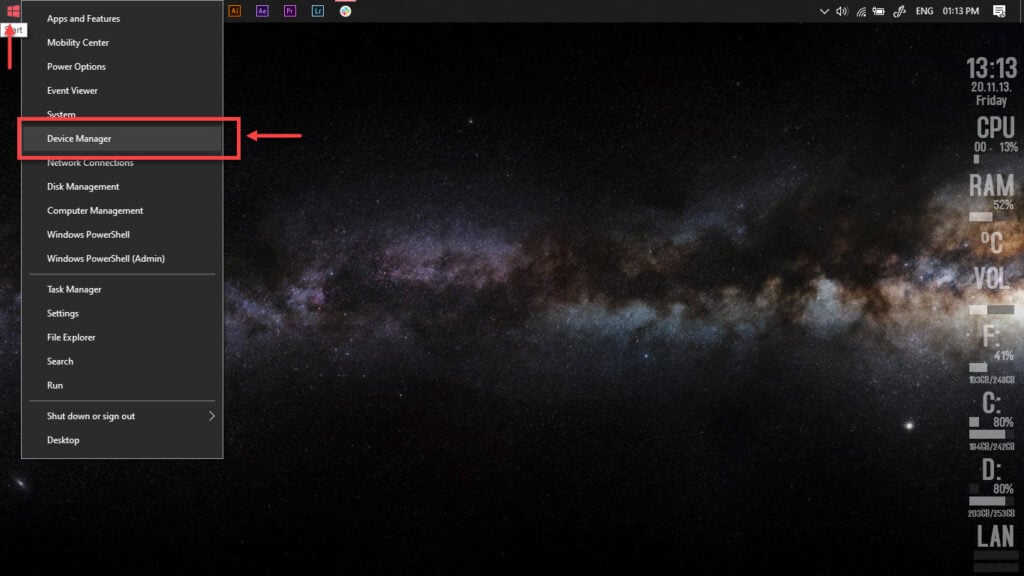
Step 1: Right-click Start and select Device Manager from the menu.
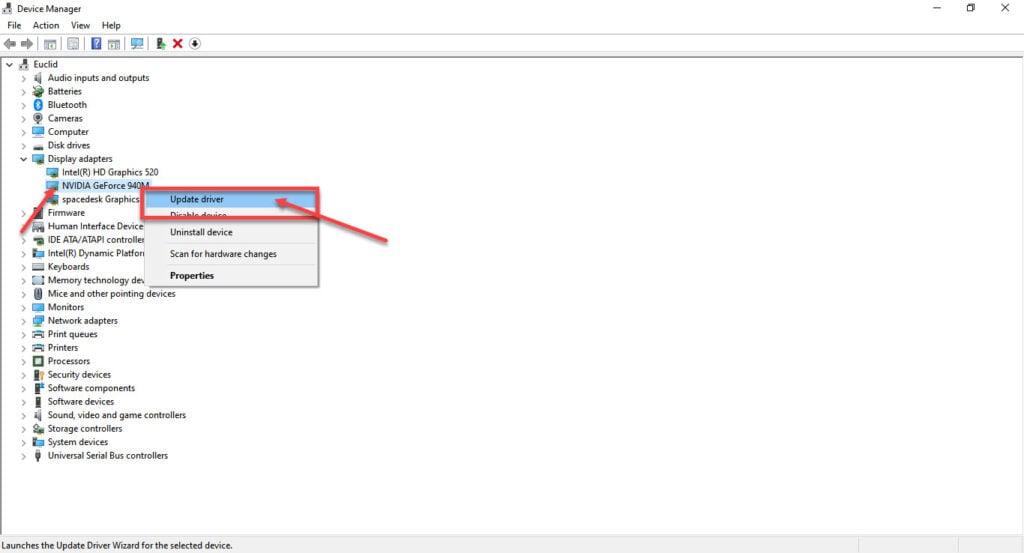
Step 2: Under Display Adaptors, find your graphics card’s name, right-click on it and click on Update Drivers.
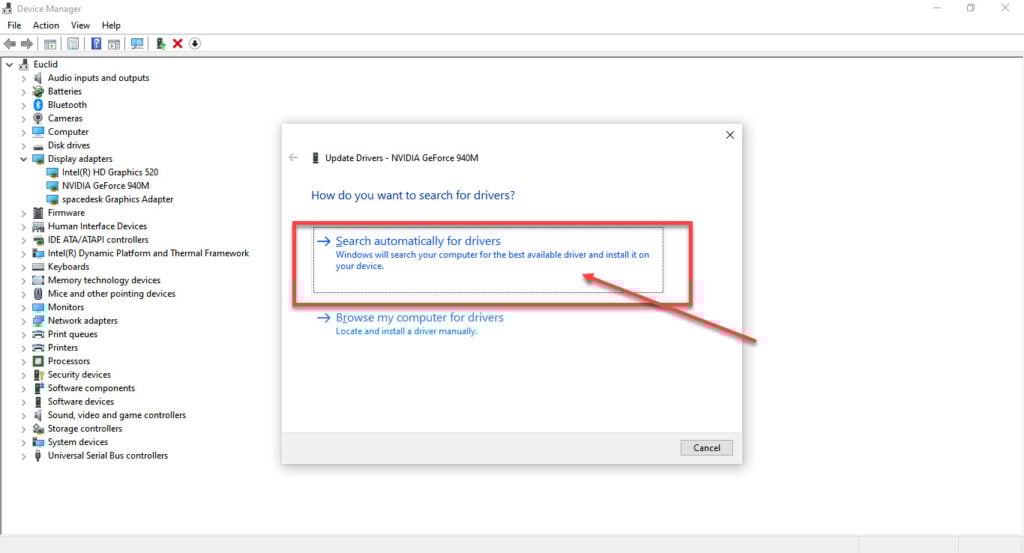
Step 3: Click on Search automatically for drivers. Windows will then automatically look for and download the latest drivers for your particular GPU.
While this should help resolve the error, in case it doesn’t, click Uninstall device and restart your PC to force Windows to install the required drivers. You can then update them later. Alternatively, you can also remove your GPU and reinsert it if you can.
Repair Easy Anti Cheat
If your game’s anti-cheat software isn’t working correctly, it can cause connection issues and other problems. All you have to do is head over to your Steam library folder, find the game directory and you’ll see the Easy Anti Cheat setup file inside the Binary/Win64 folder. Run the installer to repair the program and try launching your game again.
Also read: Open video downloader error binaries missing/corrupted: 6 Fixes
Restart the Easy Anti Cheat service
If the anti-cheat is installed fine but isn’t running properly, that’ll still cause problems for you. Here’s how to restart the service.
Step 1: Press Windows Key + R to open the Run prompt. Type services.msc and press enter.
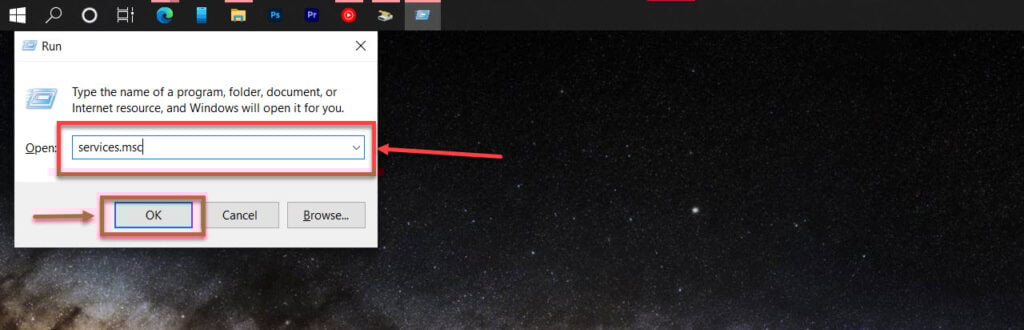
Step 2: Scroll to find the Easy Anti-Cheatservice and double click it to proceed.

Step 3: In the Startup type dropdown, select Automatic. If the service is stopped, click the Start button to activate the service manually. Click Apply and OK when done.
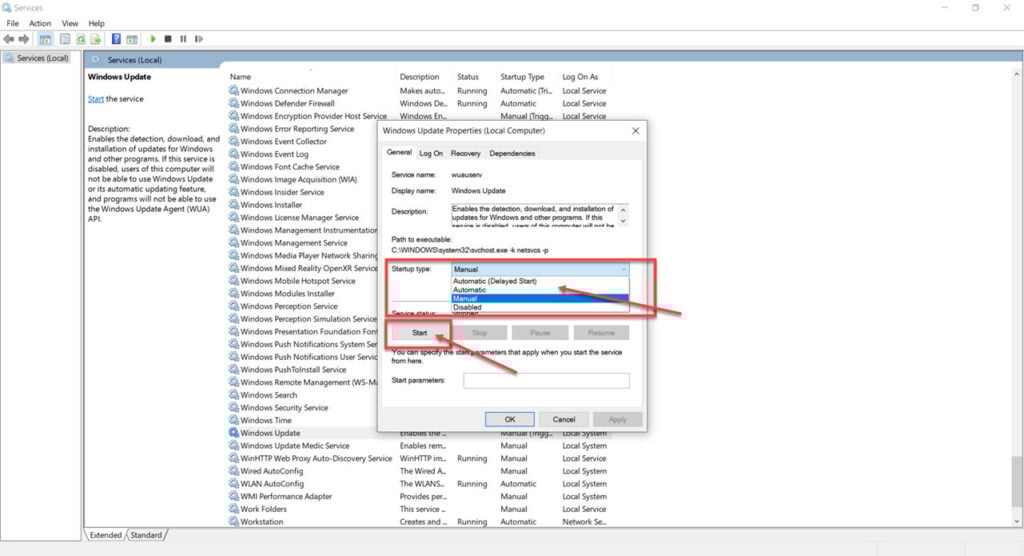
Now try launching your game again and it should work just fine.
Edit the hosts file
Although rare, there can be an issue with the Windows hosts file as well that can keep you from connecting to RSI’s servers. Here’s how you can reset your Windows hosts file to see if that fixes the issue for you.
Step 1: Open up Windows Explorer and head over to the following path
Windows (C:) > Windows > System32 > drivers > etc 
Step 2: You’ll see a file named hosts. Right-click on the file and open it with notepad using the Open with option.
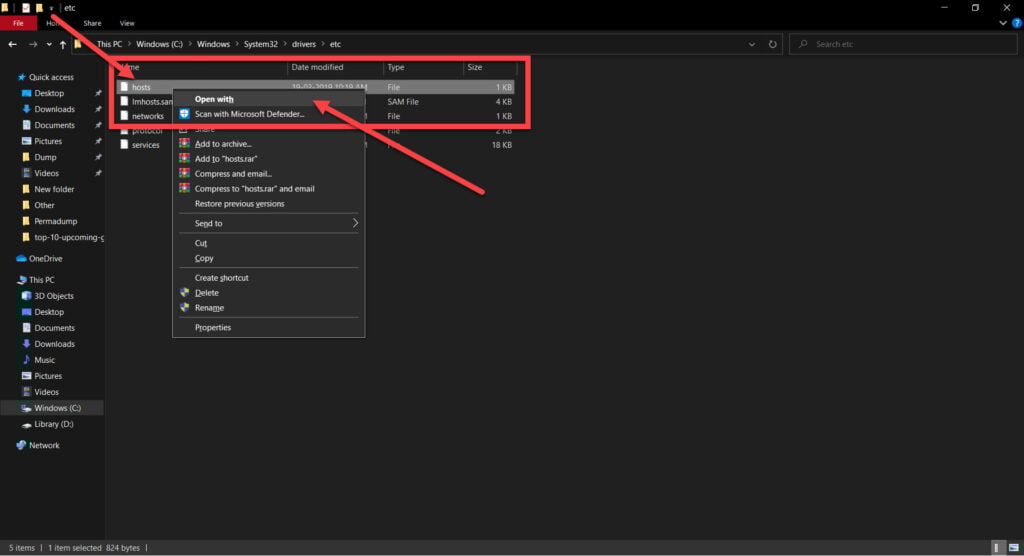
Step 3: Select everything in the file and clear it out. Make sure to save before closing the file.

Also read: Top 10 FPS games for browsers

Someone who writes/edits/shoots/hosts all things tech and when he’s not, streams himself racing virtual cars.
You can contact him here: [email protected]
Содержание
- How to fix Cig error 16008?
- What causes this issue?
- How to fix this?
- Check internet connection
- Check RSI server status
- Update your launcher
- Disable VPN or proxies
- Update your GPU drivers
- Repair Easy Anti Cheat
- Restart the Easy Anti Cheat service
- Edit the hosts file
- Star Citizen throwing error code 16008: How to Fix
- Star Citizen throwing error code 16008: How to Fix
- Star Citizen throwing ‘error code 16008’
- Issue under investigation
- Possible solutions
- You may like
- Leave a Reply
- Gaming
- Pokemon Scarlet and Violet: How to get more PC Boxes
- Pokemon Scarlet and Violet: How to get more PC Boxes
- Can You Get More PC Boxes in Pokemon Scarlet and Violet?
- Star Citizen throwing error code 16008 or not launching issue under investigation
- Star Citizen throwing error code 16008
- The question under investigation is not solved.
- Potential workarounds
How to fix Cig error 16008?

Star Citizen is a multiplayer space trading and combat simulation game that’s currently under development and seeing quite a lot of players signing up to play, especially during its September 8 to 15 free play window.
That said, while the game does offer a different experience, it’s under development and can still throw random bugs and glitches your way. In this article, we’re talking about the CIG error 16008 in Star Citizen and what you can do to fix the problem.
What causes this issue?
The error currently seems to be mostly impacting players in the US and is currently being investigated by the Star Citizen team. Possible causes include the following.
- RSI server outages.
- Outdated launcher.
- Issues with Easy anti-cheat.
- Game access is blocked by a firewall.
- ISP issues.
How to fix this?
Here are eight fixes you can try out.
Check internet connection
Now’s also a good time to check whether or not you have an active internet connection. If you’re on WiFi, make sure you’ve got an active link and that there are no signal issues. On cellular data, ensure that it’s enabled and that you’re getting good network coverage.
Check RSI server status
If RSI servers are down, you won’t be able to play the game leading to this error or a host of other ones. Check the RSI status update page to see if there’s an outage and if there is, sit tight until the developers get things going again.
Update your launcher
Using an outdated launcher has also been known to cause this issue. Head over to the RSI download page to download the latest available launcher version (version 3.17.2A at the time of writing), install it or update your existing installation and try launching the game again.
Disable VPN or proxies
If you’re running a VPN connection or any proxies, chances are they could be hampering your connection to the Star Citizen servers. In such cases, try disabling any active VPN connections or proxy settings to see if that helps resolve the issue.
Alternatively, if your ISP is blocking your connection to the game, using a VPN can actually come in handy as it’ll reroute your traffic and can help the game run.
Update your GPU drivers
Outdated GPU drivers can also cause this issue in particular. While you should update all your drivers, take special care of your display drivers if you run into an error like this.
Step 1: Right-click Start and select Device Manager from the menu.
Step 2: Under Display Adaptors, find your graphics card’s name, right-click on it and click on Update Drivers.
Step 3: Click on Search automatically for drivers. Windows will then automatically look for and download the latest drivers for your particular GPU.
While this should help resolve the error, in case it doesn’t, click Uninstall device and restart your PC to force Windows to install the required drivers. You can then update them later. Alternatively, you can also remove your GPU and reinsert it if you can.
Repair Easy Anti Cheat
If your game’s anti-cheat software isn’t working correctly, it can cause connection issues and other problems. All you have to do is head over to your Steam library folder, find the game directory and you’ll see the Easy Anti Cheat setup file inside the Binary/Win64 folder. Run the installer to repair the program and try launching your game again.
Restart the Easy Anti Cheat service
If the anti-cheat is installed fine but isn’t running properly, that’ll still cause problems for you. Here’s how to restart the service.
Step 1: Press Windows Key + R to open the Run prompt. Type services.msc and press enter.
Step 2: Scroll to find the Easy Anti-Cheatservice and double click it to proceed.
Step 3: In the Startup type dropdown, select Automatic. If the service is stopped, click the Start button to activate the service manually. Click Apply and OK when done.
Now try launching your game again and it should work just fine.
Edit the hosts file
Although rare, there can be an issue with the Windows hosts file as well that can keep you from connecting to RSI’s servers. Here’s how you can reset your Windows hosts file to see if that fixes the issue for you.
Step 1: Open up Windows Explorer and head over to the following path
Step 2: You’ll see a file named hosts. Right-click on the file and open it with notepad using the Open with option.
Step 3: Select everything in the file and clear it out. Make sure to save before closing the file.
Someone who writes/edits/shoots/hosts all things tech and when he’s not, streams himself racing virtual cars.
You can contact him here: [email protected]
Источник
Star Citizen throwing error code 16008: How to Fix

Star Citizen throwing error code 16008: How to Fix

A new space living simulator computer game is called Star Citizen. You will be in an online universe with other human players because it is designed as an MMO. You can collaborate with your buddies to design your own adventure. Non-player characters (NPCs) will also be present to maintain the game’s economic equilibrium.
Star Citizen throwing ‘error code 16008’
But other reports claim that many Star Citizen players are currently unable to enter the game because they are receiving “error code 16008” at launch (1,2,3,4,5,6,7). Other users from around the world are able to access Star Citizen without encountering this error notice, suggesting that this problem is just affecting US-based players. A gamer tried logging out and then back in, and even tried reinstalling the game, but none of these actions fixed the problem.
Issue under investigation
On the plus side, the Star Citizen team is already aware of this issue and is attempting to fix it. They did not, however, provide a date for the distribution of the remedy. It appears that gamers of Star Citizen will need to wait a few more hours before they can resume gameplay.
Possible solutions
Star Citizen US players can utilize a VPN and choose a different region to access the game in the interim. Make sure to keep watching this space as we will be monitoring the situation and updating this page as and when we learn more.
MultiVersus: LeBron James Character Guide along with Best Perks
Can you catch a shiny Hisuian Braviary in Pokémon Go?

You may like


NBA 2K23 MyTeam Season 4: How to collect all Centerpiece Rewards


NBA 2K23: How to complete Lunar New Year event and get 97 OVR Yi Jianlian


Genshin Impact: How to find and defeat the Algorithm of Semi-Intransient Matrix of Overseer Network


Minecraft: How to fix OpenGL error 1282


Pokémon Go: Is the Larvitar Community Day Classic Ticket worth it?


Fallout 76: How to Get High Radiation Fluids
Leave a Reply
Gaming
Pokemon Scarlet and Violet: How to get more PC Boxes
November 20, 2022

Pokemon Scarlet and Violet: How to get more PC Boxes

A novel box system may be found in Pokémon Scarlet and Violet. Trainers would still need to visit a Pokémon Center in earlier games in order to place a Pokémon in a box. Trainers will undoubtedly use their boxes frequently because there are so many new Pokémon in Generation 9 to catch, and sometimes that may not be enough. As you continue to gather Pokémon, you have the option of manually increasing the number of boxes at your disposal or letting the game do it for you automatically. Read this guide if you want to know how to get more boxes in Pokémon Scarlet and Violet.
Can You Get More PC Boxes in Pokemon Scarlet and Violet?
The good news is that Pokemon Scarlet and Violet allow you to obtain a lot more PC boxes. Additionally, you can practice immediately increasing the number of boxes that are at your disposal. Simply capture at least eight additional Pokemon in addition to your starter. In doing so, you’ll be able to keep a minimum of one Pokemon in your party while sending the others to your PC for storage. After completing this, hit the X button to access the game’s main menu, then scroll down to the Boxes option. Place one of your eight saved Pokemon into each of the available PC boxes after selecting it.
Once you’ve completed this and made sure that each of your eight PC boxes contains at least one creature, exit the menu and shut down the game’s main menu entirely. Reopen the main menu and select the Boxes option. Once you’ve done that, eight more PC boxes should become accessible for storage, giving you a total of 16 options.
It’s also important to keep in mind that there are other ways to create more PC Boxes in Pokemon Scarlet and Violet. By once again placing at least one Pokemon in each available box, you can repeat the process. Simply exit the boxes and main menu once you’ve done so. Then, reopen the Main Menu and Boxes menus to double the number of PC Boxes that are now available, bringing the total to 32.
Источник
Star Citizen throwing error code 16008 or not launching issue under investigation

Star Citizen is a Spaceplay game. It’s designed to be an MMO, so you’ll be in an online universe with other people.
It makes it easier for you to become friends and create your own adventures. NPCs (non-player characters) are out there to keep the balance of the economy in the game.
Star Citizen throwing error code 16008
However, according to several reports, many Star Citizen players are unable to access the game now because they’re getting an error code 16008 at launch (1,2,3,4,5,6).
The problem seems to be limited to Star Citizen players based in the USA; some players around the world can access the game without this error message.
Source (Click/tap to expand)
Hello, I was so excited to play SC after the wipe happened. But when we’ve got the update, we can’t enter the game. We pass the splash screen, then get blackscreens with an error saying we didn’t load character data. Source
I love to enjoy, but despite what I do, I still get the error 16008. Unfortunately, had difficulty interaggressing with any game event, because in my case a lot of challenges came in. I’ve logged out, and back, multiple times, reinstalled the game 3 times today, reset account, nothin. Source
One of the players tried to log out and return the game, even reinstalled the game, but neither worked to resolve the problem.
The question under investigation is not solved.
The Star Citizen team acknowledged this problem already and is working on that right away.
However, they don’t have any time since the fix is due out. Since its looks, it seems that Star Citizen players have to wait a few more hours before they can play again.
Potential workarounds
Players at Star Citizen have the ability to use a VPN and pick a different area to access the game.
As soon as we get closer to the point of finding more information, please keep checking this space.
Note: We have more such stories in our dedicated game section, so you should also follow them.
The stars are the ones who are living with a new star.
PiunikaWeb started as a simple investigative tech journalism site and focused the principal focus is spreading or focusing on exclusive news. In no time, our stories were picked up by the likes of Forbes, Foxnews, Gizmodo, TechCrunch, Engadget, The Verge, Macrumors, and many other companies. Are you wanting to learn more about us? I will have you.
Источник
Star Citizen — популярная многопользовательская игра, разработанная Cloud Imperium Games. Она привлекла так много игроков по всему миру, и эта игра по исследованию космоса беспрепятственна и гарантирует игрокам 100% удовольствие. Размер файла Star Citizen имеет смысл, поскольку в этой игре есть галактики, которые нужно исследовать и использовать. Но, как и во многих онлайн-ошибках, в Star Citizen тоже есть ошибки. Когда вы пытаетесь установить, обновить или загрузить игру, вы можете столкнуться с ошибкой установщика Star Citizen на ПК с Windows 10. Иногда эта ошибка может сопровождаться подсказкой с сообщением «Произошла ошибка в процессе установки». Некоторые пользователи также сообщают, что эта ошибка возникает при попытке войти в PTU (вселенная публичного тестирования). Тем не менее, существует гораздо больше причин, которые вызывают ошибку установщика Star Citizen в Windows 10. Продолжайте читать это руководство, чтобы исправить проблему с журналами проверки ошибок установщика Star Citizen с помощью некоторых эффективных шагов по устранению неполадок.
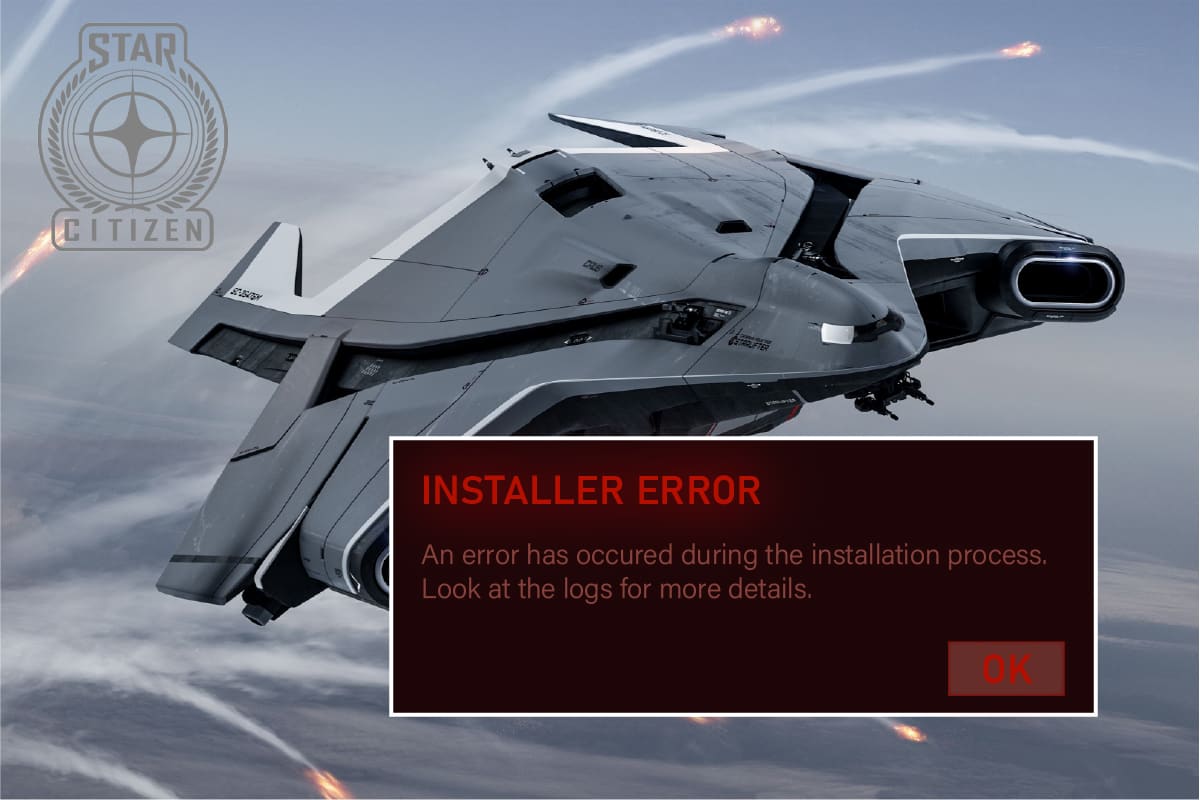
Проанализировав несколько отчетов и онлайн-площадок, мы собрали список причин, вызывающих ошибку установки Star Citizen. Проанализируйте их глубже, и вы получите представление об устранении проблемы, выполнив соответствующие решения.
-
Поврежденные данные в папке USER являются распространенной причиной, вызывающей обсуждаемую проблему.
- Сверхзащитный антивирусный пакет и компоненты брандмауэра помещают ваши файлы в карантин, и вы не можете устанавливать или загружать какие-либо обновления игры на свой ПК с Windows 10.
- Вы используете несовместимую программу запуска игр, а в некоторых случаях вы используете не ту программу запуска.
- Если файлы Star Citizen распространяются в виде нескольких компонентов повсюду на вашем компьютере, внутри игровых модулей может возникнуть большое недопонимание.
- Если вы используете выделенный SSD для установки всех игр на свой ПК, иногда поврежденный компонент на SSD может привести к проблемам с журналами проверки ошибок установщика Star Citizen.
- На вашем ПК с Windows 10 недостаточно места для установки игры. Вы должны очистить ненужные файлы и управлять хранилищем, чтобы установить Star Citizen, поскольку для этого требуется большой размер на вашем диске.
- Графические драйверы на вашем компьютере несовместимы или устарели.
- Вы используете устаревшую версию операционной системы и, следовательно, требования игры не выполняются. Как исправить ошибку установщика Star Citizen Windows 10
Вот несколько распространенных идей по устранению неполадок, которые помогут вам исправить ошибку установщика Star Citizen в Windows 10.
Метод 1: основные методы устранения неполадок
Следуйте этим основным методам устранения неполадок, чтобы решить указанную проблему.
1. Перезагрузите компьютер
Общий способ исправить все временные сбои, связанные со Star Citizen, — перезагрузить компьютер. Вы можете перезагрузить компьютер, выполнив следующие действия.
1. Войдите в меню Windows Power User, одновременно нажав клавиши Windows + X.
2. Теперь нажмите «Выключить или выйти».
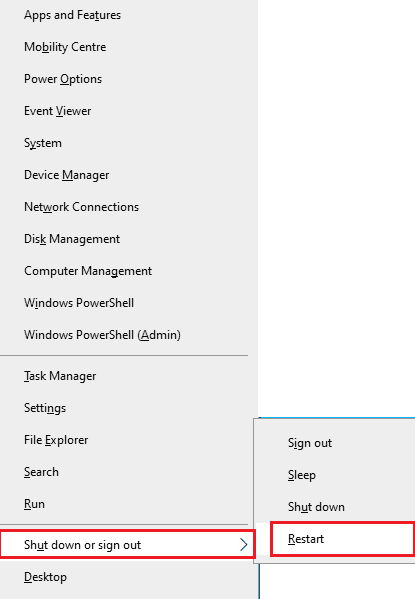
3. Наконец, нажмите «Перезагрузить».
2. Обеспечьте стабильное сетевое соединение
Нестабильное и неадекватное подключение к Интернету приводит к проблемам с журналами проверки ошибок установщика Star Citizen, а также, если между вашим маршрутизатором и ПК есть какие-либо препятствия или помехи, они могут мешать беспроводному сигналу и вызывать проблемы со стабильностью. Попробуйте запустить тест скорости, чтобы проверить скорость сети вашего компьютера.
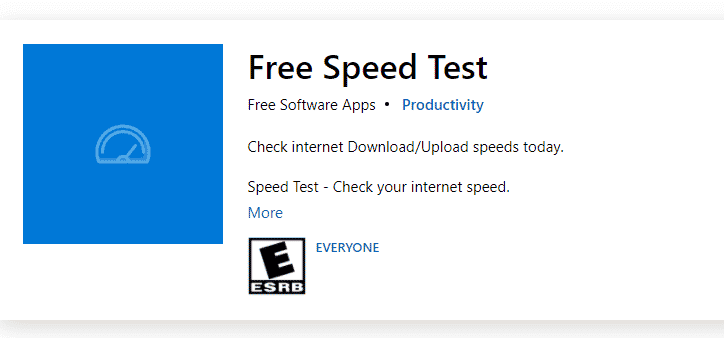
Если вы предполагаете, что возникла проблема с нестабильностью, ознакомьтесь с нашим руководством «Устранение неполадок с сетевым подключением в Windows 10», чтобы исправить то же самое.
3. Закройте фоновые процессы
Несколько пользователей подтвердили, что журналы проверки ошибок установщика Star Citizen можно устранить, закрыв все фоновые программы и приложения, работающие на ПК с Windows 10. Чтобы сделать то же самое, выполните шаги в нашем руководстве «Как завершить задачу в Windows 10» и действуйте в соответствии с инструкциями.
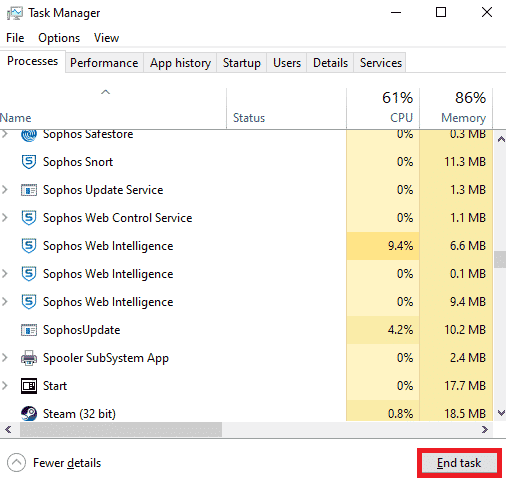
После того, как вы закрыли все фоновые процессы, проверьте, удалось ли вам исправить ошибку установки Star Citizen.
Способ 2: Запустите установщик от имени администратора
Если у Star Citizen нет необходимых прав администратора, некоторые важные функции игры будут ограничены, что приведет к ошибке установки Star Citizen всякий раз, когда вы открываете игру или устанавливаете какие-либо обновления. Следуйте приведенным ниже инструкциям, чтобы запустить игру от имени администратора.
1. Щелкните правой кнопкой мыши ярлык Star Citizen на рабочем столе или перейдите в каталог установки и щелкните его правой кнопкой мыши. Затем выберите параметр «Свойства».
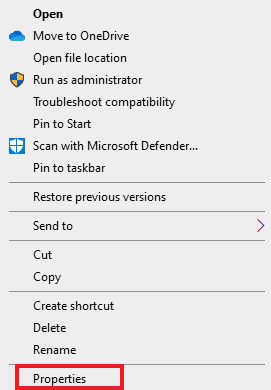
2. Теперь перейдите на вкладку «Совместимость» и нажмите «Запустить эту программу от имени администратора».
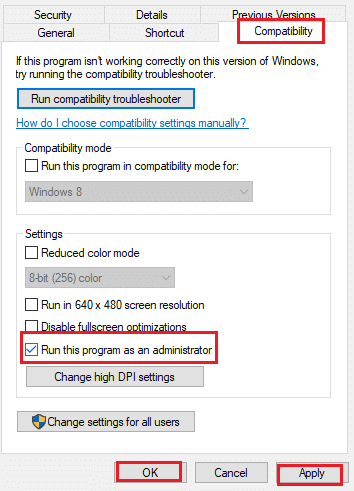
3. Наконец, нажмите «Применить» и «ОК», чтобы сохранить изменения. Проверьте, не устранена ли проблема с установщиком Star Citizen.
Способ 3: управление хранилищем для установки Star Citizen
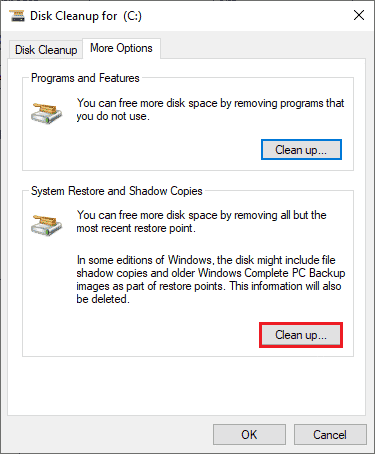
Если на вашем компьютере нет места для установки Star Citizen, вы столкнетесь с проблемой установки Star Citizen. Игра занимает более 15 ГБ места на вашем диске, и если вы все еще хотите обновить игру, она займет еще немного места. Итак, на жестком диске будет израсходовано почти 100 Гб места, если установить игру и пользоваться ею долгое время. Итак, в качестве первого шага в процессе устранения неполадок проверьте, достаточно ли места на вашем компьютере, особенно на диске, на который вы устанавливаете игру. Немногие пользователи сообщили, что очистка дискового пространства на компьютере помогла им разобраться с ошибкой установки Star Citizen. Это позволит вашему компьютеру устанавливать новые файлы, когда это необходимо, что поможет вам решить проблему. Следуйте нашему руководству «10 способов освободить место на жестком диске в Windows», которое поможет вам очистить все ненужные файлы на ПК с Windows 10.
Способ 4: удалить папку USER
Многие пользователи сообщают, что ошибку установщика Star Citizen в Windows 10 можно исправить, удалив папку USER в файловом менеджере. Это устраняет большинство проблем с целостностью в игре, и если вы предполагаете, что этот сценарий относится к вам, следуйте приведенным ниже инструкциям, чтобы сделать то же самое.
1. Во-первых, закройте все фоновые процессы.
2. Затем одновременно нажмите клавиши Windows + E, чтобы открыть проводник.
3. Перейдите в каталог установки Star Citizen, как показано ниже:
D:RSI LauncherStarCitizen LIVE
Примечание. Указанный выше путь к каталогу установки может быть разным для всех пользователей. Вы можете перейти на конкретный локальный диск (например, C или D), на котором вы сохранили файлы.
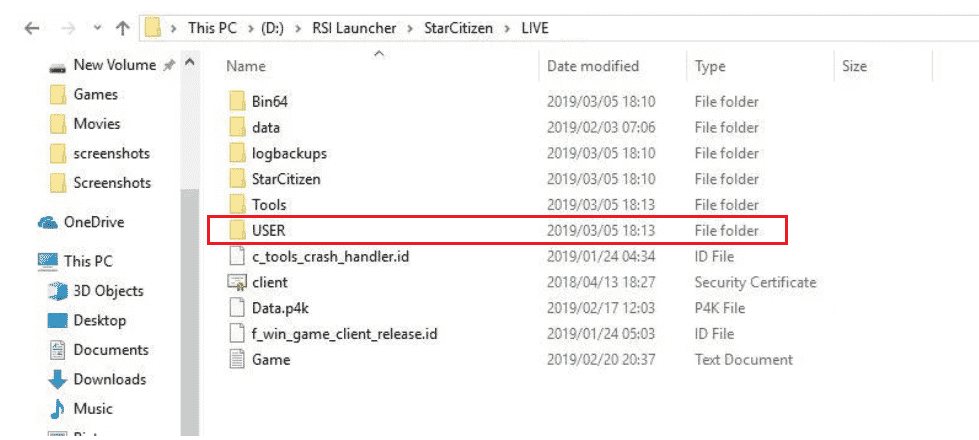
4. Затем прокрутите вниз и дважды щелкните папку USER.
5. Выберите все файлы в папке USER, нажав одновременно клавиши Ctrl + A и нажав кнопку Удалить.
6. Затем перейдите в корзину и очистите там все удаленные файлы.
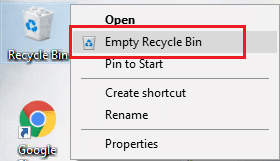
7. Наконец, запустите игру и завершите процесс входа в систему. Проверьте, не сталкиваетесь ли вы снова с проблемой установки Star Citizen.
Способ 5: использовать новую программу запуска
Многие затронутые пользователи решили проблему, используя новую программу запуска, чтобы устранить все проблемы несовместимости. Итак, если вы предполагаете, что ваш лаунчер несовместим с текущей версией игры, выполните следующие шаги, чтобы исправить то же самое.
Примечание. Перед установкой игры обязательно закройте все фоновые процессы, связанные с игрой.
1. Скачайте лаунчер Star Citizen с официального сайта
Примечание. Убедитесь, что файл запуска игры установлен в том же месте, где вы установили игру.
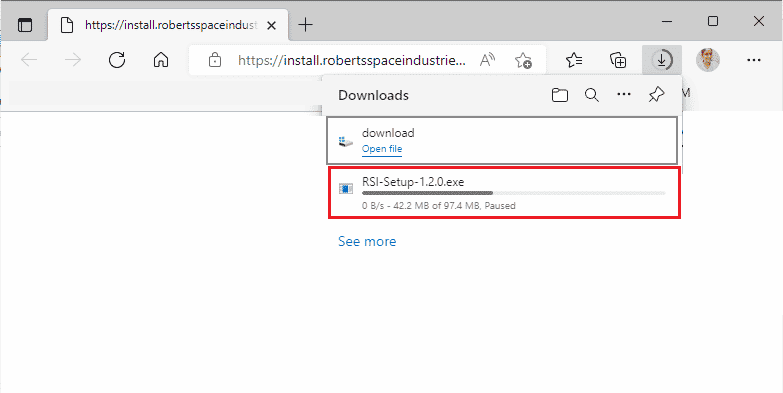
2. После установки игры на ПК перезапустите игру, установите все обновления и проверьте, не возникает ли проблема снова.
Способ 6: удалить RSILauncher из AppData
Иногда проблема возникает из-за некоторых временных поврежденных папок на вашем ПК с Windows 10. Когда вы устанавливаете игру, программа установки создает файл обновления в проводнике. В некоторых редких случаях эти папки могут быть повреждены и препятствовать запуску обновлений игрой. Если вы не знаете, как удалить папки RSILauncher и RSI с вашего ПК, выполните следующие действия.
1. Нажмите клавиши Windows + E вместе, чтобы открыть проводник.
2. Теперь перейдите к следующим путям местоположения один за другим.
C:UsersUSERNAMEAppDataLocal
C:UsersUSERNAMEAppDataRoaming
Примечание. Убедитесь, что вы установили флажок «Скрытые элементы» на вкладке «Вид», чтобы просмотреть папку AppData.
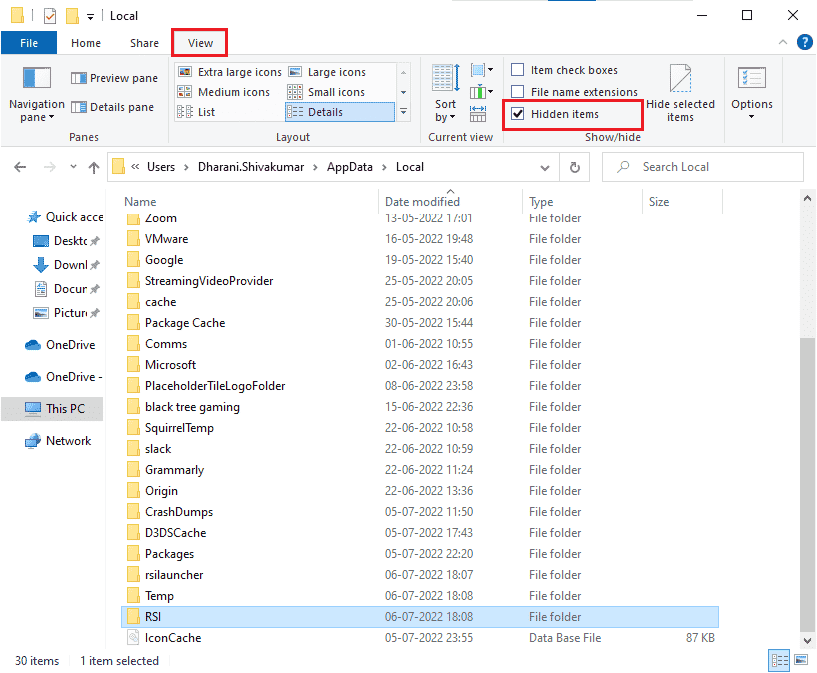
3. Теперь найдите папки rsilauncher и RSI, щелкните их правой кнопкой мыши и выберите параметр «Удалить».
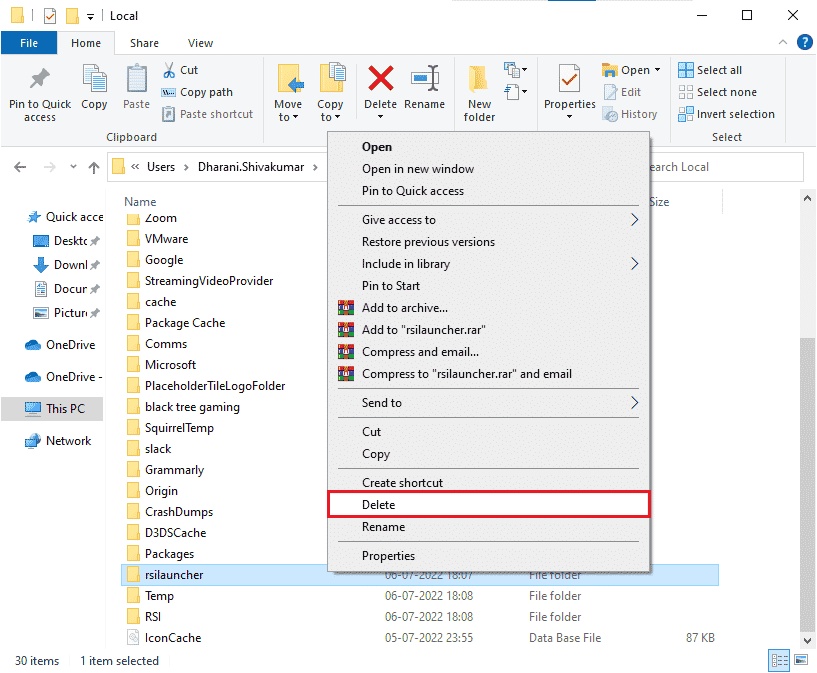
4. После того, как вы удалили эти папки, перезапустите игру, чтобы проверить, можете ли вы обновить игру без журналов проверки ошибок установщика Star Citizen.
Способ 7: переименовать файл hosts
Любые неправильные записи RSI в файле hosts могут вызвать ошибку установки Star Citizen. Вы можете решить эту проблему, удалив неправильные записи RSI из файла hosts, как указано ниже.
1. Нажмите клавиши Windows + E вместе, чтобы открыть проводник.
2. Теперь перейдите на вкладку «Вид» и установите флажок «Скрытые элементы» в разделе «Показать/скрыть».
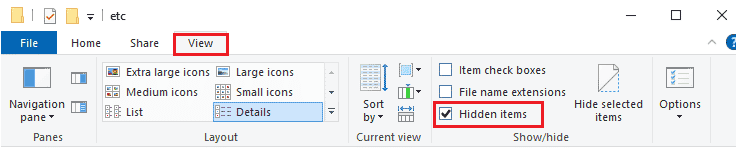
3. Теперь скопируйте и вставьте следующий путь в путь навигации Проводника. Здесь щелкните поле «Расширения имени файла» на вкладке «Вид», как показано на рисунке.
C:WindowsSystem32driversetc
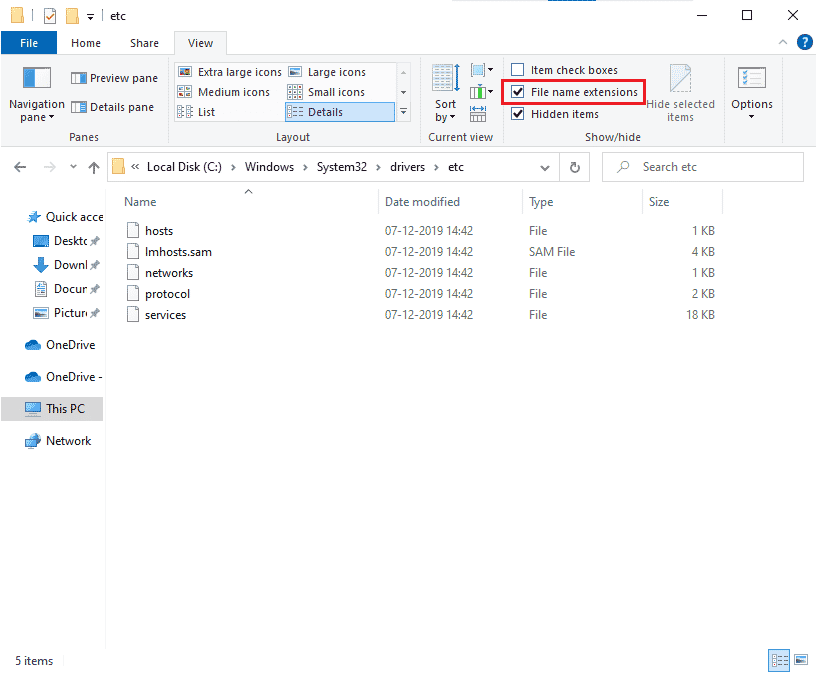
4. Теперь выберите и щелкните правой кнопкой мыши файл хоста и выберите параметр «Переименовать», как показано на рисунке. Переименуйте файл как hosts.old.
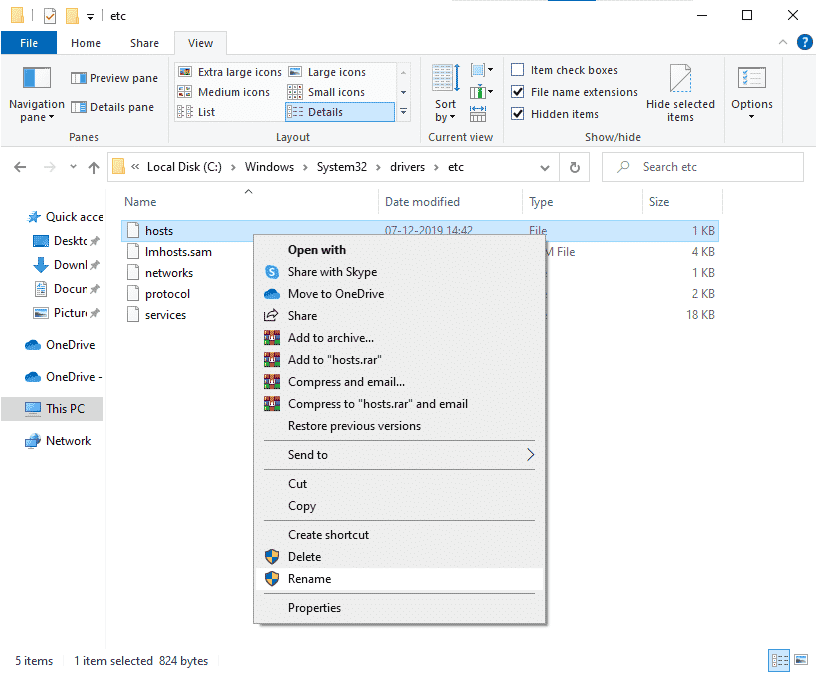
5. Теперь файл hosts с некорректными записями будет игнорироваться, и в следующий раз при запуске обновлений игры вы не столкнетесь с ошибкой установки Star Citizen.
Способ 8: обновить Windows
Если на вашем ПК с Windows 10 есть какие-либо ошибки, которые приводят к ошибке установщика Star Citizen Windows 10, вы можете решить эту проблему, обновив операционную систему Windows 10. Если вы не знаете, как обновить компьютер с Windows 10, следуйте нашему руководству «Как загрузить и установить последнее обновление Windows 10» и действуйте в соответствии с инструкциями.
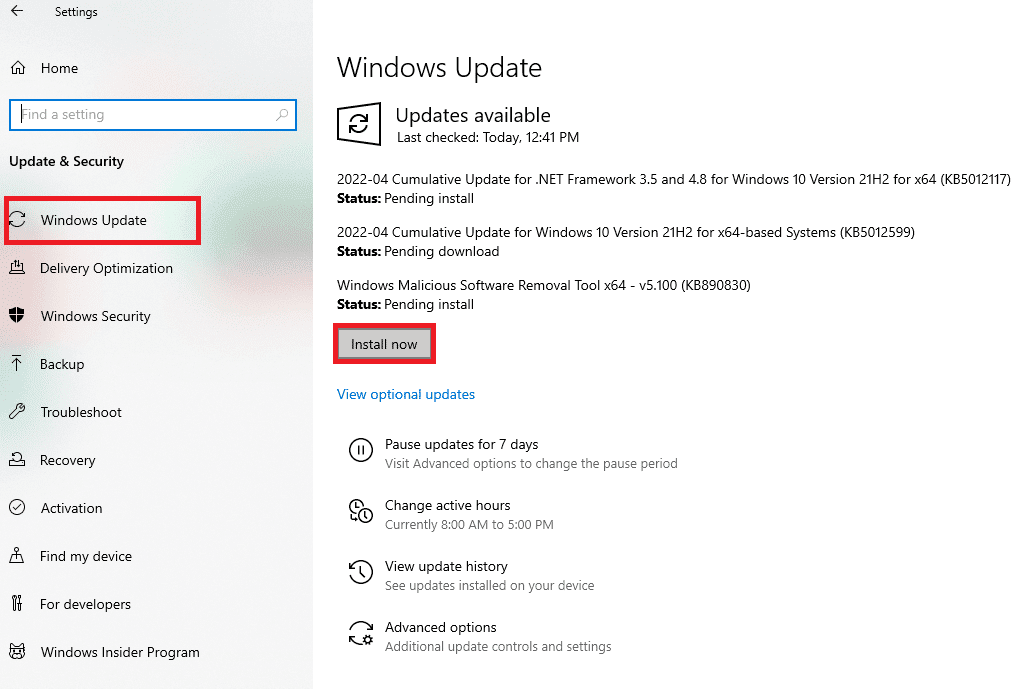
После обновления операционной системы Windows проверьте, устранена ли ошибка установщика Star Citizen Windows 10.
Способ 9: обновить графические драйверы
Star Citizen — это графическая игра, и для непрерывного игрового процесса все графические драйверы на вашем ПК должны быть совместимы и иметь последнюю версию. Если драйверы устарели или неисправны, вам необходимо обновить их все. Все новейшие обновления драйверов выпускаются с соответствующих официальных сайтов, или вы можете обновить их вручную. Ознакомьтесь с нашим руководством 4 способа обновления графических драйверов в Windows 10, чтобы обновить все драйверы и проверить, можете ли вы установить обновления игры.
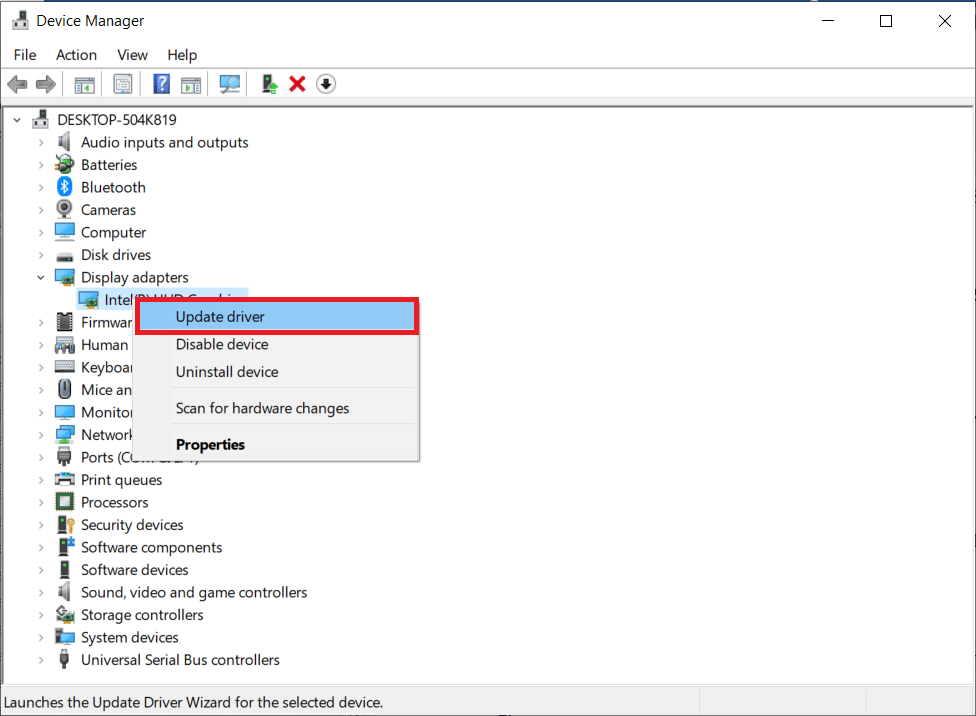
Способ 10: переустановите графические драйверы
Если вы все еще сталкиваетесь с ошибками установщика Star Citizen, проверьте журналы после обновления графических драйверов, затем переустановите драйверы устройств, чтобы устранить любые проблемы несовместимости. Существует так много способов переустановить драйверы в Windows. Тем не менее, если вы не знаете, как это реализовать, ознакомьтесь с нашим руководством «Как удалить и переустановить драйверы в Windows 10» и выполните то же самое.
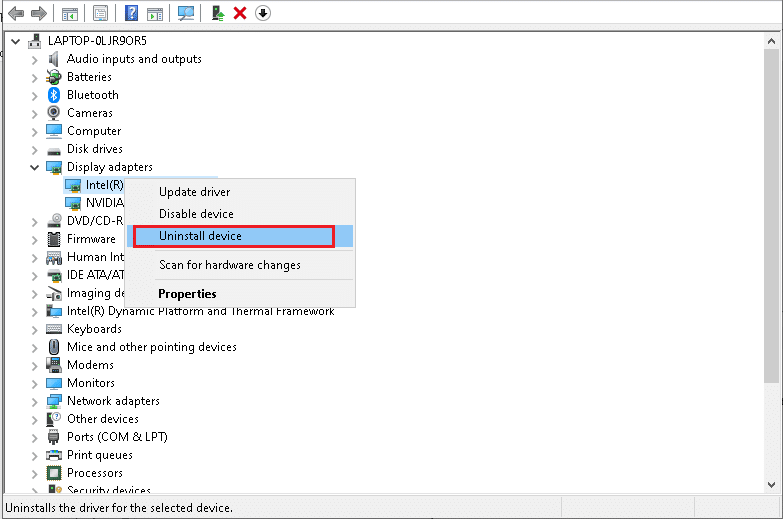
После переустановки драйверов графического процессора проверьте, разрешены ли журналы проверки ошибок установщика Star Citizen.
Метод 11: откат обновлений графического драйвера
Если текущая версия графических драйверов несовместима с вашей игрой, то нет смысла их обновлять или переустанавливать. Все, что вам нужно сделать, это откатить драйверы до предыдущей версии, следуя нашему руководству Как откатить драйверы в Windows 10.
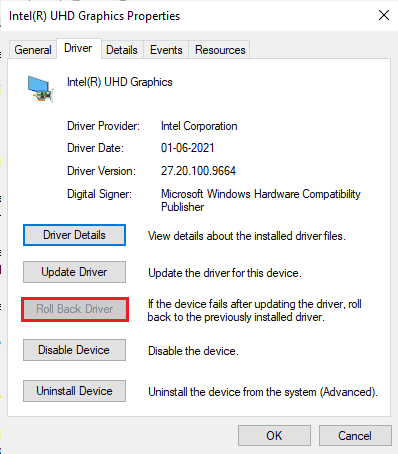
Теперь проверьте, устранена ли ошибка установки Star Citizen.
Способ 12: изменить настройки брандмауэра Защитника Windows
Ваш компьютер будет подвергаться ошибке установщика Star Citizen Windows 10 из-за чрезмерно защитного набора брандмауэров на ПК с Windows 10. Чтобы решить эту проблему, вы можете либо добавить новое правило для своей игры, внести игру в белый список, либо в качестве последнего исправления временно отключить брандмауэр.
Вариант I: Белый список Star Citizen
Чтобы включить Star Citizen в брандмауэре Защитника Windows, следуйте инструкциям в нашем руководстве Разрешить или заблокировать приложения через брандмауэр Windows.
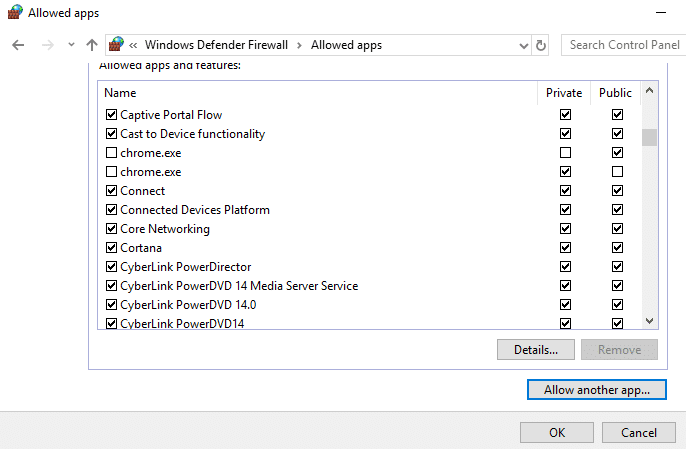
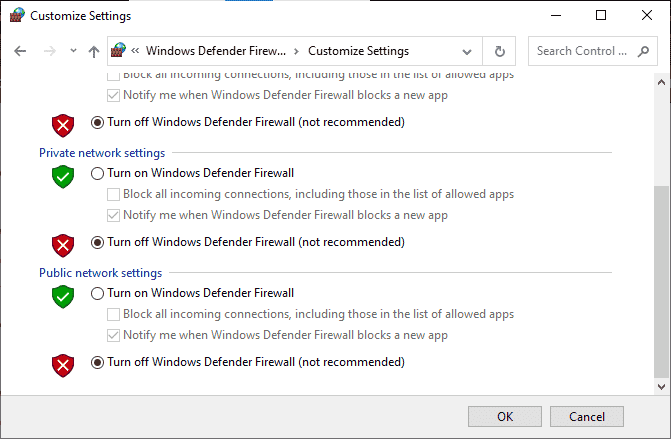
Вариант II: отключить брандмауэр Защитника Windows (не рекомендуется)
Если вам не помогает добавление игры в белый список, ознакомьтесь с нашим руководством «Как отключить брандмауэр Windows 10».
Вариант III: создать новое правило в брандмауэре
1. Нажмите клавишу Windows и введите Брандмауэр Защитника Windows, затем нажмите «Запуск от имени администратора».
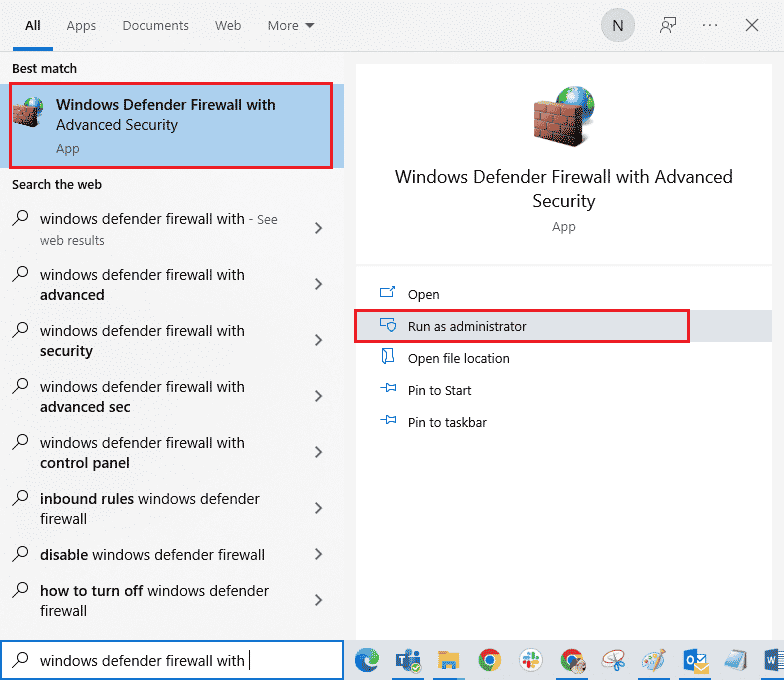
2. На левой панели выберите параметр Правила для входящих подключений.
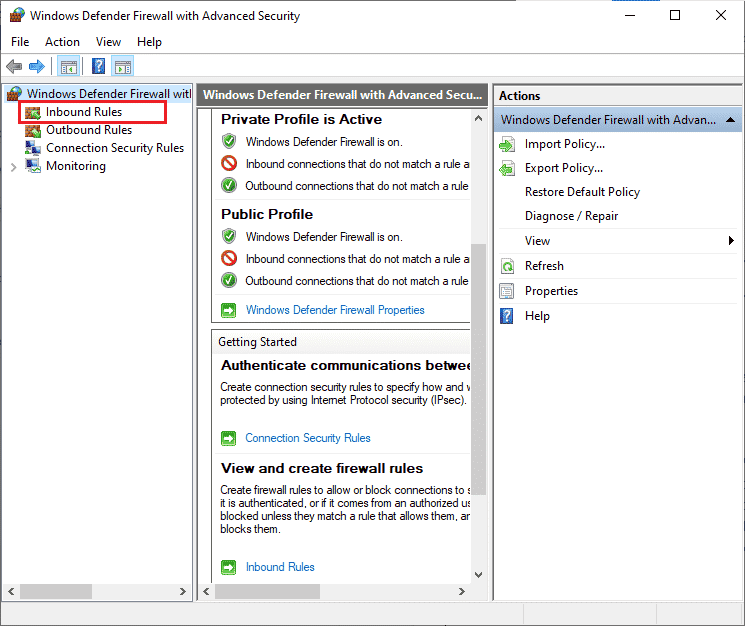
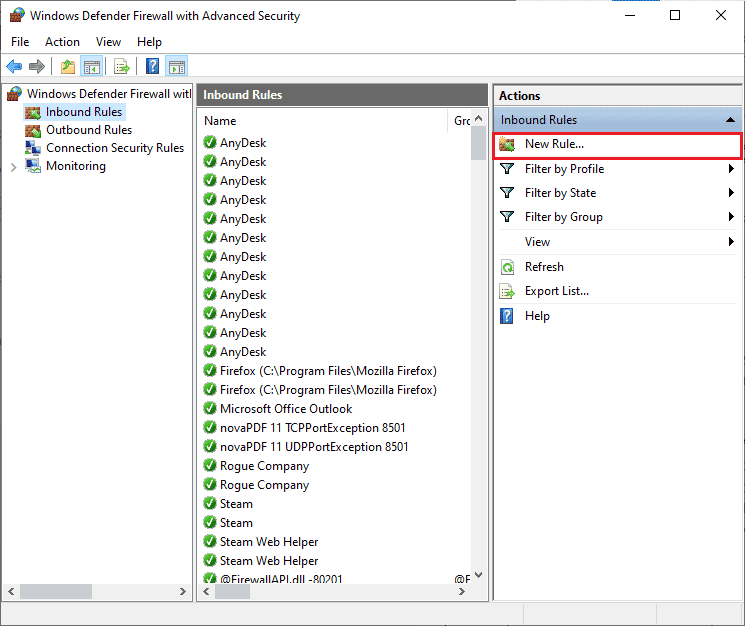
3. Перейдите на правую панель и выберите Новое правило… как показано на рисунке.
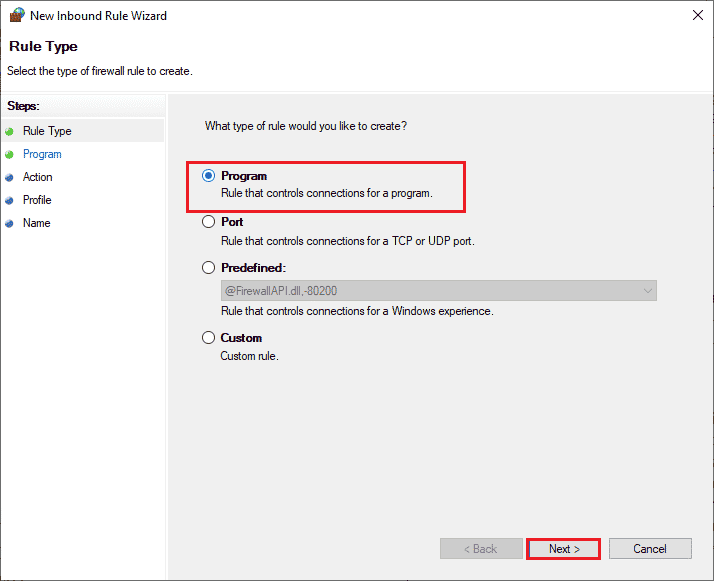
4. Затем убедитесь, что вы выбрали опцию «Программа» в разделе «Какой тип правила вы хотите создать?». меню и выберите «Далее>», как показано на рисунке.
5. Теперь нажмите кнопку Обзор… рядом с Путь к этой программе: как показано.
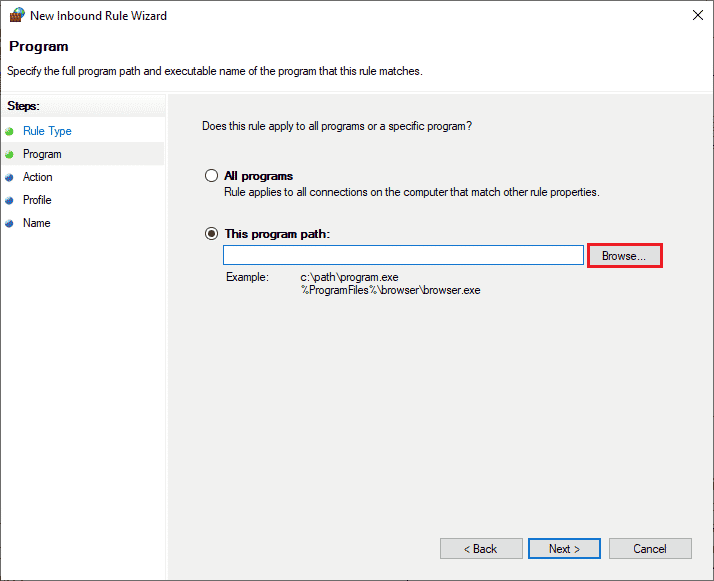
6. Теперь перейдите по пути C:Program Files (x86)Star Citizen и дважды щелкните установочный файл. Здесь нажмите на кнопку Открыть.
7. Здесь нажмите «Далее» > в окне «Мастер создания правила для нового входящего подключения», как показано на рисунке.
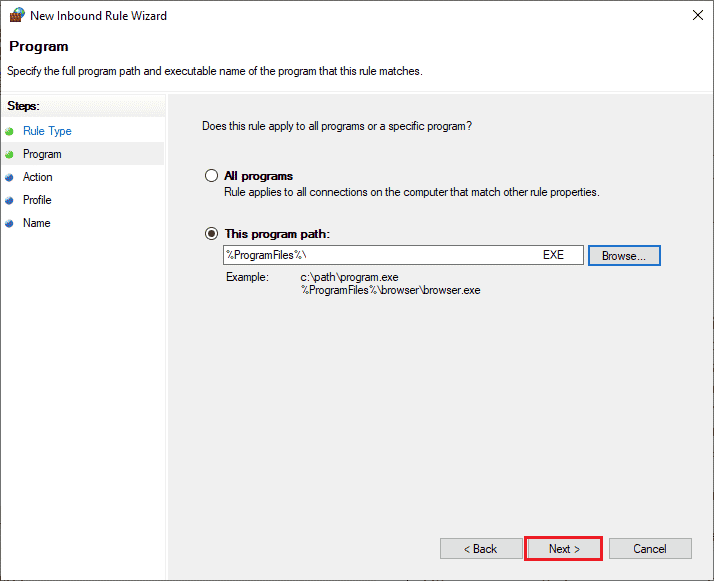
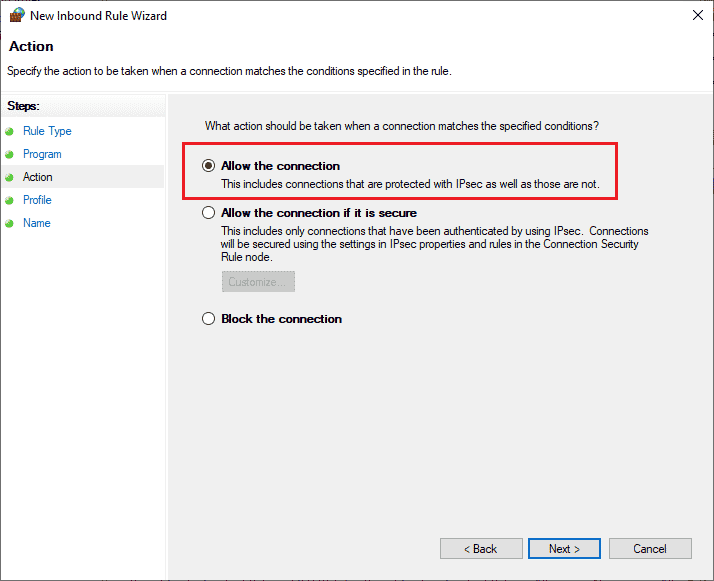
8. Затем нажмите Разрешить подключение и выберите Далее >, как показано.
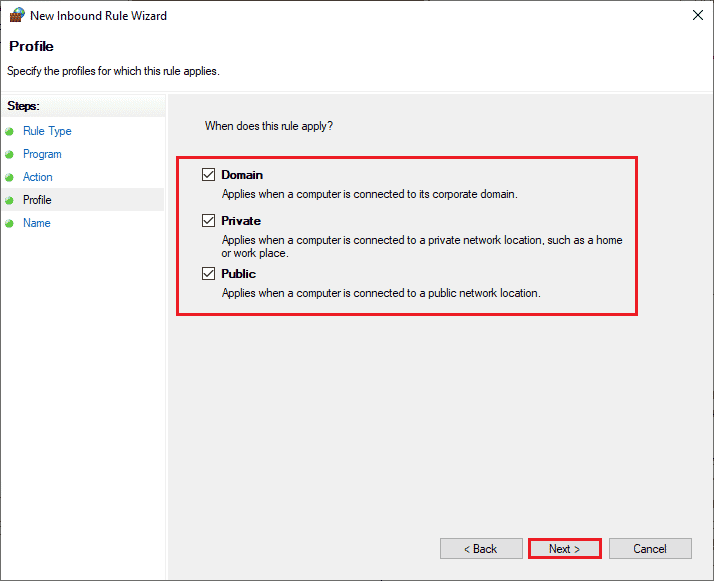
9. Убедитесь, что нажаты поля «Домен», «Частный», «Общий», и выберите параметр «Далее >».
10. Наконец, назовите новое правило и нажмите «Готово».
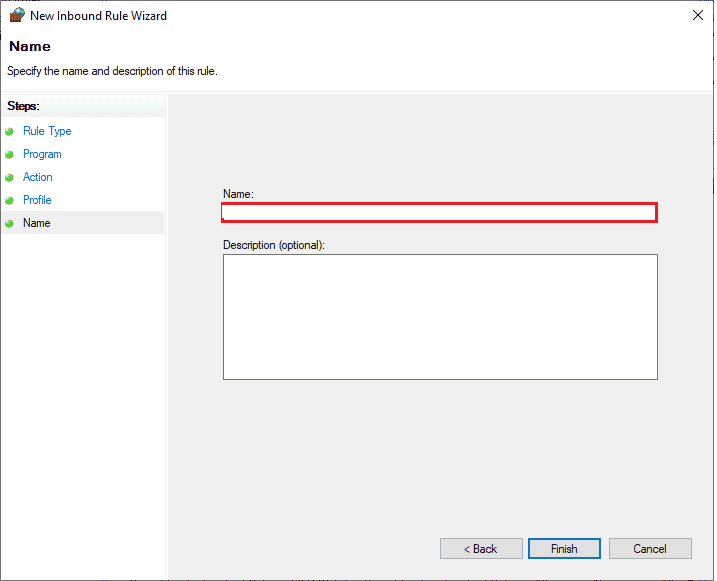
Проверьте, исправили ли вы ошибку установки Star Citizen или нет.
Способ 13: временно отключить антивирус (если применимо)
Как и в случае с брандмауэром, отключите антивирусную программу на своем компьютере, чтобы устранить проблему с журналами проверки ошибок установщика Star Citizen в вашей игре. Если на вашем компьютере есть угрозы вредоносных программ или файлов. Временно отключите сверхзащитную антивирусную программу, как указано в нашем руководстве «Как временно отключить антивирус в Windows 10».
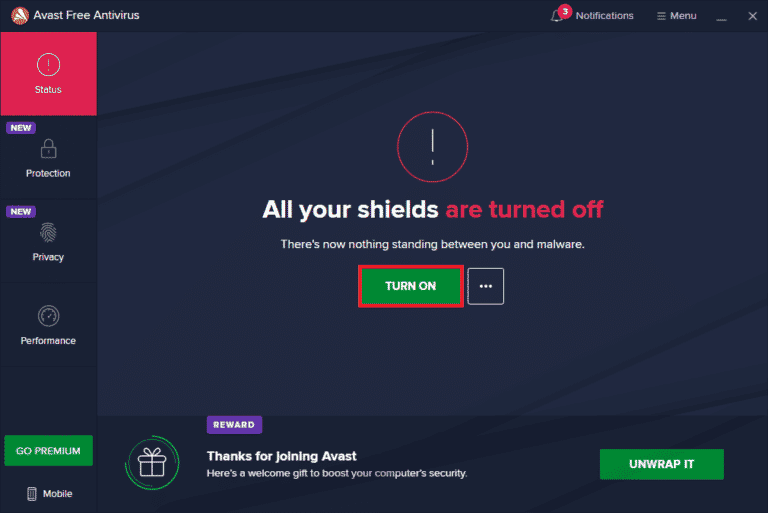
Если вы можете установить обновления игры после отключения антивирусной программы на компьютере, рекомендуется полностью удалить программу с вашего ПК. Если вы хотите это сделать, следуйте нашему руководству по принудительному удалению программ, которые не удаляются в Windows 10.
Способ 14: переустановите игру в другом месте
Если вы не можете устранить неполадки в журналах проверки ошибок установщика Star Citizen после применения всех вышеперечисленных методов, вы можете переустановить игру в другом месте, где у вас достаточно места (более 60 ГБ). Многие пользователи подтвердили, что переустановка игры помогла им решить проблему с ошибкой установщика Star Citizen в Windows 10. Хотя нет очевидной причины, по которой это потенциальное исправление, следуйте этому обычному исправлению, чтобы решить проблему.
1. Нажмите одновременно клавиши Windows + I, чтобы открыть настройки Windows.
2. Теперь нажмите «Настройки приложений».
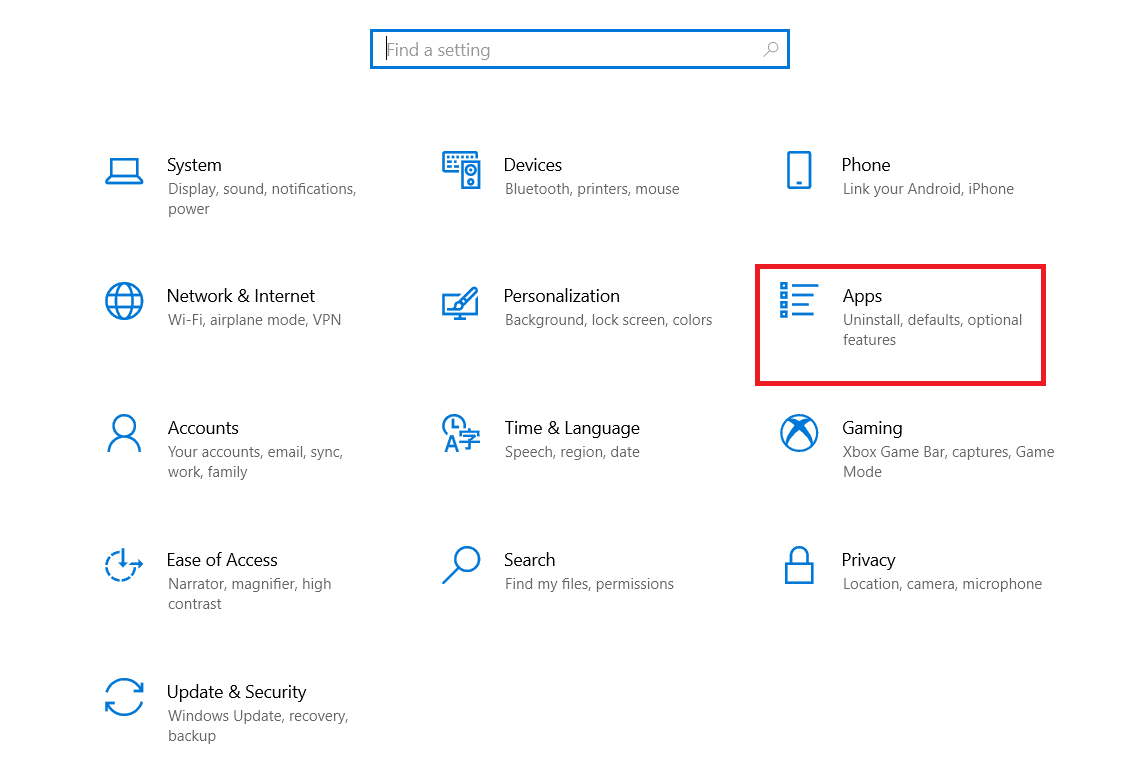
3. Теперь найдите и нажмите Star Citizen и выберите вариант «Удалить».
4. Теперь подтвердите приглашение, если оно есть, и перезагрузите компьютер после удаления Star Citizen.
5. Затем посетите официальную страницу загрузки RSI и нажмите кнопку ПОЛУЧИТЬ ВСЮ ИНФОРМАЦИЮ О ПОСЛЕДНЕЙ ЗАГРУЗКЕ. Затем следуйте инструкциям на экране, чтобы установить пакет на свой компьютер.
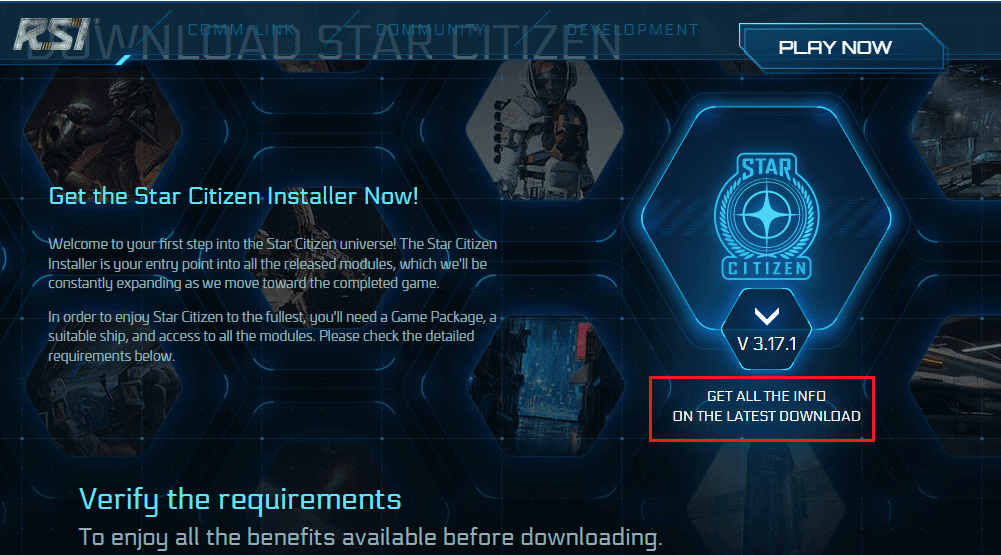
После того, как вы установили игру, вы больше не столкнетесь с ошибкой. Тем не менее, если вы столкнулись с тем же, возможно, вы установили игру на свой выделенный SSD. В этом случае вам необходимо отформатировать SSD, как указано в следующем методе.
Способ 15: форматирование SDD (не рекомендуется)
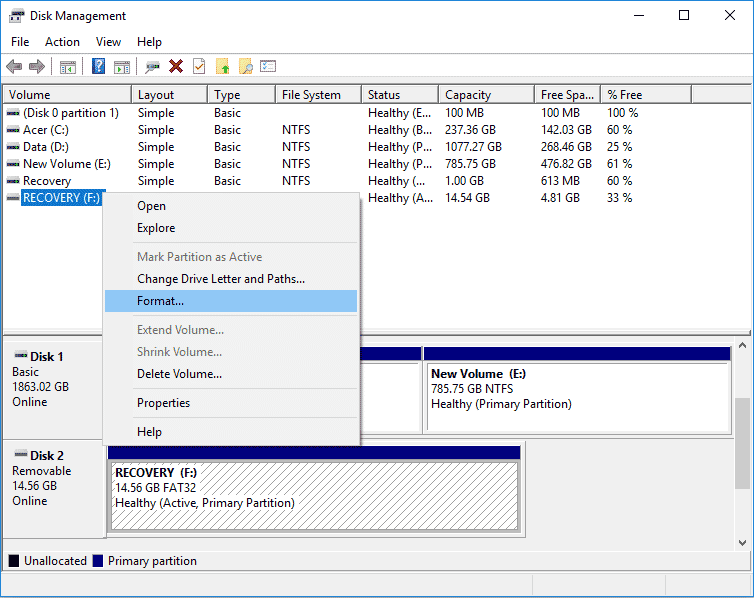
В случае, если вы используете SSD для установки игр на ПК с Windows 10, нет смысла следовать перечисленным методам устранения неполадок. В этом случае вам нужно полностью отформатировать SSD, чтобы решить проблему. Это может показаться ненужным, но это эффективный способ исправить ошибку установки на вашем компьютере. Несколько пользователей подтвердили, что этот метод полезен, и вы можете отформатировать свой SSD, следуя нашему руководству Как отформатировать диск или диск в Windows 10. Кроме того, если у вас есть какие-либо важные данные, сохраненные игры и другие личные вещи на вашем SSD, вы должны сделать резервную копию всех из них заранее, прежде чем форматировать диск. Этот процесс удалит данные и всю другую информацию на SSD.
***
Мы надеемся, что это руководство было полезным, и вы смогли исправить ошибку установщика Star Citizen на своем ПК с Windows 10. Дайте нам знать, какой метод работал для вас лучше всего. Кроме того, если у вас есть какие-либо вопросы/предложения относительно этой статьи, не стесняйтесь оставлять их в разделе комментариев.
Go to starcitizen
r/starcitizen
This is the subreddit for everything related to Star Citizen — an up and coming epic space sim MMO being developed by Chris Roberts and Cloud Imperium Games.
Members
Online
•
So I just bought the game and after installing it I launched the game and got the error code 16008. I looked up solutions to the problem and I found some and did all of them, I reset my character, remade the hosts file in my pc, and made sure I had the correct launcher, still, nothing worked. And yes I have a VPN, some people say I need one. Any other ways to fix it?
SOLVED
Star Citizen is a multiplayer space trading and combat simulation game that’s currently under development and seeing quite a lot of players signing up to play, especially during its September 8 to 15 free play window.
That said, while the game does offer a different experience, it’s under development and can still throw random bugs and glitches your way. In this article, we’re talking about the CIG error 16008 in Star Citizen and what you can do to fix the problem.
What causes this issue?
The error currently seems to be mostly impacting players in the US and is currently being investigated by the Star Citizen team. Possible causes include the following.
- RSI server outages.
- Outdated launcher.
- Issues with Easy anti-cheat.
- Game access is blocked by a firewall.
- ISP issues.
Also read: What is US01LV: ‘Wireless customer is not available’ error?
How to fix this?
Here are eight fixes you can try out.
Check internet connection
Now’s also a good time to check whether or not you have an active internet connection. If you’re on WiFi, make sure you’ve got an active link and that there are no signal issues. On cellular data, ensure that it’s enabled and that you’re getting good network coverage.
Check RSI server status
If RSI servers are down, you won’t be able to play the game leading to this error or a host of other ones. Check the RSI status update page to see if there’s an outage and if there is, sit tight until the developers get things going again.
Update your launcher
Using an outdated launcher has also been known to cause this issue. Head over to the RSI download page to download the latest available launcher version (version 3.17.2A at the time of writing), install it or update your existing installation and try launching the game again.
Also read: Is Bloom.exe a virus? How to remove it?
Disable VPN or proxies
If you’re running a VPN connection or any proxies, chances are they could be hampering your connection to the Star Citizen servers. In such cases, try disabling any active VPN connections or proxy settings to see if that helps resolve the issue.
Alternatively, if your ISP is blocking your connection to the game, using a VPN can actually come in handy as it’ll reroute your traffic and can help the game run.
Update your GPU drivers
Outdated GPU drivers can also cause this issue in particular. While you should update all your drivers, take special care of your display drivers if you run into an error like this.
Step 1: Right-click Start and select Device Manager from the menu.
Step 2: Under Display Adaptors, find your graphics card’s name, right-click on it and click on Update Drivers.
Step 3: Click on Search automatically for drivers. Windows will then automatically look for and download the latest drivers for your particular GPU.
While this should help resolve the error, in case it doesn’t, click Uninstall device and restart your PC to force Windows to install the required drivers. You can then update them later. Alternatively, you can also remove your GPU and reinsert it if you can.
Repair Easy Anti Cheat
If your game’s anti-cheat software isn’t working correctly, it can cause connection issues and other problems. All you have to do is head over to your Steam library folder, find the game directory and you’ll see the Easy Anti Cheat setup file inside the Binary/Win64 folder. Run the installer to repair the program and try launching your game again.
Also read: Open video downloader error binaries missing/corrupted: 6 Fixes
Restart the Easy Anti Cheat service
If the anti-cheat is installed fine but isn’t running properly, that’ll still cause problems for you. Here’s how to restart the service.
Step 1: Press Windows Key + R to open the Run prompt. Type services.msc and press enter.
Step 2: Scroll to find the Easy Anti-Cheatservice and double click it to proceed.
Step 3: In the Startup type dropdown, select Automatic. If the service is stopped, click the Start button to activate the service manually. Click Apply and OK when done.
Now try launching your game again and it should work just fine.
Edit the hosts file
Although rare, there can be an issue with the Windows hosts file as well that can keep you from connecting to RSI’s servers. Here’s how you can reset your Windows hosts file to see if that fixes the issue for you.
Step 1: Open up Windows Explorer and head over to the following path
Windows (C:) > Windows > System32 > drivers > etc
Step 2: You’ll see a file named hosts. Right-click on the file and open it with notepad using the Open with option.
Step 3: Select everything in the file and clear it out. Make sure to save before closing the file.
Also read: Top 10 FPS games for browsers

Topic: Star Citizen error code 16008 (Read 2615 times)
Hello community. I have this issue entered over at Star Citizen’s issue council right now, however, I figured I would ask a troubleshooting question here as well.
I had been using Voice Attack with Star Citizen with an HCS Voice pack, Kate to be specific. This had been working for several days with no issues. One day I started getting a persistent error code when trying to launch Star Citizen that only happens when I use Voice Attack. the error message is as follows.
ERROR- CIG services (CODE 16008) Account data update failed.
Synchronizing account data with the game network either failed or timed out
Now, this is most certainly an issue with Star Citizen as, well, Star Citizen is Star Citizen.
With that being said I would like to double check Voice Attack. Is there a way to confirm or verify that everything with Voice Attack is as it should be?
Thank you.

Logged
Have you tried disabling plugin support?
Click the wrench icon on VoiceAttack’s main window, and on the «General» tab of the VoiceAttack options window uncheck the «Enable Plugin Support» option, click «OK», click «OK», then restart VoiceAttack
VoiceAttack itself does not interface directly with any target application in a manner that should cause this type of error message.
You are, however, using a third-party addon specifically designed to interface with the application the issue is occurring with.
The authors of that product can be contacted via their forum, or their Discord
Logged
I will try that, and will look into the HCS site.
It did not occur to me that HCS would be the issue, thank you for that suggestion.
Logged
New updates are being added at the bottom of this story…….
Original story (published on July 29, 2022) follows:
Star Citizen is an upcoming space living simulator video game. It is designed as an MMO which means that you’ll be in an online universe with other human players.
It also allows you to team up with your friends and create your own adventure. Additionally, NPCs (non-player characters) will be there to keep a balance of the economics in the game.
However, according to multiple reports, many Star Citizen players are currently unable to access the game as they are getting ‘error code 16008’ at launch (1,2,3,4,5,6,7).
This issue seems to be limited to Star Citizen players based in the US, as others around the world are able to access the game without this error message.
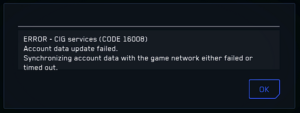
Hello, me and my buddy were really looking forward to playing SC after the wipe happened, but ever since the update we cant get into the game. We get just past the splash screen and then get blackscreens with an error saying failed to load character data.
Source
I would love to enjoy but no matter what I do, I keep getting error 16008. Unfortunately, haven’t been able to interact with any in game events because I’m always having issues. I’ve logged out and back in multiple times, reinstalled the game 3 times today, reset account, nothin.
Source
One of the players tried logging out and then back in, even reinstalled the game but neither resolved the issue.
Issue under investigation
On the brighter side, the Star Citizen team has already acknowledged this problem and is currently working on it.
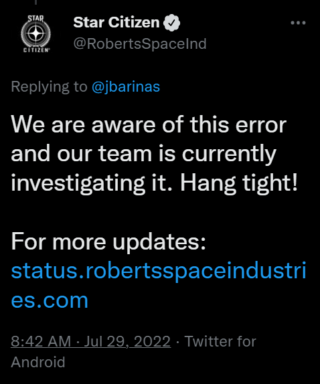
However, they did not share any timeline of when the fix will be released. From the looks of it, it seems Star Citizen players will have to wait a few more hours before they are able to play again.
Potential workarounds
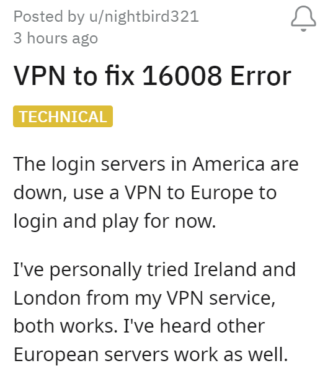
In the meantime, Star Citizen US players can use a VPN and select a different region to access the game.
We will be keeping tabs on the matter and update this article as and when we come across more information so make sure you keep checking this space.
Update 1 (August 01)
05:28 pm (IST): According to Star Citizen status page, the issue with ‘error code 16008’ has now been resolved.
Note: We have more such stories in our dedicated gaming section, so make sure to follow them as well.
Featured image:Star Citizen
PiunikaWeb started as purely an investigative tech journalism website with main focus on ‘breaking’ or ‘exclusive’ news. In no time, our stories got picked up by the likes of Forbes, Foxnews, Gizmodo, TechCrunch, Engadget, The Verge, Macrumors, and many others. Want to know more about us? Head here.