
In these regular posts, we’ll walk you through “How-To’s” for equipment that we service, and questions that we are regularly asked from you, our customers.
 In this tech tip, we’ll look at how to check and acknowledge a trouble on the keypad of a Honeywell Vista Alarm Monitoring Panel. You can use this tip if you use your Honeywell Alarm Monitoring system at home or for your business or commercial security alarm system. From time to time, conditions may arise which cause what is known as a ‘trouble’ condition on the keypad. Trouble conditions are wide ranging and can be anything from a low battery to a power failure to a communications failure. This will cause the word “CHECK” to appear on the Honeywell Alarm System Keypad, with a corresponding Zone number. If you receive a trouble condition on your alarm system which you cannot clear, please call our service department and we will help get the issue resolved.

Here are step-by-step instructions on how to check and acknowledge a trouble on the keypad of a DSC Power Series Alarm Monitoring Panel on your DSC Power Series security alarm panel, and how to silence that beep:
How to Check a Trouble Condition on a Honeywell Vista Alarm Monitoring Panel Keypad
- Any beeping which accompanies a Trouble Condition can be silences by entering your user code followed by the “OFF” button.
- Check the zones which have been indicated for issues, and correct any issues you may see. If you are unsure, please contact our monitoring station. If the problem has been corrected, the display can be cleared if you enter the OFF sequence (security code plus OFF key) twice. If the display persists, please contact our service department.
- If you have wireless sensors, ensure environmental conditions are not an issue and if the problem has been corrected, the display can be cleared if you enter the OFF sequence (security code plus OFF key) twice. If the display persists, please contact our service department.
- The following trouble conditions could also be present on the alarm system. If they are present, please call for service:
- COMM FAILURE (or FC): A problem with the telephone line which is communicating alarms to our monitoring station
- SYSTEM LO BAT: A system Low battery condition is present, and the back-up battery on the system will need to be changed by an FMC Security Technician.
- LO BAT + Zone: A Low Battery Condition Exists on the Zone Described. Many Wireless Sensors can be changed by the user, but if you are unsure, please call our service department.
- RCVR JAM: The wireless receiver is experience difficulty communicating with the devices installed in your property.
- ALARM 1xx FAULT 1xx CHECK 1xx (Or CHECK 90): Indicates a communications fault with the device listed
- MODEM COMM (or 91): Indicates that FMC is currently connected with the system remotely.
- BELL FAILURE (or CHECK 70): Indicates a wiring issue with the external sounder/siren
- AC LOSS (Or NO AC): Indicates the system is operating on Battery Power due to a lack of AC power to the system.
- Busy-STANDYBY (Or dl): Indicates the system is disabled. If this is displayed for more than 1 minute, contact FMC’s service department.
- OPEN CIRCUIT (or OC): The Keypad is not communicating with the main control panel.
- Long Rng Trbl (or bF): If installed, there is an issue with long-range communication
- TELCO FAULT (Or CHECK 94): The telephone line has a problem.
That’s it, you’re done!
This tip is applicable for the following alarm panels:
- Honeywell Vista 10
- Honeywell Vista 15
- Honeywell Vista 20
- Honeywell Vista 32
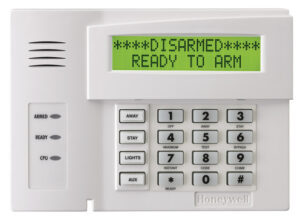 In this article, we will walk you through how to check and acknowledge a trouble signal on a Honeywell Vista alarm panel keypad. Trouble conditions can be caused by a variety of situations including low batteries, power failures, or communication failures. As a result, you may see the word “CHECK” on your Honeywell Vista alarm panel keypad along with a corresponding zone number. It’s important to remember that if you receive a trouble condition on your alarm system that you are unable to clear, please call our Service Department for assistance at 1 800 263 2534.
These instructions would apply to any of the following Honeywell Vista Alarm Panels:
- Honeywell Vista 10
- Honeywell Vista 15
- Honeywell Vista 20
- Honeywell Vista 32
Instructions – How to Check a Trouble
- Any beeping that accompanies the trouble condition can be silenced by entering your user code followed by the “OFF” button.
- Check the zones that have been indicated on the keypad as the source of the trouble and correct any issues you may see. If you are unsure, please call our monitoring station to confirm any possible issues at 1 800 563 3840. If the problem has been corrected, the display can be cleared by entering your user code followed by the “OFF” button twice. If the displayed trouble persists, please contact our Service Department.
- If you have wireless sensors, ensure environmental conditions are not an issue, and if the problem has been corrected, the display can be cleared by entering your user code followed by the “OFF” button twice.
When to Call for Service
If any of the following trouble conditions are present, please call our Service Department at 1 800 263 2534.
- COMM FAILURE (or FC): Indicates a problem with the line that is communicating alarms to the monitoring station.
- SYSTEM LOW BAT: A low battery condition is present, and the back-up battery on the system will need to be changed by a Service Technician.
- LOW BAT + Zone: A low battery condition is present on the zone indicated. Many wireless sensors can be changed by the user however, if you are unsure, please call our Service Department.
- RCVR JAM: The wireless receiver is experiencing difficulty communicating with the devices installed at your property.
- ALARM 1xx FAULT 1xx CHECK 1xx (Or CHECK 90): Indicates a communication fault with the device that is listed.
- MODEM COMM (or 91): Indicates that our Service or Monitoring Centre is currently remotely connected with your system.
- BELL FAILURE (or CHECK 70): Indicates a wiring issue is present with an external sounder/siren.
- AC LOSS (Or NO AC): Indicates that the system is operating on battery power due to a lack of AC power to the system.
- Busy-STANDBY (Or dl): Shows that the system is disabled. If this is displayed for longer than 60 seconds, please contact our Service Department.
- OPEN CIRCUIT (or OC): The keypad is not communicating with the main control panel.
- LONG RNG TRBL (or BF): If installed, this indicates that there is an issue with long range communication.
- TELCO FAULT (Or CHECK 94): The telephone line has a problem.
Contact Us
 For over 20 years, Bulldog Fire and Security has been an industry leader in fire alarm and security services, having installed, and serviced a variety of systems across Southwestern, Ontario.
If you’re interested in learning more about intrusion alarm systems and the role they can play at your facility, call us at 1 866 513 2881, email info@bulldogsecurity.ca, or fill out the contact form below.
Если ваша система безопасности ADT показывает «FC», значит, она не обменивается данными должным образом. «FC» означает «сбой связи» и является распространенной проблемой в системах безопасности ADT. Шаг 1: Найдите кнопку сброса на клавиатуре сигнализации ADT.
Как очистить код FC при тревоге? Вы можете сбросить код FC на своей сигнализации Honeywell, введя [Код установщика] + [800] + [*41*] + [*42*] + [*54] + [#15] + [*55] + [1 ] + [*99]. Это удалит запрограммированный номер телефона. Он также изменит настройки динамической сигнализации для панели, чтобы предотвратить будущие сообщения FC.
Как удалить код неисправности ADT? //www.youtube.com/watch?v=fZ6KB4z5ot0
Как сбросить сигнал тревоги ADT без кода? Одновременно нажмите и удерживайте клавиши * и #; Проверьте, запрашивает ли клавиатура код установщика; Нажмите *20, а затем 4-значный код (на ваш выбор);
Как сбросить ошибку в моей сигнализации ADT? //www.youtube.com/watch?v=fZ6KB4z5ot0
Что означает FC ADT?
Неудачная связь
Как сбросить ошибку ADT?
Что означает FC в моей системе сигнализации?
не удалось связаться
Как отключить FC в будильнике ADT?
– Шаг 1: Найдите кнопку сброса на клавиатуре сигнализации ADT.
– Шаг 2: Иногда кнопка сброса не работает.
– Шаг 3: Если вы правильно выполнили шаги 1 и 2, ваша сигнализация перезагрузится, а затем выключится.
— Шаг 4: Вот и все!
Как сбросить код будильника?
В зависимости от типа домашней системы безопасности, установленной в вашем доме, вам нужно будет либо нажать кнопку «Сброс», либо «#9» на клавиатуре. При появлении запроса (обычно три звуковых сигнала) введите текущий код тревоги, затем «#», а затем мастер-код.
Как сбросить настройки сигнализации?
– Найдите кнопку состояния вашей системы безопасности.
– Найдите веб-сайт производителя для получения инструкций по установке.
– Найдите источник питания на главной панели управления.
– Отключите резервную батарею.
– Оставьте питание выключенным не менее чем на 5 минут.
– Снова подсоедините провода аккумуляторной батареи.
– Одновременно нажмите клавиши (*) (#).
– Введите свой код.
Как сбросить ошибки в моей сигнализации ADT?
Что означает код ADT FC?
Неудачная связь
Как устранить проблему с ячейкой ADT?
Что означает FC в ADT?
Неудачная связь
Как мне перепрограммировать мою систему сигнализации ADT?
– Нажмите клавишу со звездочкой [*], а затем цифру 5 на клавиатуре и введите номер текущего мастер-кода.
– Введите на клавиатуре число 40 в зависимости от имеющейся у вас модели, чтобы перепрограммировать мастер-код в системе.
– Введите новый четырех- или шестизначный мастер-код в зависимости от вашей системы.
Что означает желтый треугольник на моем будильнике ADT?
аварийный свет
Как отключить сигнализацию без кода?
Во-первых, вам нужно отключить питание и резервный аккумулятор. Найдите металлический корпус. От металлической коробки должен идти силовой провод, который идет к подключаемому силовому трансформатору переменного тока. Если этот провод отсоединить, сигнализация прекратится.
Сбросит ли автосигнализация отключение аккумулятора?
Сбросит ли автосигнализация отключение аккумулятора?
Что происходит с ADT, когда отключается электричество?
Когда батарея вашей резервной системы разряжается, вы должны быть уведомлены охраной ADT, однако центр мониторинга не будет получать сигналы от системы безопасности, когда питание отключено, а резервная батарея полностью разряжена.
Как обновить систему сигнализации ADT?
Если вы являетесь текущим клиентом ADT, который платит за услуги мониторинга, вы можете обновить свою систему в любое время. Существуют специальные пакеты обновлений для клиентов, у которых есть мониторинг не менее двух лет. Позвоните им напрямую по телефону 1-888-238-2727.