
I am trying to convert SQL inner join query into PostgreSQL inner join query. In this inner join query which tables are using that all tables are not present in one database. we separated tables into two databases i.e. application db and security db
- users and permission table are present in security db
- userrolemapping and department are present in application db
I tried like below but I am getting following error
Error
ERROR:  cross-database references are not implemented: "Rockefeller_ApplicationDb.public.userrolemapping"
LINE 4:         INNER JOIN "Rockefeller_ApplicationDb".public.userro..
SQL Stored Function
SELECT   Department.nDeptID
    FROM Users INNER JOIN Permission
         ON Users.nUserID = Permission.nUserID INNER JOIN UserRoleMapping
         ON Users.nUserID = UserRoleMapping.nUserID INNER JOIN Department
         ON Permission.nDeptInst = Department.nInstID
         AND  Department.nInstID = 60
    WHERE
         Users.nUserID = 3;
PostgreSQL Stored Function
SELECT dep.ndept_id
        FROM "Rockefeller_SecurityDb".public.users as  u
        INNER JOIN  "Rockefeller_SecurityDb".public.permissions p ON u.nuser_id = p.nuser_id
        INNER JOIN "Rockefeller_ApplicationDb".public.userrolemapping as urm ON u.nuser_id = urm.nuser_id
        INNER JOIN "Rockefeller_ApplicationDb".public.department dep ON p.ndept_inst = dep.ninst_id
           AND  dep.ninst_id = 60
                        WHERE
                            u.nuser_id = 3;

asked Aug 10, 2018 at 10:52

1
You cannot join tables from different databases.
Databases are logically separated in PostgreSQL by design.
If you want to join the tables, you should put them into different schemas in one database rather than into different databases.
Note that what is called “database” in MySQL is called a “schema” in standard SQL.
If you really need to join tables from different databases, you need to use a foreign data wrapper.
answered Aug 10, 2018 at 12:43

Laurenz AlbeLaurenz Albe
204k17 gold badges195 silver badges250 bronze badges
8
For future searchs, you can to use dblink to connect to other database.
Follow commands:
create extension dblink;

SELECT dblink_connect('otherdb','host=localhost port=5432 dbname=otherdb user=postgres password=???? options=-csearch_path=');

SELECT * FROM dblink('otherdb', 'select field1, field2 from public.tablex')
AS t(field1 text, field2 text);
answered Jul 22, 2020 at 11:58

New to postrgreSQL and I had the same requirement. FOREIGN DATA WRAPPER did the job.
IMPORT FOREIGN SCHEMA — import table definitions from a foreign server
But first I had to:
-
enable the fdw extension
-
define the foreign server (which was the locahost in this case!)
-
create a mapping between the local user and the foreign user.
CREATE EXTENSION postgres_fdw;

CREATE SERVER localsrv
FOREIGN DATA WRAPPER postgres_fdw
OPTIONS (host 'localhost', dbname 'otherdb', port '5432');

CREATE USER MAPPING FOR <local_user>
SERVER localsrv
OPTIONS (user 'ohterdb_user', password 'ohterdb_user_password');

IMPORT FOREIGN SCHEMA public
FROM SERVER localsrv
INTO public;
After that I could use the foreign tables as if they were local. I did not notice any performance cost.

Jeremy Caney
7,03963 gold badges48 silver badges76 bronze badges
answered Dec 6, 2021 at 20:40

In my case, I changed my query from:
SELECT * FROM myDB.public.person
to this:
SELECT * FROM "myDB".public.cats
and it worked.
You can read more at mathworks.com.

answered Feb 20, 2022 at 9:57

BehnamBehnam
9992 gold badges14 silver badges38 bronze badges
Introduction
The restore process which is focusing only into the execution of an insert statement ended in a failure. Actually, there is an SQL file containing hundreds of records or rows available as values for insert query in its associated columns. But the process for importing those records or row data fail because of a certain cause. The following is the execution of the process for importing records or row data from an SQL file with the name of ‘insert-active-employee.sql’ :
C:>psql -Udb_user -d db_app < "C:UsersPersonalDownloadsinsert-active-employee.sql"
Password for user db_user: ERROR: cross-database references are not implemented: "main.dbo.employee"
LINE 1: INSERT INTO main.dbo.employee (name,birthdate,address...
^
Solution
Actually, the solution for solving the above problem is very simple. It exist in the name of the database which is being the target for the import process. There is no cross-reference database in this context. The SQL file actually exist as the process from Microsoft SQL Server backup or SQL insert statement generated process. In other words, the SQL file source is from Microsoft SQL Server. But the target for the restore process is not a Microsoft SQL Server. Instead, it is a PostgreSQL database server as the target of the database. The solution is very simple, just replace the cross-database references above with another suitable format.
So, check the database PostgreSQL name and then look up for the table. Actually in the command for restoring or importing the records or the row data, the database name is already becoming part of the value from one of the argument. The argument exist in ‘-d db_app’ where the database name is ‘db_app.
The only part left is to edit the SQL file further. Just replace the cross-database references exist in the above which is ‘main.dbo.employee’ into a name of a table from the database ‘db_app’. In this context as an example it is ”. The following is the pattern of the INSERT statement available in the SQL file before the editing process :
INSERT INTO main.dbo.employee (name,birthdate,address... VALUES(...,,,)
Following after, below is the actual content of the SQL file after the editing process :
INSERT INTO public.org_employee (name,birthdate,address... VALUES(...,,,)
Since, PostgreSQL has a default schema of ‘public’, so the definition of the table will have a reference of ‘public.org_employee’ where ‘org_employee’ is the name of the table itself. After editing it, just execute it once more and the INSERT query process will be proceed normally if there are no more errors exist.
- Yes the tabel ( product ) in the public schema
- postgreSQL version : postgresql-9.2.1-1-windows-x64
- The following is restsql.properties file:
logging.facility=log4j
logging.config=resources/properties/log4j.properties
logging.dir=/geronimo/geronimo-tomcat7-javaee6-web-3.0.0-bin/var/log
sqlresources.dir=sqlresources
request.useXmlDirective=false
request.useXmlSchema=false
response.useXmlSchema=false
response.useXmlDirective=false
database.driverClassName=org.postgresql.Driver
database.url=jdbc:postgresql://localhost:5432/jeisDB
database.user=testUser
database.password=testUsers
org.restsql.core.SqlResourceMetaData=org.restsql.core.impl.SqlResourceMetaDataPostgreSql
org.restsql.core.Factory.RequestFactory=org.restsql.core.impl.RequestFactoryImpl
org.restsql.core.Factory.RequestDeserializerFactory=org.restsql.core.impl.RequestDeserializerFactoryImpl
org.restsql.core.Factory.ResponseSerializerFactory=org.restsql.core.impl.ResponseSerializerFactoryImpl
org.restsql.core.HttpRequestAttributes=org.restsql.core.impl.HttpRequestAttributesImpl
org.restsql.core.RequestLogger=org.restsql.core.impl.RequestLoggerImpl
org.restsql.core.SqlBuilder=org.restsql.core.impl.SqlBuilderImpl
org.restsql.security.Authorizer=org.restsql.security.impl.AuthorizerImpl
-
The following is the product.xml file:
xml version=»1.0″ encoding=»UTF-8″?
rs:sqlResource xmlns:rs=»http://restsql.org/schema» xmlns:xsi=»http://www.w3.org/2001/XMLSchema-instance» xsi:schemaLocation=»http://restsql.org/schema SqlResource.xsd «
query
SELECT productid «id», name «thisName» FROM product
/query
metadata
database default=»jeisDB» table role=»Parent» name=»product»/metadata
/rs:sqlResource

I am trying to convert SQL inner join query into PostgreSQL inner join query. In this inner join query which tables are using that all tables are not present in one database. we separated tables into two databases i.e. application db and security db
- users and permission table are present in security db
- userrolemapping and department are present in application db
I tried like below but I am getting following error
Error
ERROR:  cross-database references are not implemented: "Rockefeller_ApplicationDb.public.userrolemapping"
LINE 4:         INNER JOIN "Rockefeller_ApplicationDb".public.userro..
SQL Stored Function
SELECT   Department.nDeptID
    FROM Users INNER JOIN Permission
         ON Users.nUserID = Permission.nUserID INNER JOIN UserRoleMapping
         ON Users.nUserID = UserRoleMapping.nUserID INNER JOIN Department
         ON Permission.nDeptInst = Department.nInstID
         AND  Department.nInstID = 60
    WHERE
         Users.nUserID = 3;
PostgreSQL Stored Function
SELECT dep.ndept_id
        FROM "Rockefeller_SecurityDb".public.users as  u
        INNER JOIN  "Rockefeller_SecurityDb".public.permissions p ON u.nuser_id = p.nuser_id
        INNER JOIN "Rockefeller_ApplicationDb".public.userrolemapping as urm ON u.nuser_id = urm.nuser_id
        INNER JOIN "Rockefeller_ApplicationDb".public.department dep ON p.ndept_inst = dep.ninst_id
           AND  dep.ninst_id = 60
                        WHERE
                            u.nuser_id = 3;
asked Aug 10, 2018 at 10:52
1
You cannot join tables from different databases.
Databases are logically separated in PostgreSQL by design.
If you want to join the tables, you should put them into different schemas in one database rather than into different databases.
Note that what is called “database” in MySQL is called a “schema” in standard SQL.
If you really need to join tables from different databases, you need to use a foreign data wrapper.
answered Aug 10, 2018 at 12:43
Laurenz AlbeLaurenz Albe
204k17 gold badges195 silver badges250 bronze badges
8
For future searchs, you can to use dblink to connect to other database.
Follow commands:
create extension dblink;

SELECT dblink_connect('otherdb','host=localhost port=5432 dbname=otherdb user=postgres password=???? options=-csearch_path=');

SELECT * FROM dblink('otherdb', 'select field1, field2 from public.tablex')
AS t(field1 text, field2 text);
answered Jul 22, 2020 at 11:58
New to postrgreSQL and I had the same requirement. FOREIGN DATA WRAPPER did the job.
IMPORT FOREIGN SCHEMA — import table definitions from a foreign server
But first I had to:
-
enable the fdw extension
-
define the foreign server (which was the locahost in this case!)
-
create a mapping between the local user and the foreign user.
CREATE EXTENSION postgres_fdw;

CREATE SERVER localsrv
FOREIGN DATA WRAPPER postgres_fdw
OPTIONS (host 'localhost', dbname 'otherdb', port '5432');

CREATE USER MAPPING FOR <local_user>
SERVER localsrv
OPTIONS (user 'ohterdb_user', password 'ohterdb_user_password');

IMPORT FOREIGN SCHEMA public
FROM SERVER localsrv
INTO public;
After that I could use the foreign tables as if they were local. I did not notice any performance cost.
Jeremy Caney
7,03163 gold badges48 silver badges76 bronze badges
answered Dec 6, 2021 at 20:40
In my case, I changed my query from:
SELECT * FROM myDB.public.person
to this:
SELECT * FROM "myDB".public.cats
and it worked.
You can read more at mathworks.com.
answered Feb 20, 2022 at 9:57
BehnamBehnam
9992 gold badges14 silver badges38 bronze badges
Есть таблица artist и user_artist
artist:
- id (PK)
- name
user_artist:
- id (PK)
- userId(FK)
- artistId(FK)
- added
Следующий запрос возвращает ошибку
ссылки между базами не реализованы: user_artist.addedreturn db.query(`
SELECT artist.name AS "artistName", artist.id AS "artistId", user_artist.added
FROM user_artist
INNER JOIN artist
ON artist.id = user_artist."artistId"
WHERE user_artist."userId" = $(userId)
AND user_artist.added::timestamp < to_timestamp($(index) / 1000)
ORDER BY user_artist.added $(order)
LIMIT $(limit);`, obj);
Если убрать ORDER BY user_artist.added $(order) то ошибка исчезает.
Вот точная структура таблица user_artist
create table user_artist
(
  "id" serial primary key,
  "userId" serial REFERENCES user (id) on delete cascade,
  "artistId" serial REFERENCES artist (id) on delete cascade,
  "added" timestamp,
  unique ("userId", "artistId")
);
Что не так?

Здравствуйте, такая проблема, у меня есть задание :В базе данных basa1 имеется таблица Книга. Из базы данных basa2 необходимо выполнить действие по увеличению цены всех книг на 10%. В какой базе данных должна быть создана процедура и как можно ее выполнить?
Под это дело я написала нечто такое:
| SQL | ||
|
процедура создается, но когда пытаюсь ее вызвать пишет «ссылки между базами не реализованы: «basa1.dbl.Книга»»
как можно это исправить?
p.s. данный вариант составления процедуры не первый, и если раньше он эту процедуру даже заметить ее, то сейчас хоть понятно в чем проблема
p.s. p.s. Надеюсь код я занесла в правильные скобки
Вы получаете эту ошибку, потому что вы не подключены к базе данных real_estate.
Я предполагаю, что вы подключены к postgres, потому что это то, что вы обычно делаете для запуска CREATE DATABASE.
Вам нужно будет разорвать существующее соединение с базой данных, а затем запустить его для вновь созданной базы данных. Только тогда вам разрешено создавать объекты в базе данных.
Это особенность, что разные базы данных строго разделены, и любой запрос на изменение, который будет отклонен.
Как это лучше всего сделать, зависит от того, как вы запускаете сценарий. Если вы запустите его с psql, подойдет простой c real_estate.
Я пытаюсь преобразовать запрос внутреннего соединения SQL в запрос внутреннего соединения PostgreSQL. В этом запросе внутреннего соединения, какие таблицы используют, не все таблицы присутствуют в одной базе данных. мы разделили таблицы на две базы данных, то есть базу данных приложений и базу данных безопасности.
- пользователи и таблица разрешений присутствуют в базе данных безопасности
- сопоставление ролей пользователя и отдел присутствуют в базе данных приложения
Я пробовал, как показано ниже, но получаю следующую ошибку
Ошибка
ERROR:  cross-database references are not implemented: "Rockefeller_ApplicationDb.public.userrolemapping"
LINE 4:         INNER JOIN "Rockefeller_ApplicationDb".public.userro..
Сохраненная функция SQL
SELECT   Department.nDeptID
    FROM Users INNER JOIN Permission
         ON Users.nUserID = Permission.nUserID INNER JOIN UserRoleMapping
         ON Users.nUserID = UserRoleMapping.nUserID INNER JOIN Department
         ON Permission.nDeptInst = Department.nInstID
         AND  Department.nInstID = 60
    WHERE
         Users.nUserID = 3;
Сохраненная функция PostgreSQL
SELECT dep.ndept_id
        FROM "Rockefeller_SecurityDb".public.users as  u
        INNER JOIN  "Rockefeller_SecurityDb".public.permissions p ON u.nuser_id = p.nuser_id
        INNER JOIN "Rockefeller_ApplicationDb".public.userrolemapping as urm ON u.nuser_id = urm.nuser_id
        INNER JOIN "Rockefeller_ApplicationDb".public.department dep ON p.ndept_inst = dep.ninst_id
           AND  dep.ninst_id = 60
                        WHERE
                            u.nuser_id = 3;
4 ответа
Вы не можете соединять таблицы из разных баз данных.
Базы данных логически разделены в PostgreSQL.
Если вы хотите соединить таблицы, вы должны поместить их в разные схемы в одной базе данных, а не в разные базы данных.
Обратите внимание, что то, что называется «базой данных» в MySQL, называется «схемой» в стандартном SQL.
Если вам действительно нужно объединить таблицы из разных баз данных, вам нужно использовать стороннюю оболочку данных.
29
Laurenz Albe
8 Янв 2019 в 10:09
Для будущих поисков вы можете использовать dblink для подключения к другой базе данных.
Следуйте командам:
create extension dblink;

SELECT dblink_connect('otherdb','host=localhost port=5432 dbname=otherdb user=postgres password=???? options=-csearch_path=');

SELECT * FROM dblink('otherdb', 'select field1, field2 from public.tablex')
AS t(field1 text, field2 text);
6
rafaelnaskar
22 Июл 2020 в 14:58
У меня была такая же проблема с Postgres и JpaRepo, и я просто удалил dbname.public из запроса.
0
Krizsán Balazs
19 Авг 2021 в 19:43
Новичок в postrgreSQL, и у меня было такое же требование. FOREIGN DATA WRAPPER сделал свое дело.
IMPORT FOREIGN SCHEMA — импорт определений таблиц с внешнего сервера.
Но сначала мне нужно было:
-
включить расширение fdw
-
определить внешний сервер (который в данном случае был лока-хостом!)
-
создать сопоставление между локальным пользователем и внешним пользователем.
CREATE EXTENSION postgres_fdw;

CREATE SERVER localsrv
FOREIGN DATA WRAPPER postgres_fdw
OPTIONS (host 'localhost', dbname 'otherdb', port '5432');

CREATE USER MAPPING FOR <local_user>
SERVER localsrv
OPTIONS (user 'ohterdb_user', password 'ohterdb_user_password');

IMPORT FOREIGN SCHEMA public
FROM SERVER localsrv
INTO public;
После этого я мог использовать чужие таблицы, как если бы они были локальными. Затрат на производительность я не заметил.
0
Jeremy Caney
7 Дек 2021 в 03:33
I am trying to convert SQL inner join query into PostgreSQL inner join query. In this inner join query which tables are using that all tables are not present in one database. we separated tables into two databases i.e. application db and security db
- users and permission table are present in security db
- userrolemapping and department are present in application db
I tried like below but I am getting following error
Error
ERROR:  cross-database references are not implemented: "Rockefeller_ApplicationDb.public.userrolemapping"
LINE 4:         INNER JOIN "Rockefeller_ApplicationDb".public.userro..
SQL Stored Function
SELECT   Department.nDeptID
    FROM Users INNER JOIN Permission
         ON Users.nUserID = Permission.nUserID INNER JOIN UserRoleMapping
         ON Users.nUserID = UserRoleMapping.nUserID INNER JOIN Department
         ON Permission.nDeptInst = Department.nInstID
         AND  Department.nInstID = 60
    WHERE
         Users.nUserID = 3;
PostgreSQL Stored Function
SELECT dep.ndept_id
        FROM "Rockefeller_SecurityDb".public.users as  u
        INNER JOIN  "Rockefeller_SecurityDb".public.permissions p ON u.nuser_id = p.nuser_id
        INNER JOIN "Rockefeller_ApplicationDb".public.userrolemapping as urm ON u.nuser_id = urm.nuser_id
        INNER JOIN "Rockefeller_ApplicationDb".public.department dep ON p.ndept_inst = dep.ninst_id
           AND  dep.ninst_id = 60
                        WHERE
                            u.nuser_id = 3;
asked Aug 10, 2018 at 10:52

1
You cannot join tables from different databases.
Databases are logically separated in PostgreSQL by design.
If you want to join the tables, you should put them into different schemas in one database rather than into different databases.
Note that what is called “database” in MySQL is called a “schema” in standard SQL.
If you really need to join tables from different databases, you need to use a foreign data wrapper.
answered Aug 10, 2018 at 12:43
Laurenz AlbeLaurenz Albe
190k17 gold badges175 silver badges229 bronze badges
8
For future searchs, you can to use dblink to connect to other database.
Follow commands:
create extension dblink;

SELECT dblink_connect('otherdb','host=localhost port=5432 dbname=otherdb user=postgres password=???? options=-csearch_path=');

SELECT * FROM dblink('otherdb', 'select field1, field2 from public.tablex')
AS t(field1 text, field2 text);
answered Jul 22, 2020 at 11:58
New to postrgreSQL and I had the same requirement. FOREIGN DATA WRAPPER did the job.
IMPORT FOREIGN SCHEMA — import table definitions from a foreign server
But first I had to:
-
enable the fdw extension
-
define the foreign server (which was the locahost in this case!)
-
create a mapping between the local user and the foreign user.
CREATE EXTENSION postgres_fdw;

CREATE SERVER localsrv
FOREIGN DATA WRAPPER postgres_fdw
OPTIONS (host 'localhost', dbname 'otherdb', port '5432');

CREATE USER MAPPING FOR <local_user>
SERVER localsrv
OPTIONS (user 'ohterdb_user', password 'ohterdb_user_password');

IMPORT FOREIGN SCHEMA public
FROM SERVER localsrv
INTO public;
After that I could use the foreign tables as if they were local. I did not notice any performance cost.
Jeremy Caney
6,79353 gold badges48 silver badges74 bronze badges
answered Dec 6, 2021 at 20:40
In my case, I changed my query from:
SELECT * FROM myDB.public.person
to this:
SELECT * FROM "myDB".public.cats
and it worked.
You can read more at mathworks.com.
answered Feb 20, 2022 at 9:57

BehnamBehnam
9411 gold badge14 silver badges38 bronze badges
Introduction
The restore process which is focusing only into the execution of an insert statement ended in a failure. Actually, there is an SQL file containing hundreds of records or rows available as values for insert query in its associated columns. But the process for importing those records or row data fail because of a certain cause. The following is the execution of the process for importing records or row data from an SQL file with the name of ‘insert-active-employee.sql’ :
C:>psql -Udb_user -d db_app < "C:UsersPersonalDownloadsinsert-active-employee.sql"
Password for user db_user: ERROR: cross-database references are not implemented: "main.dbo.employee"
LINE 1: INSERT INTO main.dbo.employee (name,birthdate,address...
^
Solution
Actually, the solution for solving the above problem is very simple. It exist in the name of the database which is being the target for the import process. There is no cross-reference database in this context. The SQL file actually exist as the process from Microsoft SQL Server backup or SQL insert statement generated process. In other words, the SQL file source is from Microsoft SQL Server. But the target for the restore process is not a Microsoft SQL Server. Instead, it is a PostgreSQL database server as the target of the database. The solution is very simple, just replace the cross-database references above with another suitable format.
So, check the database PostgreSQL name and then look up for the table. Actually in the command for restoring or importing the records or the row data, the database name is already becoming part of the value from one of the argument. The argument exist in ‘-d db_app’ where the database name is ‘db_app.
The only part left is to edit the SQL file further. Just replace the cross-database references exist in the above which is ‘main.dbo.employee’ into a name of a table from the database ‘db_app’. In this context as an example it is ”. The following is the pattern of the INSERT statement available in the SQL file before the editing process :
INSERT INTO main.dbo.employee (name,birthdate,address... VALUES(...,,,)
Following after, below is the actual content of the SQL file after the editing process :
INSERT INTO public.org_employee (name,birthdate,address... VALUES(...,,,)
Since, PostgreSQL has a default schema of ‘public’, so the definition of the table will have a reference of ‘public.org_employee’ where ‘org_employee’ is the name of the table itself. After editing it, just execute it once more and the INSERT query process will be proceed normally if there are no more errors exist.
- Yes the tabel ( product ) in the public schema
- postgreSQL version : postgresql-9.2.1-1-windows-x64
- The following is restsql.properties file:
logging.facility=log4j
logging.config=resources/properties/log4j.properties
logging.dir=/geronimo/geronimo-tomcat7-javaee6-web-3.0.0-bin/var/log
sqlresources.dir=sqlresources
request.useXmlDirective=false
request.useXmlSchema=false
response.useXmlSchema=false
response.useXmlDirective=false
database.driverClassName=org.postgresql.Driver
database.url=jdbc:postgresql://localhost:5432/jeisDB
database.user=testUser
database.password=testUsers
org.restsql.core.SqlResourceMetaData=org.restsql.core.impl.SqlResourceMetaDataPostgreSql
org.restsql.core.Factory.RequestFactory=org.restsql.core.impl.RequestFactoryImpl
org.restsql.core.Factory.RequestDeserializerFactory=org.restsql.core.impl.RequestDeserializerFactoryImpl
org.restsql.core.Factory.ResponseSerializerFactory=org.restsql.core.impl.ResponseSerializerFactoryImpl
org.restsql.core.HttpRequestAttributes=org.restsql.core.impl.HttpRequestAttributesImpl
org.restsql.core.RequestLogger=org.restsql.core.impl.RequestLoggerImpl
org.restsql.core.SqlBuilder=org.restsql.core.impl.SqlBuilderImpl
org.restsql.security.Authorizer=org.restsql.security.impl.AuthorizerImpl
-
The following is the product.xml file:
xml version=»1.0″ encoding=»UTF-8″?
rs:sqlResource xmlns:rs=»http://restsql.org/schema» xmlns:xsi=»http://www.w3.org/2001/XMLSchema-instance» xsi:schemaLocation=»http://restsql.org/schema SqlResource.xsd «
query
SELECT productid «id», name «thisName» FROM product
/query
metadata
database default=»jeisDB» table role=»Parent» name=»product»/metadata
/rs:sqlResource
Please try renaming your database to use all lower-case letters. The lower-case naming convention is suggested by PostgreSQL, and should resolve the error you are seeing in MATLAB.
This error is due to a difference in naming conventions between SQL and PostgreSQL.
According to PostgreSQL’s standards, any unquoted names in queries are converted to lower-case letters, so when myDB is a part of the query, PostgreSQL interprets it as mydb instead. Since Database Explorer prepends the database name and schema name to the table name, and since the database name is not all lowercase, PostgreSQL interprets Database Explorer’s query for myDB.public.person as mydb.public.person. This raises an error because you are connected to myDB but PostgreSQL thinks you are trying to query mydb, which it interprets as a different database.
The way to enforce capitalization in PostgreSQL and SQL is to surround each case-sensitive name in quotes. For example, if you change the query from
SELECT * FROM myDB.public.person
to
SELECT * FROM «myDB».public.cats
The query should be successful.
Note that this forcing to lower-case is a PostgreSQL-specific behavior. Database Explorer is generally agnostic to the type of database being used, so this behavior is not being accounted for.
You can read more about this behavior in the PostgreSQL documentation:
The relevant section is 4.1.1, particularly the last paragraph.
очень простое обновление базы данных postgresql, и оно не работает. Оператор sql select в порядке и возвращает правильные значения.
Когда я добираюсь до обновления, он выдает ошибку:
{"ERROR [0A000] ERROR: cross-database references are not implemented: "openerp.public.product_template"; Error while executing the query"}.
Я использую vb.net и postgresql 9.2.
Все, что я хочу, это изменить поле имени, чтобы оно соответствовало описанию.
log:
LOG 0   duration: 34.000 ms  statement: SELECT * FROM product_template where import_date = '08/22/2013'
LOG 0   duration: 11.000 ms  statement: select n.nspname, c.relname, a.attname, a.atttypid, t.typname, a.attnum, a.attlen, a.atttypmod, a.attnotnull, c.relhasrules, c.relkind, c.oid, d.adsrc from (((pg_catalog.pg_class c inner join pg_catalog.pg_namespace n on n.oid = c.relnamespace and c.oid = 20496) inner join pg_catalog.pg_attribute a on (not a.attisdropped) and a.attnum > 0 and a.attrelid = c.oid) inner join pg_catalog.pg_type t on t.oid = a.atttypid) left outer join pg_attrdef d on a.atthasdef and d.adrelid = a.attrelid and d.adnum = a.attnum order by n.nspname, c.relname, attnum
LOG 0   duration: 12.000 ms  parse _PLAN000000001D2CFB60: SELECT * FROM product_template where import_date = '08/22/2013'
LOG 0   duration: 11.000 ms  statement: select ta.attname, ia.attnum, ic.relname, n.nspname, tc.relname from pg_catalog.pg_attribute ta, pg_catalog.pg_attribute ia, pg_catalog.pg_class tc, pg_catalog.pg_index i, pg_catalog.pg_namespace n, pg_catalog.pg_class ic where tc.oid = 20496 AND tc.oid = i.indrelid AND n.oid = tc.relnamespace AND i.indisprimary = 't' AND ia.attrelid = i.indexrelid AND ta.attrelid = i.indrelid AND ta.attnum = i.indkey[ia.attnum-1] AND (NOT ta.attisdropped) AND (NOT ia.attisdropped) AND ic.oid = i.indexrelid order by ia.attnum
LOG 0   duration: 0.000 ms  statement: select current_schema()
LOG 0   duration: 1.000 ms  statement: select c.relhasrules, c.relkind, c.relhasoids from pg_catalog.pg_namespace u, pg_catalog.pg_class c where u.oid = c.relnamespace and c.relname = 'product_template' and u.nspname = 'public'
LOG 0   duration: 1.000 ms  statement: select c.relhasrules, c.relkind, c.relhasoids from pg_catalog.pg_namespace u, pg_catalog.pg_class c where u.oid = c.relnamespace and c.relname = 'product_template' and u.nspname = 'public'
ERROR   0A000   cross-database references are not implemented: "openerp.public.product_template"
Код:
Private Sub btnChgNameToDescr_Click(sender As Object, e As EventArgs) Handles btnChgNameToDescr.Click

    Dim objConn As New System.Data.Odbc.OdbcConnection
    Dim objCmd As New System.Data.Odbc.OdbcCommand
    Dim dtAdapter As New System.Data.Odbc.OdbcDataAdapter
    Dim ds As New DataSet

    Me.Cursor = System.Windows.Forms.Cursors.WaitCursor

    Dim strConnString As String
    Dim strSQL As String
    Dim iRecCount As Integer

    Me.Cursor = System.Windows.Forms.Cursors.WaitCursor

    If objConn.State = ConnectionState.Open Then
        'do nothing
    Else
        strConnString = "Dsn=PostgreSQL35W;database=OpenERP;server=localhost;port=5432;uid=openpg;pwd=openpgpwd"
        objConn.ConnectionString = strConnString
        objConn.Open()
    End If


    If Me.txtImportDate.Text = "" Then
        MsgBox("Import Date field cannot be blank.")
        Exit Sub
    End If

    Dim str_import_date As String = Me.txtImportDate.Text


    strSQL = "SELECT * FROM product_template where import_date = " & "'" & str_import_date & "'"

    dtAdapter.SelectCommand = objCmd

    With objCmd
        .Connection = objConn
        .CommandText = strSQL
        .CommandType = CommandType.Text
        .ExecuteNonQuery()

        dtAdapter.Fill(ds, "product_template")

        iRecCount = ds.Tables("product_template").Rows.Count

    End With

    If iRecCount = 0 Then
        MsgBox("No records found.")
        Me.Cursor = System.Windows.Forms.Cursors.Default
        Exit Sub
    End If


    Dim cb As New Odbc.OdbcCommandBuilder(dtAdapter)


    'change the name field to item_description
    With ds
        For i As Integer = 0 To .Tables("product_template").Rows.Count - 1

            'this works, returns a string
            Dim str_default_code As String = (.Tables(0).Rows(i).Item("name").ToString)
            'this works
            Dim str_item_description As String = (.Tables(0).Rows(i).Item("description").ToString)

            .Tables("product_template").Rows(i).Item("name") = str_item_description
            'setting the variable doesn't work either - Dim str_item_description As String = "BH LITE BRT"

            'this throws the error
            dtAdapter.Update(ds, "product_template")

        Next
    End With

    Me.Cursor = System.Windows.Forms.Cursors.Default
End Sub

Working on PostGreSQL and have ever encountered the error
(0A000/0) ERROR: cross-database references are not implemented:?
Then your search ends here and I hope this blog would answer your queries
PostGreSQL Database/Catalog/Schema/Table names are case sensitive. If the name contains any upper case letter, they have to be encapsulated between double quotes. If not, the Database/Catalog/Schema/Table names in query is internally converted to small case during execution and throws following error
(0A000/0) ERROR: cross-database references are not implemented:
And this behavior is in non-compliance/incompatible with SQL standards
Actually the error could be because of 2 reasons
a) If you are trying to connect to a remote DB
Solution : Use DBLink(The link to DBLink would explain it all)
b) If Database/Catalog/Schema/Table name contains alphabets in upper case and they are not encapsulated within double quotes
Solution : In your query , specify the Database/Catalog/Schema/Table names as “Database”.”Schema”.”Table”
Reference :
From the official website of PostGreSQL on their syntax
http://www.postgresql.org/docs/8.0/static/sql-syntax.html
Snippet from the above link which explains it
Problem
When performing an upgrade from JIRA 6.1.x to JIRA 7.1.x with your instance connected to a Postgres DB, the upgrade fails. The following error appears in the atlassian-jira.log:
Exception thrown during upgrade: ERROR: cross-database references are not implemented: "public.audit_item.idx_audit_item_log_id"
org.postgresql.util.PSQLException: ERROR: cross-database references are not implemented: "public.audit_item.idx_audit_item_log_id"
at org.postgresql.core.v3.QueryExecutorImpl.receiveErrorResponse(QueryExecutorImpl.java:2101)
at org.postgresql.core.v3.QueryExecutorImpl.processResults(QueryExecutorImpl.java:1834)
at org.postgresql.core.v3.QueryExecutorImpl.execute(QueryExecutorImpl.java:255)
at org.postgresql.jdbc2.AbstractJdbc2Statement.execute(AbstractJdbc2Statement.java:510)
at org.postgresql.jdbc2.AbstractJdbc2Statement.executeWithFlags(AbstractJdbc2Statement.java:372)
at org.postgresql.jdbc2.AbstractJdbc2Statement.execute(AbstractJdbc2Statement.java:364)
at org.apache.commons.dbcp2.DelegatingStatement.execute(DelegatingStatement.java:291)
at org.apache.commons.dbcp2.DelegatingStatement.execute(DelegatingStatement.java:291)
at com.atlassian.jira.upgrade.tasks.DropIndexTask.dropIndex(DropIndexTask.java:24)
Diagnostic
- Enable verbose logging in postgres and observe the log (http://www.postgresql.org/docs/9.0/static/runtime-config-logging.html)
-
Look for entries in the verbose logs that look like the following:
2016-03-04 14:28:09 CET [23855-15739] jiradbuser@jiradb LOG: duration: 0.091 ms parse <unnamed>: DROP INDEX
public.audit_item.idx_audit_item_log_id
2016-03-04 14:28:09 CET [23855-15740] jiradbuser@jiradb LOG: duration: 0.010 ms bind <unnamed>: DROP INDEX
public.audit_item.idx_audit_item_log_id
2016-03-04 14:28:09 CET [23855-15741] jiradbuser@jiradb ERROR: cross-database references are not implemented:
"public.audit_item.idx_audit_item_log_id"
2016-03-04 14:28:09 CET [23855-15742] jiradbuser@jiradb STATEMENT: DROP INDEX public.audit_item.idx_audit_item_log_id
Resolution
tip/resting
Created with Sketch.
Please make sure to make a database backup before making any changes in the database.
- Please stop the server.
- Please DROP the table with the below SQL query:
DROP INDEX idx_audit_item_log_id; DROP INDEX idx_audit_item_log_id2;
- Please restart the server.
- You should be able to continue with the upgrade with no issues.
Last modified on Nov 12, 2018
Related content
- No related content found
Error Message
If custom dbinit.sde files were not created for each ArcSDE service when initially installing ArcSDE, the following error message is returned:
«Error: Failed to connect to the specified server. Underlying DBMS error[ERROR: cross-database references are not implemented]».
Each ArcSDE service connects to a single database; however, unless ArcSDE is told otherwise, it assumes that the database name is ‘sde’. A different database name can be specified in the dbinit.sde file, which is created during ArcSDE installation. If an ArcSDE implementation requires multiple ArcSDE services, each of which will interact with their own uniquely named databases, then a separate dbinit.sde file is required for each service connecting to an ArcSDE geodatabase when using PostgreSQL. If dbinit files were not initially created for all services prior to running sdesetup -o install and creating the geodatabases, new custom dbinit.sde files must subsequently be created for each service in order to successfully create an application connection to the ArcSDE geodatabase.
Cause
If custom dbinit.sde files are not created for each service, the default dbinit created with the initial database will be used for all services. Therefore, regardless of what service is used in the ArcCatalog Spatial Database Connection dialog box, the initial database will always be connected to, because the default dbinit.sde file is being referenced. If another database name is specified for the database parameter in the database connection dialog box, the error message shown above is returned.
Solution or Workaround
- Create a new dbinit.sde file for each service found in the services.sde file at $SDEHOME/etc.
Note:
The dbinit.sde file name must mirror the name of the service exactly. For example, if the service is called esri_production, the dbinit would be named dbinit_esri_production.sde.
The file should resemble the default dbinit.sde file’s structure:
set PGHOST = <server name>
set PGPORT = <port number>
set SDE_DATABASE= <database name> - Re-run sdesetup -o install for each database that a new custom dbinit has been created for.
Code:
sdesetup –o install –d POSTGRESQL –D <database name> –u sde –p <password> –l
The appropriate file is automatically referenced during the running of the sdesetup command.
Last Published: 5/5/2016
Article ID: 000010556
https://www.devart.com/odbc/postgresql/docs/microsoft_sql_server_manager_s.htm
https://www.devart.com/odbc/postgresql/docs/troubleshooting_ssms.htm
Existing Architecture:
- I have SQL Server 2016 installed on On-premise VM.
- I have PostgreSQL Installed on Azure Ubuntu VM. Also DBeaver client tool has been installed on this VM to query PostgreSQL DB.
https://scalegrid.io/blog/which-is-the-best-postgresql-gui-2019-comparison/
Requirement:
- Want to create a link server between SQL Server and PostgreSQL DB so that PostgreSQL query can be executed from SSMS.
- Need to create a SSIS connection to connect to PostgreSQL DB to pull data from it.
Steps:
- Download the ODBC Drivers (32-bit and 64-bit both) from link:
https://www.postgresql.org/ftp/odbc/versions/msi/ . You need 32-bit for SSIS packages and 64-bit for Linked server (If your SQL server is 64) - Install PostgreSQL ODBC Driver: Follow this link for installation.
https://www.mssqltips.com/sqlservertip/3662/sql-server-and-postgresql-linked-server-configuration—part-2/Install both 32-bit and 64-bit on your local computer as well as on SQL Server Compute.
- Create ODBC Data Source: Do this for both 32-bit and 64-bit and on your local computer (this is for SSIS to create and run packages from your local) as well as on SQL server Machine. Once the driver has been installed,
it’s time to create a System DSN from it. So, let’s start the ODBC Data Source (64-bit) application from the Server Manager applet (see below) or by typing ODBC. Repeat these steps for 32-bit also.
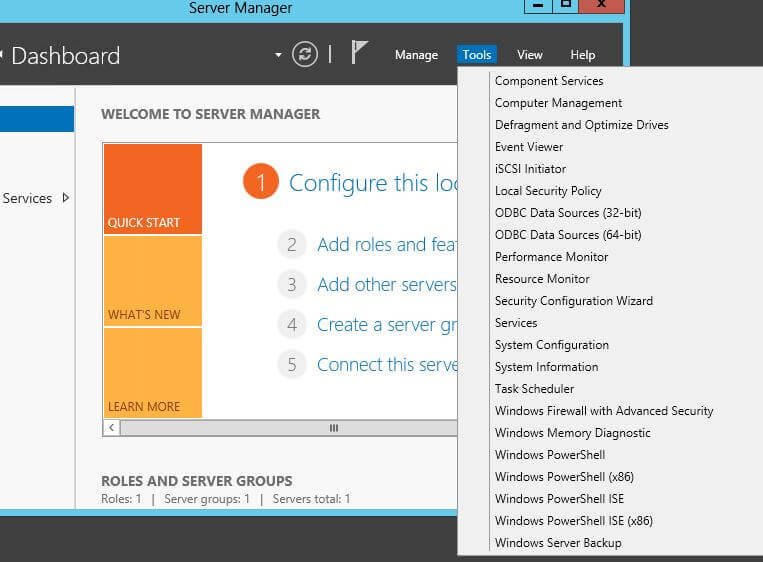
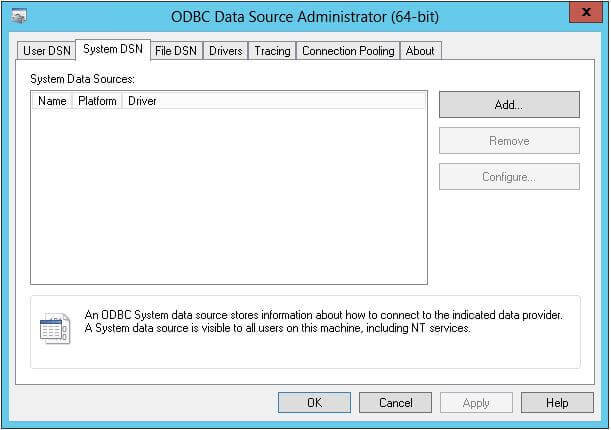
In the next few screenshots, we can see how an ODBC data source is created.
Step 1: First let’s choose the System DSN tab and then click Add…
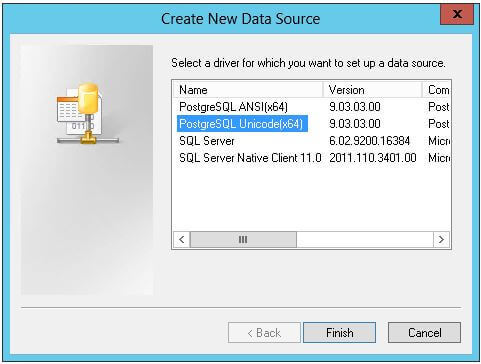
Step 2: Next we choose the PostgreSQL Unicode (x64) version and click Finish.
Step 3: In the dialog box that pops-up, provide a name and description for the data source, specify the database name, server’s IP address, port, username and password as connection parameters.
Once done, test the details by clicking on the Test button.
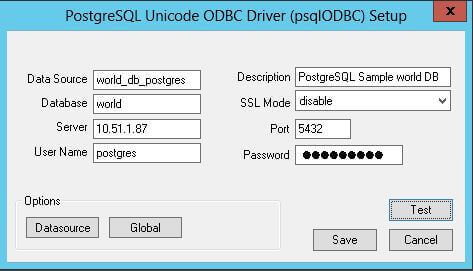
In my case I used port 5433 as 5432 was not working and after checking with infrastructure guy, I have been advised to use port 5433.
If the test is successful, click Save and then click OK in the ODBC Data Source Administrator.
- Troubleshooting: When creating a linked server in SSMS, most errors happen due to security issues with DCOM class MSDAINITIALIZE. We need to alter the DCOM Class MSDAINITIALIZE security settings
on the System/Machine where SQL Server is installed to make it work.
https://www.devart.com/odbc/postgresql/docs/troubleshooting_ssms.htm
Following are the steps:
- RDP to the Machine your SQL Server is installed.
- Open Component Services (Start>Run>DCOMCNFG)
- Expand Component Services>Computers>My Computer>DCOM Config
- From the list of DCOM components on the right side, select MSDAINITIALIZE and go to its properties:
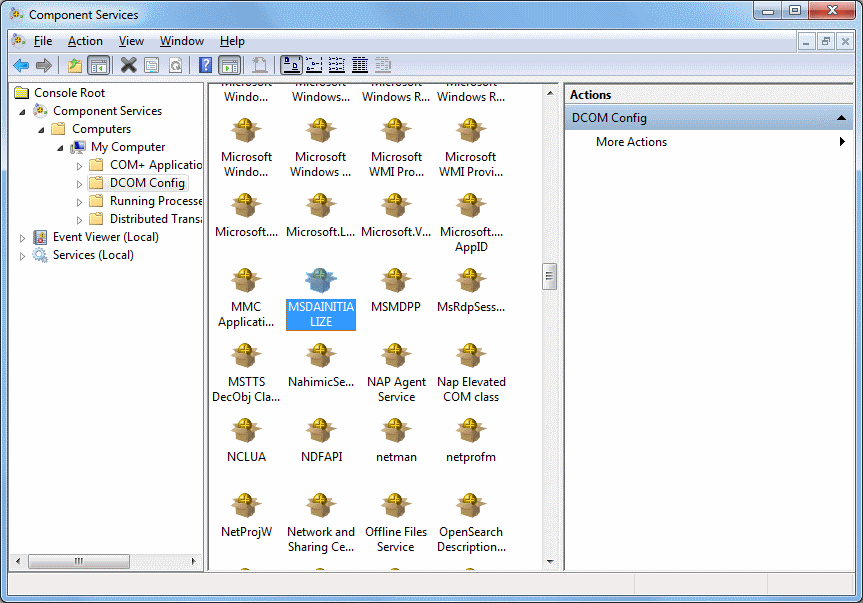
- Go to the Security Tab, choose ‘Customize’ and click on the ‘Edit’ Button:
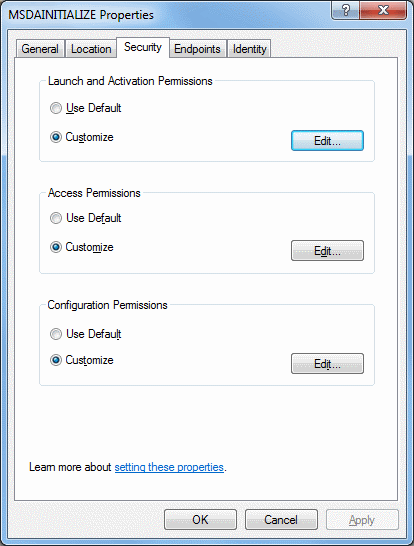
- Add the Domain User (you need to add all individual users who are going to use this link server) who is accessing the linked server and ‘Allow’ all the permissions available (Local Launch, Remote Launch, Local Activation, Remote Activation). If
you are connecting to SQL server using SQL account, you need to provide this permission to the account under which the SQL service is running. - Do this for all the 3 sections in the above screenshot.
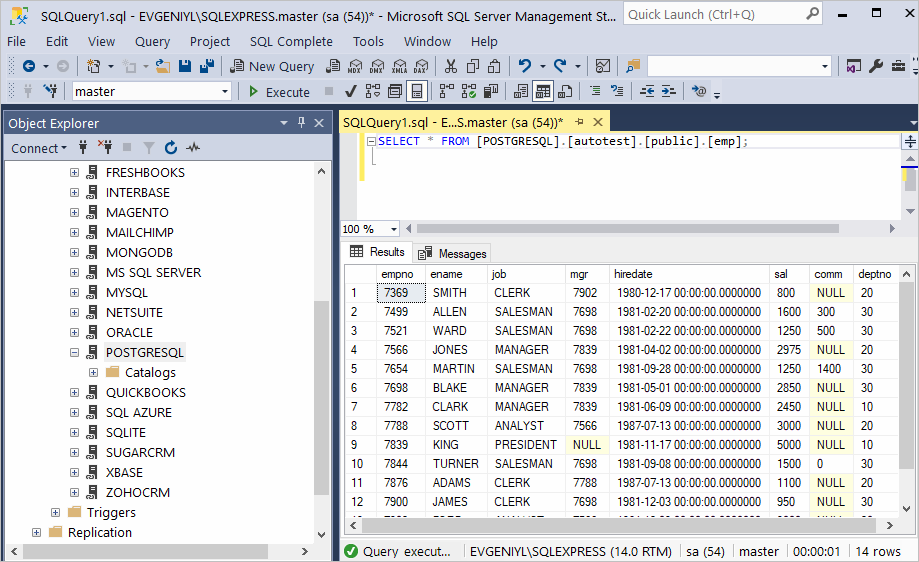
OR you can run query like this:
SELECT
*
FROM
OpenQuery([POSTGRESQL64S],
‘SELECT * From stg.pageviews’)
As a result, you can see the contents of the selected table retrieved directly from the PostgreSQL account you are connected to.
- Create a SSIS Connection: Create an ODBC connection in SSIS and select DNS from dropdown. Note: With SSIS only 32-bit DNS does work.
https://mask-me.net/datamaskingwiki/wiki/168/ssis-with-postgresql-connect-to-postgresql-with-ssis-components
OR
https://docs.microsoft.com/en-us/sql/integration-services/import-export-data/connect-to-a-postgresql-data-source-sql-server-import-and-export-wizard?view=sql-server-ver15
Thanks Shiven:) If Answer is Helpful, Please Vote
- Marked as answer by
Shivendoo Kumar Dubey
Tuesday, March 31, 2020 6:20 AM
Я пытаюсь преобразовать запрос внутреннего соединения SQL в запрос внутреннего соединения PostgreSQL. В этом запросе внутреннего соединения, какие таблицы используют, не все таблицы присутствуют в одной базе данных. мы разделили таблицы на две базы данных, то есть базу данных приложений и базу данных безопасности.
- пользователи и таблица разрешений присутствуют в базе данных безопасности
- сопоставление ролей пользователя и отдел присутствуют в базе данных приложения
Я пробовал, как показано ниже, но получаю следующую ошибку
Ошибка
ERROR:  cross-database references are not implemented: "Rockefeller_ApplicationDb.public.userrolemapping"
LINE 4:         INNER JOIN "Rockefeller_ApplicationDb".public.userro..
Сохраненная функция SQL
SELECT   Department.nDeptID
    FROM Users INNER JOIN Permission
         ON Users.nUserID = Permission.nUserID INNER JOIN UserRoleMapping
         ON Users.nUserID = UserRoleMapping.nUserID INNER JOIN Department
         ON Permission.nDeptInst = Department.nInstID
         AND  Department.nInstID = 60
    WHERE
         Users.nUserID = 3;
Сохраненная функция PostgreSQL
SELECT dep.ndept_id
        FROM "Rockefeller_SecurityDb".public.users as  u
        INNER JOIN  "Rockefeller_SecurityDb".public.permissions p ON u.nuser_id = p.nuser_id
        INNER JOIN "Rockefeller_ApplicationDb".public.userrolemapping as urm ON u.nuser_id = urm.nuser_id
        INNER JOIN "Rockefeller_ApplicationDb".public.department dep ON p.ndept_inst = dep.ninst_id
           AND  dep.ninst_id = 60
                        WHERE
                            u.nuser_id = 3;
4 ответа
Вы не можете соединять таблицы из разных баз данных.
Базы данных логически разделены в PostgreSQL.
Если вы хотите соединить таблицы, вы должны поместить их в разные схемы в одной базе данных, а не в разные базы данных.
Обратите внимание, что то, что называется «базой данных» в MySQL, называется «схемой» в стандартном SQL.
Если вам действительно нужно объединить таблицы из разных баз данных, вам нужно использовать стороннюю оболочку данных.
29
Laurenz Albe
8 Янв 2019 в 10:09
Для будущих поисков вы можете использовать dblink для подключения к другой базе данных.
Следуйте командам:
create extension dblink;

SELECT dblink_connect('otherdb','host=localhost port=5432 dbname=otherdb user=postgres password=???? options=-csearch_path=');

SELECT * FROM dblink('otherdb', 'select field1, field2 from public.tablex')
AS t(field1 text, field2 text);
6
rafaelnaskar
22 Июл 2020 в 14:58
У меня была такая же проблема с Postgres и JpaRepo, и я просто удалил dbname.public из запроса.
0
Krizsán Balazs
19 Авг 2021 в 19:43
Новичок в postrgreSQL, и у меня было такое же требование. FOREIGN DATA WRAPPER сделал свое дело.
IMPORT FOREIGN SCHEMA — импорт определений таблиц с внешнего сервера.
Но сначала мне нужно было:
-
включить расширение fdw
-
определить внешний сервер (который в данном случае был лока-хостом!)
-
создать сопоставление между локальным пользователем и внешним пользователем.
CREATE EXTENSION postgres_fdw;

CREATE SERVER localsrv
FOREIGN DATA WRAPPER postgres_fdw
OPTIONS (host 'localhost', dbname 'otherdb', port '5432');

CREATE USER MAPPING FOR <local_user>
SERVER localsrv
OPTIONS (user 'ohterdb_user', password 'ohterdb_user_password');

IMPORT FOREIGN SCHEMA public
FROM SERVER localsrv
INTO public;
После этого я мог использовать чужие таблицы, как если бы они были локальными. Затрат на производительность я не заметил.
0
Jeremy Caney
7 Дек 2021 в 03:33