
Настройка во время выполнения
Поведение этих функций зависит от установок в php.ini.
| Имя | По умолчанию | Место изменения | Список изменений |
|---|---|---|---|
| error_reporting | NULL | PHP_INI_ALL | |
| display_errors | «1» | PHP_INI_ALL | |
| display_startup_errors | «1» | PHP_INI_ALL |
До PHP 8.0.0 значение по умолчанию было "0".
|
| log_errors | «0» | PHP_INI_ALL | |
| log_errors_max_len | «1024» | PHP_INI_ALL | Не имеет смысла в версии PHP 8.0.0, удалено в версии PHP 8.1.0. |
| ignore_repeated_errors | «0» | PHP_INI_ALL | |
| ignore_repeated_source | «0» | PHP_INI_ALL | |
| report_memleaks | «1» | PHP_INI_ALL | |
| track_errors | «0» | PHP_INI_ALL | Объявлено устаревшим в PHP 7.2.0, удалено в PHP 8.0.0. |
| html_errors | «1» | PHP_INI_ALL | |
| xmlrpc_errors | «0» | PHP_INI_SYSTEM | |
| xmlrpc_error_number | «0» | PHP_INI_ALL | |
| docref_root | «» | PHP_INI_ALL | |
| docref_ext | «» | PHP_INI_ALL | |
| error_prepend_string | NULL | PHP_INI_ALL | |
| error_append_string | NULL | PHP_INI_ALL | |
| error_log | NULL | PHP_INI_ALL | |
| error_log_mode | 0o644 | PHP_INI_ALL | Доступно, начиная с PHP 8.2.0 |
| syslog.facility | «LOG_USER» | PHP_INI_SYSTEM | Доступно, начиная с PHP 7.3.0. |
| syslog.filter | «no-ctrl» | PHP_INI_ALL | Доступно, начиная с PHP 7.3.0. |
| syslog.ident | «php» | PHP_INI_SYSTEM | Доступно, начиная с PHP 7.3.0. |
Для подробного описания констант
PHP_INI_*, обратитесь к разделу Где могут быть установлены параметры конфигурации.
Краткое разъяснение конфигурационных
директив.
-
error_reporting
int -
Задаёт уровень протоколирования ошибки. Параметр может быть либо числом,
представляющим битовое поле, либо именованной константой.
Соответствующие уровни и константы приведены в разделе
Предопределённые константы,
а также в php.ini. Для установки настройки во время выполнения используйте функцию
error_reporting(). Смотрите также описание директивы
display_errors.Значение по умолчанию равно
E_ALL.До PHP 8.0.0 значение по умолчанию было:
E_ALL&
~E_NOTICE&
~E_STRICT&
~E_DEPRECATED
При этой настройке не отображаются уровни ошибокE_NOTICE,
E_STRICTиE_DEPRECATED.Замечание:
PHP-константы за пределами PHPИспользование PHP-констант за пределами PHP, например в файле
httpd.conf, не имеет смысла, так как в таких случаях требуются
целочисленные значения (int). Более того, с течением времени будут
добавляться новые уровни ошибок, а максимальное значение константы
E_ALLсоответственно будет расти. Поэтому в месте, где
предполагается указатьE_ALL, лучше задать большое целое число,
чтобы перекрыть все возможные битовые поля. Таким числом может быть, например,
2147483647(оно включит все возможные ошибки, не
толькоE_ALL). -
display_errors
string -
Эта настройка определяет, требуется ли выводить ошибки на экран вместе
с остальным выводом, либо ошибки должны быть скрыты от пользователя.Значение
"stderr"посылает ошибки в потокstderr
вместоstdout.Замечание:
Эта функциональность предназначена только для разработки и не должен использоваться в
готовых производственных системах (например, системах, имеющих доступ в интернет).Замечание:
Несмотря на то, что display_errors может быть установлена во время выполнения
(функцией ini_set()), это ни на что не повлияет, если в скрипте есть
фатальные ошибки. Это обусловлено тем, что ожидаемые действия программы во время
выполнения не получат управления (не будут выполняться). -
display_startup_errors
bool -
Даже если display_errors включена, ошибки, возникающие во время запуска PHP, не будут
отображаться. Настойчиво рекомендуем включать директиву display_startup_errors только
для отладки. -
log_errors
bool -
Отвечает за выбор журнала, в котором будут сохраняться сообщения об ошибках. Это
может быть журнал сервера или error_log.
Применимость этой настройки зависит от конкретного сервера.Замечание:
Настоятельно рекомендуем при работе на готовых работающих
web сайтах протоколировать ошибки там, где они отображаются. -
log_errors_max_len
int -
Задание максимальной длины log_errors в байтах. В
error_log добавляется информация
об источнике. Значение по умолчанию 1024. Установка значения в 0
позволяет снять ограничение на длину log_errors. Это ограничение
распространяется на записываемые в журнал ошибки, на отображаемые ошибки,
а также на $php_errormsg, но не на явно вызываемые функции,
такие как error_log().Если используется int, значение измеряется байтами. Вы также можете использовать сокращённую запись, которая описана в этом разделе FAQ.
-
ignore_repeated_errors
bool -
Не заносить в журнал повторяющиеся ошибки. Ошибка считается
повторяющейся, если происходит в том же файле и в той же строке, и если настройка
ignore_repeated_source выключена. -
ignore_repeated_source
bool -
Игнорировать источник ошибок при пропуске повторяющихся сообщений. Когда
эта настройка включена, повторяющиеся сообщения об ошибках не будут
заноситься в журнал вне зависимости от того, в каких файлах и строках они происходят. -
report_memleaks
bool -
Если настройка включена (по умолчанию), будет формироваться отчёт об утечках памяти,
зафиксированных менеджером памяти Zend. На POSIX платформах этот отчёт будет
направляться в поток stderr. На Windows платформах он будет посылаться в отладчик
функцией OutputDebugString(), просмотреть отчёт в этом случае можно с помощью утилит,
вроде » DbgView. Эта настройка имеет
смысл в сборках, предназначенных для отладки. При этом
E_WARNINGдолжна быть включена в список error_reporting. -
track_errors
bool -
Если включена, последняя произошедшая ошибка будет первой в переменной
$php_errormsg. -
html_errors
bool -
Если разрешена, сообщения об ошибках будут включать теги HTML. Формат для
HTML-ошибок производит нажимаемые ссылки, ведущие на описание ошибки, либо
функии, в которой она произошла. За такие ссылки ответственны
docref_root и
docref_ext.Если запрещена, то ошибки будут выдаваться простым текстом, без форматирования.
-
xmlrpc_errors
bool -
Если включена, то нормальное оповещение об ошибках отключается и, вместо него,
ошибки выводятся в формате XML-RPC. -
xmlrpc_error_number
int -
Используется в качестве значения XML-RPC элемента faultCode.
-
docref_root
string -
Новый формат ошибок содержит ссылку на страницу с описанием ошибки или
функции, вызвавшей эту ошибку. Можно разместить копию
описаний ошибок и функций локально и задать ini директиве значение
URL этой копии. Если, например, локальная копия описаний доступна по
адресу"/manual/", достаточно прописать
docref_root=/manual/. Дополнительно, необходимо
задать значение директиве docref_ext, отвечающей за соответствие
расширений файлов файлам описаний вашей локальной копии,
docref_ext=.html. Также возможно использование
внешних ссылок. Например,
docref_root=http://manual/en/или
docref_root="http://landonize.it/?how=url&theme=classic&filter=Landon

       &url=http%3A%2F%2Fwww.php.net%2F"
В большинстве случаев вам потребуется, чтобы значение docref_root оканчивалось
слешем"/". Тем не менее, бывают случаи, когда
это не требуется (смотрите выше, второй пример).Замечание:
Эта функциональность предназначена только для разработки, так как он облегчает
поиск описаний функций и ошибок. Не используйте его в готовых
производственных системах (например, имеющих доступ в интернет). -
docref_ext
string -
Смотрите docref_root.
Замечание:
Значение docref_ext должно начинаться с точки
".". -
error_prepend_string
string -
Строка, которая будет выводиться непосредственно перед сообщением об ошибке.
Используется только тогда, когда на экране отображается сообщение об ошибке.
Основная цель — добавить дополнительную HTML-разметку к сообщению об ошибке. -
error_append_string
string -
Строка, которая будет выводиться после сообщения об ошибке.
Используется только тогда, когда на экране отображается сообщение об ошибке.
Основная цель — добавить дополнительную HTML-разметку к сообщению об ошибке. -
error_log
string -
Имя файла, в который будут добавляться сообщения об ошибках. Файл
должен быть открыт для записи пользователем веб-сервера. Если
используется специальное значениеsyslog, то
сообщения будут посылаться в системный журнал. На Unix-системах это
syslog(3), на Windows NT — журнал событий. Смотрите также: syslog().
Если директива не задана, ошибки будут направляться в SAPI журналы.
Например, это могут быть журналы ошибок Apache или поток
stderrкомандной строки CLI.
Смотрите также функцию error_log(). -
error_log_mode
int -
Режим файла, описанного в error_log.
-
syslog.facility
string -
Указывает, какой тип программы регистрирует сообщение.
Действует только в том случае, если опция error_log установлена в «syslog». -
syslog.filter
string -
Указывает тип фильтра для фильтрации регистрируемых сообщений.
Разрешённые символы передаются без изменений; все остальные записываются в шестнадцатеричном представлении с префиксомx.-
all– строка будет разделена
на символы новой строки и все символы будут переданы без изменений
-
ascii– строка будет разделена
на символы новой строки, а любые непечатаемые 7-битные символы ASCII будут экранированы
-
no-ctrl– строка будет разделена
на символы новой строки, а любые непечатаемые символы будут экранированы
-
raw– все символы передаются в системный
журнал без изменений, без разделения на новые строки (идентично PHP до 7.3)
Параметр влияет на ведение журнала через error_log установленного в «syslog» и вызовы syslog().
Замечание:
Тип фильтра
rawдоступен начиная с PHP 7.3.8 и PHP 7.4.0.
Директива не поддерживается в Windows.
-
-
syslog.ident
string -
Определяет строку идентификатора, которая добавляется к каждому сообщению.
Действует только в том случае, если опция error_log установлена в «syslog».
cjakeman at bcs dot org 
14 years ago
Using


<?php ini_set('display_errors', 1); ?>


at the top of your script will not catch any parse errors. A missing ")" or ";" will still lead to a blank page.
This is because the entire script is parsed before any of it is executed. If you are unable to change php.ini and set
display_errors On
then there is a possible solution suggested under error_reporting:
<?php
error_reporting(E_ALL);
ini_set("display_errors", 1);
include("file_with_errors.php");
?>
[Modified by moderator]
You should also consider setting error_reporting = -1 in your php.ini and display_errors = On if you are in development mode to see all fatal/parse errors or set error_log to your desired file to log errors instead of display_errors in production (this requires log_errors to be turned on).
ohcc at 163 dot com 
6 years ago
If you set the error_log directive to a relative path, it is a path relative to the document root rather than php's containing folder.
iio7 at protonmail dot com 
1 year ago
It's important to note that when display_errors is "on", PHP will send a HTTP 200 OK status code even when there is an error. This is not a mistake or a wrong behavior, but is because you're asking PHP to output normal HTML, i.e. the error message, to the browser.
When display_errors is set to "off", PHP will send a HTTP 500 Internal Server Error, and let the web server handle it from there. If the web server is setup to intercept FastCGI errors (in case of NGINX), it will display the 500 error page it has setup. If the web server cannot intercept FastCGI errors, or it isn't setup to do it, an empty screen will be displayed in the browser (the famous white screen of death).
If you need a custom error page but cannot intercept PHP errors on the web server you're using, you can use PHPs custom error and exception handling mechanism. If you combine that with output buffering you can prevent any output to reach the client before the error/exception occurs. Just remember that parse errors are compile time errors that cannot be handled by a custom handler, use "php -l foo.php" from the terminal to check for parse errors before putting your files on production.
Roger 
3 years ago
When `error_log` is set to a file path, log messages will automatically be prefixed with timestamp [DD-MMM-YYYY HH:MM:SS UTC]. This appears to be hard-coded, with no formatting options.
php dot net at sp-in dot dk 
8 years ago
There does not appear to be a way to set a tag / ident / program for log entries in the ini file when using error_log=syslog.  When I test locally, "apache2" is used.
However, calling openlog() with an ident parameter early in your script (or using an auto_prepend_file) will make PHP use that value for all subsequent log entries. closelog() will restore the original tag.
This can be done for setting facility as well, although the original value does not seem to be restored by closelog().
jaymore at gmail dot com 
6 years ago
Document says
So in place of E_ALL consider using a larger value to cover all bit fields from now and well into the future, a numeric value like 2147483647 (includes all errors, not just E_ALL).
But it is better to set "-1" as the E_ALL value.
For example, in httpd.conf or .htaccess, use
php_value error_reporting -1
to report all kind of error without be worried by the PHP version.
Включение вывода всех ошибок и предупреждений в файле php.ini
error_reporting = E_ALL
display_errors = On
display_startup_errors = On
Включение вывода всех ошибок и предупреждений в коде PHP-скриптов
Включить вывод уведомлений и предупреждений можно, добавив в начало нужного .php файла следующие строки:
ini_set('error_reporting', E_ALL);
ini_set('display_errors', 1);
ini_set('display_startup_errors', 1);
Включение вывода всех ошибок и предупреждений в файле .htaccess
php_value display_errors 1
php_value display_startup_errors 1
php_value error_reporting E_ALL
(PHP 4, PHP 5, PHP 7, PHP 
error_reporting — Sets which PHP errors are reported
Description
error_reporting(?int $error_level = null): int
Parameters
-
error_level -
The new error_reporting
level. It takes on either a bitmask, or named constants. Using named
constants is strongly encouraged to ensure compatibility for future
versions. As error levels are added, the range of integers increases,
so older integer-based error levels will not always behave as expected.The available error level constants and the actual
meanings of these error levels are described in the
predefined constants.
Return Values
Returns the old error_reporting
level or the current level if no error_level parameter is
given.
Changelog
| Version | Description |
|---|---|
| 8.0.0 |
error_level is nullable now.
|
Examples
Example #1 error_reporting() examples
<?php// Turn off all error reporting
error_reporting(0);// Report simple running errors
error_reporting(E_ERROR | E_WARNING | E_PARSE);// Reporting E_NOTICE can be good too (to report uninitialized
// variables or catch variable name misspellings ...)
error_reporting(E_ERROR | E_WARNING | E_PARSE | E_NOTICE);// Report all errors except E_NOTICE
error_reporting(E_ALL & ~E_NOTICE);// Report all PHP errors
error_reporting(E_ALL);// Report all PHP errors
error_reporting(-1);// Same as error_reporting(E_ALL);
ini_set('error_reporting', E_ALL);?>
Notes
Tip
Passing in the value -1 will show every possible error,
even when new levels and constants are added in future PHP versions. The
behavior is equivalent to passing E_ALL constant.
See Also
- The display_errors directive
- The html_errors directive
- The xmlrpc_errors directive
- ini_set() — Sets the value of a configuration option
info at hephoz dot de 
14 years ago
If you just see a blank page instead of an error reporting and you have no server access so you can't edit php configuration files like php.ini try this:
- create a new file in which you include the faulty script:
<?php
error_reporting(E_ALL);
ini_set("display_errors", 1);
include("file_with_errors.php");
?>
- execute this file instead of the faulty script file
now errors of your faulty script should be reported.
this works fine with me. hope it solves your problem as well!
jcastromail at yahoo dot es 
2 years ago
Under PHP 8.0, error_reporting() does not return 0 when then the code uses a @ character.
For example
<?php
$a
=$array[20]; // error_reporting() returns 0 in php <8 and 4437 in PHP>=8?>
dave at davidhbrown dot us 
17 years ago
The example of E_ALL ^ E_NOTICE is a 'bit' confusing for those of us not wholly conversant with bitwise operators.
If you wish to remove notices from the current level, whatever that unknown level might be, use & ~ instead:
<?php
//....
$errorlevel=error_reporting();
error_reporting($errorlevel & ~E_NOTICE);
//...code that generates notices
error_reporting($errorlevel);
//...
?>
^ is the xor (bit flipping) operator and would actually turn notices *on* if they were previously off (in the error level on its left). It works in the example because E_ALL is guaranteed to have the bit for E_NOTICE set, so when ^ flips that bit, it is in fact turned off. & ~ (and not) will always turn off the bits specified by the right-hand parameter, whether or not they were on or off.
Fernando Piancastelli 
18 years ago
The error_reporting() function won't be effective if your display_errors directive in php.ini is set to "Off", regardless of level reporting you set. I had to set
display_errors = On
error_reporting = ~E_ALL
to keep no error reporting as default, but be able to change error reporting level in my scripts.
I'm using PHP 4.3.9 and Apache 2.0.
ecervetti at orupaca dot fr 
14 years ago
It could save two minutes to someone:
E_ALL & ~E_NOTICE  integer value is 6135
huhiko334 at yandex dot ru 
4 years ago
If you get a weird mysql warnings like "Warning: mysql_query() : Your query requires a full tablescan...", don't look for error_reporting settings - it's set in php.ini.
You can turn it off with
ini_set("mysql.trace_mode","Off");
in your script
http://tinymy.link/mctct
kevinson112 at yahoo dot com 
5 years ago
I had the problem that if there was an error, php would just give me a blank page. Any error at all forced a blank page instead of any output whatsoever, even though I made sure that I had error_reporting set to E_ALL, display_errors turned on, etc etc. But simply running the file in a different directory allowed it to show errors!
Turns out that the error_log file in the one directory was full (2.0 Gb). I erased the file and now errors are displayed normally. It might also help to turn error logging off.
https://techysupport.co/norton-tech-support/
luisdev 
5 years ago
This article refers to these two reporting levels:
// Report all PHP errors (see changelog)
error_reporting(E_ALL);
// Report all PHP errors
error_reporting(-1);
What is the difference between those two levels?
Please update this article with a clear explanation of the difference and the possible use cases.
qeremy ! gmail 
8 years ago
If you want to see all errors in your local environment, you can set your project URL like "foo.com.local" locally and put that in bootstrap file.
<?php
if (substr($_SERVER['SERVER_NAME'], -6) == '.local') {
ini_set('display_errors', 1);
ini_set('error_reporting', E_ALL);
// or error_reporting(E_ALL);
}
?>
adam at adamhahn dot com 
6 years ago
To expand upon the note by chris at ocproducts dot com. If you prepend @ to error_reporting(), the function will always return 0.
<?php
error_reporting(E_ALL);
var_dump(
error_reporting(), // value of E_ALL,
@error_reporting() // value is 0
);
?>
keithm at aoeex dot com 
13 years ago
Some E_STRICT errors seem to be thrown during the page's compilation process. This means they cannot be disabled by dynamically altering the error level at run time within that page.
The work-around for this was to rename the file and replace the original with a error_reporting() call and then a require() call.
Ex, rename index.php to index.inc.php, then re-create index.php as:
<?php
error_reporting(E_ALL & ~(E_STRICT|E_NOTICE));
require('index.inc.php');
?>
That allows you to alter the error reporting prior to the file being compiled.
I discovered this recently when I was given code from another development firm that triggered several E_STRICT errors and I wanted to disable E_STRICT on a per-page basis.
chris at ocproducts dot com 
6 years ago
The error_reporting() function will return 0 if error suppression is currently active somewhere in the call tree (via the @ operator).
Rash 
8 years ago
If you are using the PHP development server, run from the command line via `php -S servername:port`, every single error/notice/warning will be reported in the command line itself, with file name, and line number, and stack trace.
So if you want to keep a log of all the errors even after page reloads (for help in debugging, maybe), running the PHP development server can be useful.
vdephily at bluemetrix dot com 
18 years ago
Note that E_NOTICE will warn you about uninitialized variables, but assigning a key/value pair counts as initialization, and will not trigger any error :
<?php
error_reporting(E_ALL);$foo = $bar; //notice : $bar uninitialized$bar['foo'] = 'hello'; // no notice, although $bar itself has never been initialized (with "$bar = array()" for example)$bar = array('foobar' => 'barfoo');
$foo = $bar['foobar'] // ok$foo = $bar['nope'] // notice : no such index
?>
&IT 
3 years ago
error_reporting(E_ALL);
if (!ini_get('display_errors')) {
    ini_set('display_errors', '1');
}
lhenry at lhenry dot com 
3 years ago
In php7, what was generally a notice or a deprecated is now a warning : the same level of a mysql error … unacceptable for me.
I do have dozen of old projects and I surely d'ont want to define every variable which I eventually wrote 20y ago.
So two option: let php7 degrade my expensive SSDs writing Gb/hours or implement smthing like server level monitoring ( with auto_[pre-ap]pend_file in php.ini) and turn off E_WARNING
Custom overriding the level of php errors should be super handy and flexible …
rojaro at gmail dot com 
12 years ago
To enable error reporting for *ALL* error messages including every error level (including E_STRICT, E_NOTICE etc.), simply use:
<?php error_reporting(-1); ?>
j dot schriver at vindiou dot com 
22 years ago
error_reporting() has no effect if you have defined your own error handler with set_error_handler()
[Editor's Note: This is not quite accurate.
E_ERROR, E_PARSE, E_CORE_ERROR, E_CORE_WARNING, E_COMPILE_ERROR and E_COMPILE_WARNING error levels will be handled as per the error_reporting settings.
All other levels of errors will be passed to the custom error handler defined by set_error_handler().
Zeev Suraski suggests that a simple way to use the defined levels of error reporting with your custom error handlers is to add the following line to the top of your error handling function:
if (!($type & error_reporting())) return;
-zak@php.net]
kc8yds at gmail dot com 
14 years ago
this is to show all errors for code that may be run on different versions
for php 5 it shows E_ALL^E_STRICT and for other versions just E_ALL
if anyone sees any problems with it please correct this post
<?php
ini_set('error_reporting', version_compare(PHP_VERSION,5,'>=') && version_compare(PHP_VERSION,6,'<') ?E_ALL^E_STRICT:E_ALL);
?>
fredrik at demomusic dot nu 
17 years ago
Remember that the error_reporting value is an integer, not a string ie "E_ALL & ~E_NOTICE".
This is very useful to remember when setting error_reporting levels in httpd.conf:
Use the table above or:
<?php
ini_set("error_reporting", E_YOUR_ERROR_LEVEL);
echo ini_get("error_reporting");
?>
To get the appropriate integer for your error-level. Then use:
php_admin_value error_reporting YOUR_INT
in httpd.conf
I want to share this rather straightforward tip as it is rather annoying for new php users trying to understand why things are not working when the error-level is set to (int) "E_ALL" = 0...
Maybe the PHP-developers should make ie error_reporting("E_ALL"); output a E_NOTICE informative message about the mistake?
Alex 
16 years ago
error_reporting() may give unexpected results if the @ error suppression directive is used.
<?php
@include 'config.php';
include 'foo.bar'; // non-existent file
?>
config.php
<?php
error_reporting(0);
?>
will throw an error level E_WARNING in relation to the non-existent file (depending of course on your configuration settings). If the suppressor is removed, this works as expected.
Alternatively using ini_set('display_errors', 0) in config.php will achieve the same result. This is contrary to the note above which says that the two instructions are equivalent.
teynon1 at gmail dot com 
11 years ago
It might be a good idea to include E_COMPILE_ERROR in error_reporting.
If you have a customer error handler that does not output warnings, you may get a white screen of death if a "require" fails.
Example:
<?php
error_reporting(E_ERROR | E_WARNING | E_PARSE);
function
myErrorHandler($errno, $errstr, $errfile, $errline) {
// Do something other than output message.
return true;
}$old_error_handler = set_error_handler("myErrorHandler");
require
"this file does not exist";
?>
To prevent this, simply include E_COMPILE_ERROR in the error_reporting.
<?php
error_reporting(E_ERROR | E_WARNING | E_PARSE | E_COMPILE_ERROR);
?>
Daz Williams (The Northeast) 
14 years ago
Only display php errors to the developer...
<?php
if($_SERVER['REMOTE_ADDR']=="00.00.00.00")
{
ini_set('display_errors','On');
}
else
{
ini_set('display_errors','Off');
}
?>
Just replace 00.00.00.00 with your ip address.
DarkGool 
17 years ago
In phpinfo() error reporting level display like a bit (such as 4095)
Maybe it is a simply method to understand what a level set on your host
if you are not have access to php.ini file
<?php
$bit = ini_get('error_reporting');
while ($bit > 0) {
for($i = 0, $n = 0; $i <= $bit; $i = 1 * pow(2, $n), $n++) {
$end = $i;
}
$res[] = $end;
$bit = $bit - $end;
}
?>
In $res you will have all constants of error reporting
$res[]=int(16) // E_CORE_ERROR
$res[]=int(8) // E_NOTICE
...
misplacedme at gmail dot com 
14 years ago
I always code with E_ALL set.
After a couple of pages of
<?php
$username = (isset($_POST['username']) && !empty($_POST['username']))....
?>

I made this function to make things a little bit quicker.  Unset values passed by reference won't trigger a notice.
<?php
function test_ref(&$var,$test_function='',$negate=false) {
$stat = true;
if(!isset($var)) $stat = false;
if (!empty($test_function) && function_exists($test_function)){
$stat = $test_function($var);
$stat = ($negate) ? $stat^1 : $stat;
}
elseif($test_function == 'empty') {
$stat = empty($var);
$stat = ($negate) ? $stat^1 : $stat;
}
elseif (!function_exists($test_function)) {
$stat = false;
trigger_error("$test_function() is not a valid function");
}
$stat = ($stat) ? true : false;
return $stat;
}
$a = '';
$b = '15';test_ref($a,'empty',true); //False
test_ref($a,'is_int'); //False
test_ref($a,'is_numeric'); //False
test_ref($b,'empty',true); //true
test_ref($b,'is_int'); //False
test_ref($b,'is_numeric'); //false
test_ref($unset,'is_numeric'); //false
test_ref($b,'is_number'); //returns false, with an error.
?>
forcemdt 
9 years ago
Php >5.4
Creating a Custom Error Handler
set_error_handler("customError",E_ALL);
function customError($errno, $errstr)
{
echo "<b>Error:</b> [$errno] $errstr<br>";
echo "Ending Script";
die();
}
Хостинг-провайдеры нередко отключают или блокируют вывод всех ошибок и предупреждений. Такие ограничения вводятся не просто так. Дело в том, что на рабочих серверах крайне не рекомендуется держать ошибки в открытом доступе. Информация о неисправностях может стать «наживкой» для злоумышленников.
При этом в процессе разработки сайтов и скриптов, очень важно отслеживать возникающие предупреждения. Знать о сбоях и неисправностях также важно и системным администраторам — это позволяет предотвратить проблемы на сайте или сервере.
Самый оптимальный вариант — не просто скрыть показ ошибок, но и настроить запись о них в логах. Это позволит отслеживать предупреждения и не подвергать сервер угрозе.
В статье мы расскажем, как включить и отключить через .htaccess вывод ошибок php, а также двумя другими способами — через скрипт PHP и через файл php.ini.
Обратите внимание: в некоторых случаях изменение настроек вывода возможно только через обращение в техническую поддержку хостинга.
Через .htaccess
Перейдите в каталог сайта и откройте файл .htaccess.
Вариант 1. Чтобы включить вывод, добавьте следующие строки:
php_flag display_startup_errors on
php_flag display_errors on
php_flag html_errors on
Чтобы отключить ошибки PHP htaccess, введите команду:
php_flag display_startup_errors off
php_flag display_errors off
php_flag html_errors off
Также выключить .htaccess display errors можно командой:
php_flag display_startup_errors off
php_flag display_errors off
php_flag html_errors off
php_value docref_root 0
php_value docref_ext 0
Через логи PHP
Если вам нужно проверить или выключить ошибки только в определенных файлах, это можно сделать с помощью вызова PHP-функций.
Вариант 1. Чтобы включить вывод, используйте команду error_reporting. В зависимости от типа ошибок, которые вы хотите увидеть, подставьте нужное значение. Например, команда для вывода всех ошибок будет выглядеть так:
А для всех типов, исключая тип Notice, так:
error_reporting(E_ALL & ~E_NOTICE)Чтобы отключить вывод, введите команду:
Чтобы отключить логирование повторяющихся ошибок, введите:
# disable repeated error logging
php_flag ignore_repeated_errors on
php_flag ignore_repeated_source on
Вариант 2. Чтобы проверить конкретный кусок кода, подойдет команда ниже. В зависимости от типа ошибок, которые вы хотите увидеть, в скобках подставьте нужное значение. Например, команда для вывода всех ошибок будет выглядеть так:
ini_set('display_errors', 'On')
error_reporting(E_ALL)
После этого в консоли введите:
ini_set('display_errors', 'Off')Вариант 3. Ещё один из вариантов подключения через скрипт:
php_flag display_startup_errors on
php_flag display_errors on
Для отключения укажите:
php_flag display_startup_errors off
php_flag display_errors off
Вариант 4. Чтобы настроить вывод с логированием через конфигурацию веб-сервера, введите:
- для Apache —
ErrorLog «/var/log/apache2/my-website-error.log», - для Nginx —
error_log /var/log/nginx/my-website-error.log.
Подробнее о других аргументах читайте в документации на официальном сайте php.net.
Через файл php.ini
Настроить отслеживание также можно через файл php.ini. Этот вариант подойдет, когда отображение или скрытие ошибок нужно настроить для всего сайта или кода. Обратите внимание: возможность настройки через файл php.ini есть не у всех, поскольку некоторые хостинг-провайдеры частично или полностью закрывают доступ к файлу.
Вариант 1. Если у вас есть доступ, включить вывод можно командой:
После этого нужно перезагрузить сервер:
sudo apachectl -k gracefulВариант 2. Чтобы включить вывод, используйте команду error_reporting. В зависимости от типа ошибок, которые вы хотите увидеть, после знака = подставьте нужное значение. Например, команда для вывода всех ошибок будет выглядеть так:
error_reporting = E_ALL

display_errors On
После ввода перезагрузите сервер:
sudo apachectl -k gracefulЧтобы скрыть отображение, во второй строке команды укажите Оff вместо On:
Теперь вы знаете, как настроить не только через PHP и php.ini, но и через htaccess отображение ошибок.
- Способы включения и отключения вывода ошибок PHP
- Через .htaccess
- Через логи PHP
- Через файл php.ini
Как правило, хостинг-провайдеры отключают или блокируют показ ошибок PHP. Подобные ограничения вводятся потому что информацией об ошибках могут воспользоваться злоумышленники. Поэтому на рабочих серверах нежелательно включать вывод ошибок на экран.
При разработке сайтов и скриптов крайне важно отслеживать возникающие проблемы. Также эта информация нужна и системным администраторам, чтобы своевременно предотвращать сбои в работе сайта и сервера.
Лучшим вариантом будет отключить вывод ошибок на экран и настроить отображение ошибок в логах. Так вы сможете отслеживать возникающие проблемы, не подвергая сервер угрозе.
В статье мы расскажем, как отключить или включить отображение ошибок PHP при помощи .htaccess, через скрипт PHP и с помощью файла php ini.
Обратите внимание: в некоторых случаях изменить настройки вывода можно только через обращение в техническую поддержку.
Способы включения и отключения вывода ошибок PHP
Через .htaccess
Перейдите в корневую папку сайта. Путь к корневой папке можно посмотреть в разделе «Хостинг» > «Сайты» в колонке «Папка»:
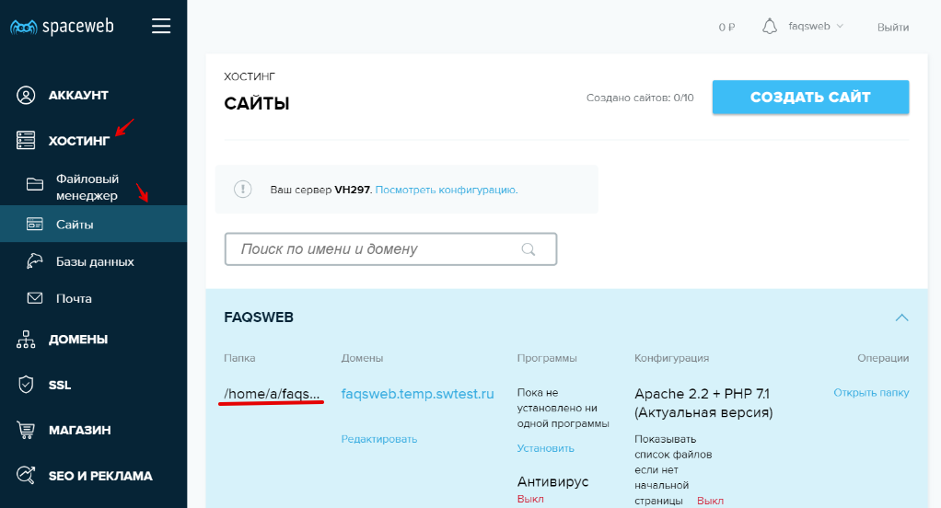
Открыть папку можно в разделе «Хостинг» > «Файловый менеджер». Другой способ перейти к папке: в разделе «Хостинг» > «Сайты» в колонке «Операции» нажмите Открыть папку.
В корневой папке откройте файл .htaccess. Если файла не существует, создайте его.
Чтобы вывести ошибки, добавьте в файл следующие строки:
php_flag display_startup_errors on
php_flag display_errors on
php_flag html_errors on
Чтобы отключить ошибки PHP, добавьте в файл строки:
php_flag display_startup_errors off
php_flag display_errors off
php_flag html_errors off
Так же отключить отображение PHP error можно используя строки:
php_flag display_startup_errors off
php_flag display_errors off
php_flag html_errors off
php_value docref_root 0
php_value docref_ext 0
Через логи PHP
Проверить или скрыть ошибки в определенных файлах можно при помощи вызова PHP-функций.
Способ 1. Для вывода ошибок используйте функцию error_reporting. Пропишите необходимое вам значение в зависимости от того, какие ошибки вы хотите увидеть.
- Функция для вывода всех ошибок:
error_reporting(E_ALL)
- Функция для вывода всех ошибок, за исключением типа Notice:
error_reporting(E_ALL & ~E_NOTICE)
- Отключение вывода:
error_reporting(0)
- Отключение логирования повторяющихся ошибок:
# disable repeated error logging
php_flag ignore_repeated_errors on
php_flag ignore_repeated_source on
Способ 2. Этот метод подойдет для проверки конкретной части кода. Пропишите необходимое вам значение в зависимости от того, какие типы ошибок вы хотите увидеть.
Команда для вывода всех ошибок выглядит следующим образом:
ini_set(‘display_errors’, ‘On’)
error_reporting(E_ALL)
После этого добавьте:
ini_set(‘display_errors’, ‘Off’)
Способ 3. Другой вариант включения вывода ошибок через скрипт:
php_flag display_startup_errors on
php_flag display_errors on
Для отключения добавьте строки:
php_flag display_startup_errors off
php_flag display_errors off
Способ 4. Для подключения вывода с логированием через конфигурацию веб-сервера введите:
- для Apache:
ErrorLog «/var/log/apache2/my-website-error.log»,
- для Nginx:
error_log /var/log/nginx/my-website-error.log.
Подробнее о других аргументах вы можете прочитать в документации PHP на официальном сайте php.net.
Через файл php.ini
Включить отслеживание ошибок можно с помощью файла php.ini. Такой способ подойдет тем, кто хочет отобразить или скрыть ошибки для всего сайта или кода.
 Важно! Настройка отслеживания ошибок через файл php.ini есть не у всех, так как некоторые хостинг-провайдеры частично или полностью закрывают доступ к файлу.
Способ 1. Показать все ошибки можно добавив в php.ini строку:
display_errors = on
После этого перезагрузите сервер:
sudo apachectl -k graceful
Способ 2. Включить вывод ошибок можно при помощи error_reporting. После знака «=» пропишите необходимое вам значение в зависимости от того, какие типы ошибок вы хотите увидеть.
Чтобы вывести все ошибки, добавьте следующие строки:
error_reporting = E_ALL
display_errors On
После перезагрузите веб-сервер:
sudo apachectl -k graceful
Чтобы скрыть отображение ошибок, добавьте строки:
error_reporting = E_ALL
display_errors Off
Теперь вы знаете, как можно включить и отключить вывод ошибок PHP.