
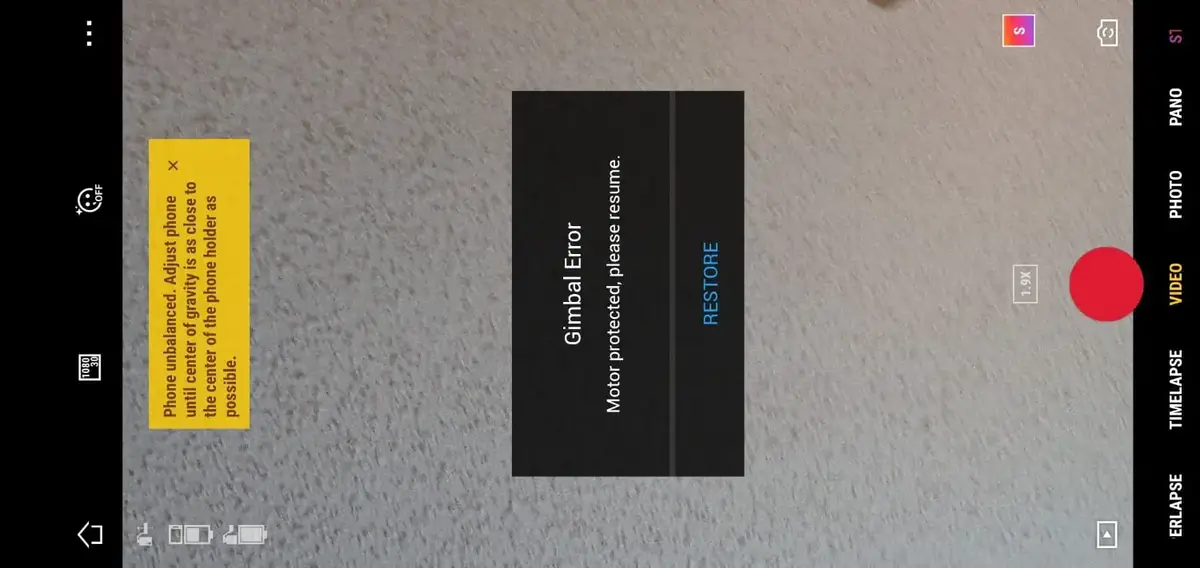
People are having this issue with their DJI Osmo mobile 3 where they get this error “gimbal error, motor protected tap to resume”
I also had this problem about a couple of weeks ago, then I went on google and no one understood what the issue was.
Then I contacted DJI but they didn’t help me solve the problem, anyways after reading a bunch of forums, hours of frustration, reading the manual it came it, I finally solved mine so I thought I could do the same for others
And this error is not something you can ignore or say I will come back to later, one because it is very frustrating plus your Osmo eventually becomes useless as the error becomes permanent.
So what is causing this and how do you fix it?
“Gimbal error, motor protected tap to resume” on DJI Osmo mobile 3 can be caused by both software and hardware issues, to fix it you should factory reset the gimbal, and removing the SD card, if that doesnt seem to work you might have to send the osmo to DJI for service.
However there are different levels of severity with this issue, it can be as easy as resetting the gimbal or cleaning it but can go up sending the Osmo to DJI for a repair which will end up costing you a lot of money
What you should understand is there is no definite way to solve this problem so I will cover all the troubleshooting methods DJI recommend and the ones I have used and I am sure one of them will fix the problem
1. make sure your phone is properly mounted on the Osmo
first, you have to make sure whether your phone is properly mounted and balanced to the Osmo Mobile 3 before powering it on.
If you have any accessories on your phone, removing them during usage with the Osmo Mobile 3 would be ideal.
2. Reset the gimbal
What helped me and fix this problem was resetting the gimbal, and plenty of people have emailed me saying it also helped them fix the gimbal error
So to reset the gimbal
- Turn on your osmo mobile 3
- Remove your mobile
- Hold the zoom in/out slider upward and press the power button at the same time for 3 seconds
- Then resle both simuntlinly
- The gimbal will reset
3. Gently clean the gimbal
one another possible cause can be dust in the gimbal.
Gimbal uses very little force to move around so few dust particles in the wrong opening can stop its movement easily, it is possible for small pieces of debris to get lodged in the gimbal, which decreases the agility and give the motors a hard time functioning.
so you can fix this problem by moving it with your finger slowly and lightly in every direction, while doing so you can blow air on it by your mouth to help tiny particles to get unclogged.
If there is something that won’t come out you can buy an air duster and Shoot the air into the rotating parts of the gimbal.
Repeat this process until the gimbal is able to do its start-up routine freely.
Make sure it’s working by moving the all the 3-axis of the osmo’s gimbal around, and check if the gimbal is able to compensate its movement on every axis which means if the gimbal will move up-down, left-right, counterclockwise, and clockwise), if it does those movements freely you are good to go.
However never use oils or grease, it will make it worse.
4. Perform a quick gimbal calibration via the DJI Mimo app
Tap the Settings button, then tap the calibration button in the upper right corner. Tap OK and it will count down for 3 seconds, then the gimbal will automatically calibrate. When gimbal calibrated is shown on the screen, tap Ok, then the Osmo pocket can be used to capture photos or videos normally.
5. Upgrade/refresh the firmware
There are three official ways you can use to update DJI Osmo’s firmware: using DJI Mimo, manually using an SD card, and with DJI assistant.
To upgrade in the firmware in DJI Mimo
To update your Osmo manually using SD card-
- First, download the latest firmware from www.dji.com Osmo product page
- Take out the micro SD card from the OSMO and put it in your computer
- Make sure you have >=100 mb free on the SD card
- Extract the file to the SD card
- Take it out of your computer and insert it in your osmo
- The update will start automatically once you insert the SD card
- The update can take upto 25 minutes so please make sure the battery is full before you insert the SD card
You can also use DJI assistant to update the firmware
- Download the proper DJI assistant on your computer
- Power on your osmo
- Connect it to your computer using the USB cable DJI provides for the osmo mobile 2
- Open the DJI assitant software on your laptop
- Log in to the DJI Assistant 2 app and select osmo mobile 2
- Next, you will see the firmware version
- Tap update and choose the latest version
- If it is already the latest version click refresh
After updating the software try to see if the wifi appears on your phone
6. Restore Osmo’s Default Wi-Fi Settings
This wouldn’t do much it wont hurt to try
- First turn on your osmo
- Hold on the trigger and the shutter button at the same time
- Next pull the power switch down until you see the system indicator light starts to flash green
- Finally release all buttons, and you are done resetting the wifi
- Note: since it is in factory settings the wifi password will be 12345678
7. remove SD card from the osmo
I am not the most technical person but the SD card have a huge correlation with a lot of software in DJI products, so If you are not using a DJI recommended SD card or if the sd card is formatted with the wrong file type it can cause a lot of issues.
If you have a DJI recommend SD card good if not it is better if you change it, below are the recommended sd cards.
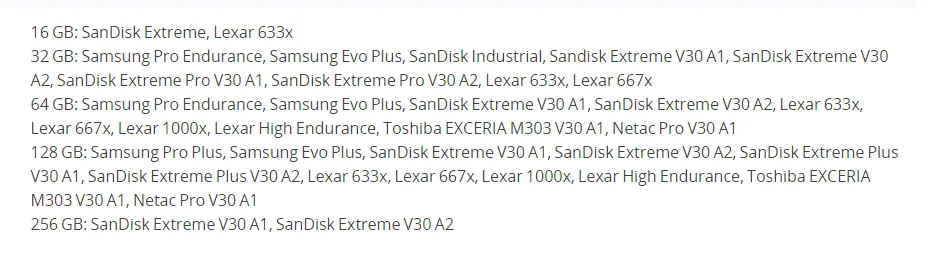
You can also try formatting it, the standard format file on computers is NTFS, you want to change that to exFAT to make it compatible with the drone.
To do that
- Open File Explorer.
- Click on This PC from the left pane.
- Under the “Devices and drives” section, right-click the SD card and select the Format option.
- Use the “File system” drop-down menu and select the exFAT option.
- This process can be a little different on Mac and Linux.
Final choice
If none of the methods fix it, you might have to send your Osmo to DJI.
contact DJI support team to do a further diagnosis to find the cause of the issue, or start an online ticket here:
If you decide to send it to DJI provide your serial number to them for them to check if you have a warranty which I don’t think you have because the product is old anyways, After you hand it to DJI it can take up to 15 days till they send it back to you, and it can take longer if you don’t live in the United States
Please note that the repair cost will depend on the warranty period of the said gimbal; otherwise, valid charges will apply.
If you are located in Armenia, you may contact the local dealer or DJI’s support via email to start a case and send the unit back.

#61

OFFLINE
Old
-

- Пользователи
-

- 8 сообщений
Начинающий летчик
- Город:Kolomna
Отправлено 06 мая 2017 — 10:47
iLoveDrones, друг покупал в Китае в магазине, потом привез в Россию
-
0
#62
OFFLINE
Spasov
Spasov
- Город:Москва
- Коптер:DJI Mavic 2 Pro
Отправлено 06 мая 2017 — 11:07
Old,
Значит первый пункт исключаем из моего предыдущего сообщения)
-
0
#63
OFFLINE
shushera
shushera
- Город:Хабаровск
- Коптер:mavic
Отправлено 09 мая 2017 — 04:05
Возникла такая проблема. При включении мавика обнаружил что камера не фокусируется. За день до этого отлетал три аккума без проблем и в штатном режиме. Калибровка подвеса, перепрошивка на разные версии не спасают положение. При попытке сброса настроек камеры кратковременно появляется фокус и опять уходит в никуда. В ручном режиме на изменения фокуса не реагирует совсем. Что делать?
Добавлено позже (09 Май 2017 — 13:05)
Отписал жалобу в DJI. пришел ответ мол обращайся к продавцу за заменой ремонтом. Брал коптер на али.
-
0
#64
OFFLINE
nktklbv
nktklbv
-
- Пользователи
-
- 3 сообщений
Начинающий летчик
- Город:Moscow
- Коптер:Mavic
Отправлено 11 мая 2017 — 09:10
Привет всем, подскажите на мавике с чем может быть связано данное предупреждение? — Gimbal motor overload. Check whether gimbal clamp is removed
Фиксатор камеры снят, калибруется и двигается все нормально. Появляется почти каждый раз при включении. Еще было что на инициализации камера дергается в разные стороны и не может видимо выйти в готовность, после выключения и включения опять все норм. Мавик новый, не падал. В интернете нашел видео где площадку с камерой вытаскивают за три ограничителя и потом вставляют на место (что меняется после этого немного растягиваются резинки или как то площадка выравнивается?), после этого не было ошибки при первом включение. С чем может быть связана данная проблема и является ли она критичной если все работает нормально, плавно двигается, калибруется? Еще вопрос как устроен подвес там есть шлейф, а еще серебристый пучек это тоже провода?
-
0
#65
OFFLINE
remisha
remisha
-

- Пользователи
-
- 16 сообщений
Начинающий летчик
- Город:Soligorsk
- Коптер:dji mavic pro
Отправлено 11 мая 2017 — 11:39
Но в полёте если вращать дрона, то горизонт всё равно заваливается
проблему решили ? или нет? если да, то как ?
-
0
#66
OFFLINE
shushera
shushera
- Город:Хабаровск
- Коптер:mavic
Отправлено 12 мая 2017 — 03:38
Еще вопрос как устроен подвес там есть шлейф, а еще серебристый пучек это тоже провода?
Если я правильно понимаю то плоский поводящий шлейф это управление подвесом. А пучок серебристых проводов это провода непосредственно с самой камеры.
-
0
#67
OFFLINE
Трос
Трос
- Город:Мурманск
- Коптер:Mavic
Отправлено 12 мая 2017 — 11:27
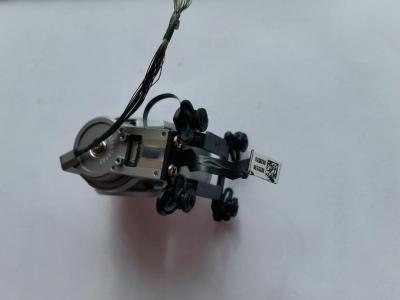
У меня переодически на новом мавике тряслась камера. Как будто не было контакта где то.При очередной тряске трогал шлейф плоский-все ок. Сделал вывод,что что то со шлейфом. Снял видео и отослал китайцам. Разобрал мавик,долез до шлейфа. Опытным путем выяснил-глючит шлейф примерно в 1см от разъема к плате(было еле заметное вздутие)подпер его упором из пластика и о чудо-тряска прекратилась,мотор не греется. А потом фигакс-пошел дым и шлейф перегорел. Китаезы предложили заменить мавик на новый или часть денег. Выбрал деньги. Заказал шлейф. Мавик один раз в автомате взлетел и тут же я его посадил. Без падений. Брак,явный брак. Китаезы общались с dji…. Знают они эту проблему,но замалчивают. Заменю шлейф. Мавик с кешбэком по акции и этой выплатой обошелся довольно дешего теперь,но ремонт…
Прикрепленные изображения
-
0
#68
OFFLINE
N00B
N00B
- Город:Moscow
- Коптер:Небесный Нубас
Отправлено 13 мая 2017 — 12:37
Прикрепленные изображения
А вот и выяснилось где серийный номер подвеса скрыт))) В ветке по ремонту спрашивали как найти его
-
0
#69
OFFLINE
DimasF
DimasF
- Город:Москва
- Коптер:Mavic Pro
Отправлено 13 мая 2017 — 08:24
Зараза, неделю отлетал в Питере без проблем, в ветрюгу. Сегодня же в Москве вначале в точке интереса связь потерял, потом два раза при включении писал, чти Мотор подвеса прегружен — убедитесь, что сняли фиксатор. Потом на высоте камеру переклинило, потом отклинило. Потом еще эта NFZ не давала спутники поймать.
Территориально: усадьба Покрово-стрешнево.
А началось все с алкаша, который решил, что мы с нтв приехали. И предлагал его снимать, потом сказал, что у него тут снайперы и лучше тут не летать… 
-
0
#70
OFFLINE
nktklbv
nktklbv
-
- Пользователи
-
- 3 сообщений
Начинающий летчик
- Город:Moscow
- Коптер:Mavic
Отправлено 14 мая 2017 — 12:24
Трос,еще заметил что при работе, после ошибок Gimbal motor overload. Check whether gimbal clamp is removed, начинает сильно греться подвес где мотор наверно по вертикали, это нормально? Или как у вас в дальнейшем может перегореть?
-
0
#71
OFFLINE
Эжен
Эжен
-
- Пользователи
-
- 2 сообщений
Начинающий летчик
- Город:Moscow
- Коптер:Mavic Pro
Отправлено 14 мая 2017 — 05:44
Коллеги, добрый день!
Появилась проблема, как у Gamayun, с «желе» на видео. Визуальный осмотр подвеса, продув, калибровки не дали результата. Может кто сталкивался? Подскажите, у кого какие мысли?
С разрешения Gamayun покажу его видео еще раз.
-
0
#72
OFFLINE
Трос
Трос
- Город:Мурманск
- Коптер:Mavic
Отправлено 15 мая 2017 — 07:32
nktklbv,у меня тоже при дергании мотор этот моментально нагревался. Когда дерганий не было,не грелся. Думаю,что это не хорошо. В итоге у меня шлейф вспыхнул.
-
0
#73
OFFLINE
unlim
unlim
- Город:RB
- Коптер:MAVIC
Отправлено 16 мая 2017 — 03:17
rylskov, это болезнь или брак завода, иногда есть иногда нету, я забил на это
-
0
#74
OFFLINE
Boldyrev
Boldyrev
- Город:Москва
- Коптер:Mavic
Отправлено 17 мая 2017 — 10:51
unlim, в смысле забил? так и летаете?
-
0
#75
OFFLINE
ChaTLaHiH
ChaTLaHiH
-
- Пользователи
-
- 4 сообщений
Начинающий летчик
- Город:Санкт-Петербург
- Коптер:Mavic
Отправлено 17 мая 2017 — 03:40
nktklbv, а это часом не после прошивки началось? я только прошился и сразу начал тупить подвес
-
0
#76
OFFLINE
nktklbv
nktklbv
-
- Пользователи
-
- 3 сообщений
Начинающий летчик
- Город:Moscow
- Коптер:Mavic
Отправлено 17 мая 2017 — 03:45
ChaTLaHiH,нет, после покупки как его из коробки достали и включили, сразу камера не вышла в готовность. А какая у вас прошивка до этого была?
Сообщение отредактировал nktklbv: 17 мая 2017 — 03:51
-
0
#77
OFFLINE
MycaeB
MycaeB
-
- Пользователи
-
- 3 сообщений
Начинающий летчик
- Город:Москва
Отправлено 18 мая 2017 — 09:18
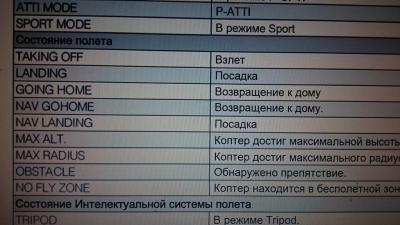
taking off obstacle пишет и сигналит что это значит?
-
0
#78
OFFLINE
DimasF
DimasF
- Город:Москва
- Коптер:Mavic Pro
Отправлено 18 мая 2017 — 10:27
MycaeB,
Прикрепленные изображения
-
0
#79
OFFLINE
NSG
NSG
-

- Пользователи
-
- 34 сообщений
Начинающий летчик
- Город:Almaty
- Коптер:Mavic Pro, Mavic Air
Отправлено 19 мая 2017 — 01:56
желе»
а вы случайно не с «блендой» летали?!
т.к. на хорошей высоте и скорости, потоки воздуха задувают в подвес так, что картинка становится с эффектом желе.
-
0
#80
OFFLINE
andreynofx
andreynofx
-
- Пользователи
-
- 13 сообщений
Начинающий летчик
- Город:Moscow
Отправлено 19 мая 2017 — 01:59
Знающие, подскажите плиз, почему видео стробит, если снято плавно на мануальных настройках 30фпс и скорость затвора 60? Так же мне кажется что ОЧЕНЬ много шумов.
Видео снято с такими настройками: ND16, iso 100, shutter speed 60, 4k30fps, NTSC, white balance — sunny, style:+1 -2 +1. Colorstyle: d-cinelike
-
0
How to fix DJI drone gimbal tilt and roll error?
- Method 1: Calibrating the IMU One of the main problems with the stability of the universal joint is related to the calibration of the IMU. …
- Method 2: Automatic gimbal calibration If the IMU calibration procedure has not resolved the stability problems, a gimbal calibration must be performed. …
- Method 3: Restore the Roll of the gimbal …
Method 1: Calibrating the IMU
- Step 1: place the drone on a flat surface in a bubble.
- Step 2: open the DJI GO application.
- Step 3: select Main Controller Setting.
- Step 4: select the Advanced Settings item.
- Step 5: enter the Sensor section.
- Step 6: Select IMU.
- Step 7: Press the Calibrate IMU key.
Full
Answer
How to fix gimbal error on DJI Osmo Mobile 3?
“Gimbal error” on DJI Osmo mobile 3 is usually caused by a software issue, to fix it you should factory reset the gimbal, to do that, hold the zoom in/out slider upward and press the power button at the same time for 3 seconds then release both simultaneously.
How to fix gimbal issues in the DJI Go apps?
It’s very likely that you are just a few taps away from resolving your gimbal issue in the DJI GO apps. For instance, by performing an IMU and gimbal calibration in the DJI GO apps you can fix a tilted horizon. By inspecting your take-off site, you can check if the gimbal motor overload is caused by obstructions stopping the gimbal from rotating.
What does a gimbal error warning mean?
When a gimbal error warning message pops up in the DJI GO or GO 4 app, it can really get your pulse going. Tilted horizon, gimbal motor overload, and abnormal gimbal vibrations are some errors you might experience. For some pilots, especially newbies, the first reaction is usually to fix the gimbal by twisting it…
Why does the gimbal roll have to be corrected after calibration?
If there are still stability problems as a result of the calibration procedures, the gimbal roll must be corrected. In this way the horizon will remain fixed while the camera is free to move
If you have received a «Gimbal Motor Overload» error message for your DJI drone, the simplest solution is to follow these three steps:Recalibrate the gimbal before flying. … Look around your gimbal to check for any dust or particles. … You need to ensure that you take-off on a flat surface and use a landing pad.
Why is my DJI gimbal not working?
Please check whether there’s anything blocking the gimbal such as dirt, dust, or sand debris as it could affect the gimbal movements. To check the functionality of the gimbal dial, we recommend performing an RC calibration.
How do I reset my gimbal?
0:001:09How to Reset DJI Osmo Pocket 2 Gimbal | Featured Tech (2021)YouTubeStart of suggested clipEnd of suggested clip2 all you have to do is take your finger. And scroll from the top. Down until the settings iconMore2 all you have to do is take your finger. And scroll from the top. Down until the settings icon comes up once it does you’re going to tap on that.
How do you fix a gimbal on a drone?
2:537:28How to FIX Your DJI Mavic Drone Gimbal for FREE!! — YouTubeYouTubeStart of suggested clipEnd of suggested clipThis that i found if you have the drone upside down so basically the gimbal is on the bottom. Here.MoreThis that i found if you have the drone upside down so basically the gimbal is on the bottom. Here. Just very gently maneuver two of these pieces. To the top side of this black.
How much does it cost to repair drone gimbal?
The price for repair service is standard across Mavic Pro models, at a flat rate of $149 (not including parts). One of the most common types of repairs is a Mavic Pro gimbal replacement.
Why does my gimbal keeps turning off?
Q3 Why does my gimbal motor automatically shut down? Protected mode is designed to protect the gimbal if the user employs the wrong operations. If the gimbal went into protected mode, the gimbal motor will shut down while the gimbal is still powered on. Remember to check whether the roll arm is unlocked before using.
How do I reset my gimbal DJI?
Osmo Mobile 3: Press the M Button, Shutter Button, and Trigger simultaneously to reset the Bluetooth connection.
How do I calibrate DJI gimbal?
0:000:38How to Calibrate DJI OM 5? — YouTubeYouTubeStart of suggested clipEnd of suggested clipWelcome to my channel in today’s video i’m gonna show you how to calibrate your dji on file tap onMoreWelcome to my channel in today’s video i’m gonna show you how to calibrate your dji on file tap on the three dots menu at the lower left corner go to gimbal auto collaboration tap on calibrate.
Why is my DJI Osmo not working?
If the gimbal function does not work at all, check the bluetooth connection. If connected, the electronic aspect of the gimbal may need to be replaced. If the gimbal works but does not move as quickly as it should, thoroughly clean the device and make sure no obstructions are impeding motion.
Why is my DJI Osmo not working?
If the gimbal function does not work at all, check the bluetooth connection. If connected, the electronic aspect of the gimbal may need to be replaced. If the gimbal works but does not move as quickly as it should, thoroughly clean the device and make sure no obstructions are impeding motion.
How do I reset my Osmo gimbal?
Resetting Osmo bluetoothOsmo Mobile 3: Press the M Button, Shutter Button, and Trigger simultaneously to reset the Bluetooth connection. … In the Bluetooth Devices screen in the Pro Camera settings, tap Search for devices. … Select the Osmo you would like to connect to.
Why is my drone camera not working?
The drone camera is not working for several reasons, including firmware update, poor calibration, corrupt SD card, scratches on the lens, and drone crash.
How do I reset my DJI om5?
Press the switch button, shutter/record button, and trigger simultaneously to reset the Bluetooth connection. The Bluetooth connection is reset successfully when the system status indicator turns from green to yellow. Search DJI OM 5 and reconnect.
What does it mean when a gimbal is not working?
Tilted horizon, gimbal motor overload, and abnormal gimbal vibrations are some errors you might experience. For some pilots, especially newbies, the first reaction is usually to fix the gimbal by twisting it manually, DO NOT do this as it doesn’t work and can damage your gimbal.
Why is my gimbal motor overloading?
By inspecting your take-off site, you can check if the gimbal motor overload is caused by obstructions stopping the gimbal from rotating. If the gimbal vibrates abnormally, you definitely need to check if any anti-vibration parts such as the vibration absorbing board, dampers, and rubber balls are malfunctioning.
What is DJI support?
DJI Support is your go-to source for answers to any questions you may have about DJI products. Whether you are just a beginner or an experienced pilot, our tips and tutorials are here to help.
Why is my gimbal wet?
Furthermore, gimbal errors can be caused by environmental factors. For example, flying in heavy fog or clouds may make the gimbal wet, leading to temporary failure. The good news is that you don’t need to worry as the gimbal will recover full functionality once it dries.
How to make sure gimbal is working?
Make sure it’s working by moving the aircraft around, if it can move freely on every axis which means if the gimbal will move up-down, left-right, counterclockwise, and clockwise), if it does those movements freely you are good to go.
What to do if gimbal is shoved back to drone?
If the gimbal is shoved back to the drone you can either do 2 things, the first is removing the frame of the drone which you will see in the video below or you can also push the gimbal out with a piece of wood or metal.
How to get gimbal unstuck?
Help the gimbal unstuck by moving it with your finger slowly and lightly in every direction, while doing that you can blow air on it by your mouth to help tiny particles to get unclogged.
Why is my gimbal dislocated?
This happens Usually because something sticky or tiny have gotten inside the rotation areas of the gimbal, it can be liquids, solids, or in some cases, the gimbal may be dislocated.
Can remote detect stuck gimble?
Note: The remote won’t detect a stuck gimble unless it is still stuck.
Can you get a gimbal cover for a drone crash?
To avoid permanent damage in a drone crash, you can also get a gimbal cover it is also sold in online stores and it can help a little
Do I need DJI factory level software?
So far from what I gather you will need DJI factory level software to run the pairing and clear the error. Some service center will have it. You can send it in. Otherwise you will have to let us know if your semi successful replacement actually completely works or not. I suggest some panoramas as it exercises the gimbal to max tilt and pitch. Or high speed flying in all directions.
What happens if you drop in a new gimbal?
If you just drop in a new gimbal, there will be pairing issue and you might get errors and a black screen.
What to do if playback doesn’t begin?
If playback doesn’t begin shortly, try restarting your device.
Is there compatibility issue when replacing a defective gimbal with a new one?
There appears to be compatibility issues when replacing a defective gimbal with a new one. What should be done to resolve this case?
Can DJI service Malaysia?
In Malaysia, even the «only» authorised service center (3rd party, not DJI) can do it. I believe some independent service center will also have this. You can ask your dealer that sold you the drone, how to get authorised service, even if you choose to pay out of pocket.
Can you add videos to your watch history?
Videos you watch may be added to the TV’s watch history and influence TV recommendations. To avoid this, cancel and sign in to YouTube on your computer.
Popular Posts:
#1
OFFLINE
NikoBor
-
- Пользователи
-
- 1 сообщений
Начинающий летчик
- Город:Челябинск
- Коптер:Dji Phantom 3 Standart
Отправлено 31 Декабрь 2017 — 12:17
Доброго времени суток! Упал Dji phantom 3 standart. Загнуло и отломало Gimbal крепление, и оторвало шлейф подвеса, все заменил. Теперь при включении коптера подвес не реагирует и не стабилизируется, Лампа-кнопка прошивки на дроне горит зеленным, а на пульте почему то красным,но при этом я могу запустить двигатели. В приложении DJI Go кнопка «камера» не активная при нажатии выдается ошибка «Remote Signal Controller». Самое интересное, что если дать постоять дрону пол дня ,а потом включить можно на 10 секунд поймать связь на пульте и зайти нормально в приложение,но вылезают 3 ошибки: Gimbal Gyroscope Error, Gimbal Tilt Eror, Gimbal Roll Eror, так же горит желтая ошибка «Aircraft Warming up. При наклоне коптера двигателе реагируют и пытаются его выровнять,соответственно гироскоп работает?
Пытался перепрошить коптер всеми возможными способами, и вернуть стандартную прошивку,но вылезают ошибки, и дрон монотонно пищит.
========== 2014.01.01 00:00:14 remo-con disconnect======
Packet: P3C_FW_V01.09.0200.bin
Upgrading …
Result: Failed.
Reboot the aircraft and try to upgrade the firmware again.
В логах не может найти одно устройство,что это может быть?Так же не может обновить одно устройство firmware v1.8.0.0 not support.
Вот логи:
[00130544]Waiting for user confirm…
[00140612]Timeout, start upgrade automatically.
[00140743]Firmware upgrading[1]…
[00140836][09 00] Firmware upgrade start…
[00167469][09 00] Firmware upgrade finish without reboot.
[00197539][09 00] Firmware upgrade finished successfully.
[00197606]Done.
[00197674]Version checking[2]…
[00197759][04 00][00] v1.51.0.0 -> v1.51.0.0
[00197889][11 00][00] v1.8.0.0 -> v1.8.0.0
[00198071][11 01][00] v1.8.0.0 -> v2.0.0.33, firmware v1.8.0.0 not support.
[00198135][11 01][00] v1.8.0.0 -> v2.0.0.33
[00198205][01 00][00] v1.14.4920 -> v1.14.4920
[00198274][01 01][00] v1.14.4920 -> v1.14.4920
[00198395][03 05][00] v34.2.0.9 -> v34.2.0.9
[00198513][03 06][00] v2.4.20.50 -> v2.4.20.50
[00211082][07 00][00] device not detected.
[00211178][09 00][05] v0.1.1.1 -> v0.1.1.1
[00211297][12 00][00] v5.9.0.0 -> v5.9.0.0
[00211448][12 01][00] v5.9.0.0 -> v5.9.0.0
[00211574][12 02][00] v5.9.0.0 -> v5.9.0.0
[00211710][12 03][00] v5.9.0.0 -> v5.9.0.0
[00211778]Packet upgrade failed at version checking.
Как я понял у меня просто нет связи с wi-fi модулем,который находиться в подвесе? Может это дело в шлейфе, но почему тогда карту памяти он читает? Есть ли смысл пробовать дальше перепрошивать дрон? Или разбирать и добираться до главной платы?
Если кто то что то знает. или сталкивался с подобными ошибками, напишите пожалуйста, буду рад любой информации. Есть один сервис в Моем городе Челябинске, но по отзывам он не очень хороший, боюсь отдавать.
Всех с наступающим Новым Годом!
-
0
#2
PriEgor
-
- Пользователи
-
- 15 сообщений
Начинающий летчик
- Город:Minsk
Отправлено 31 Декабрь 2017 — 05:52
Похоже на китайский шлейф, точно так же писало Gimbal Gyroscope Error, поставил ориг с донора — всё ок.
Картинка при этом была и даже прошивался.
Сообщение отредактировал PriEgor: 31 Декабрь 2017 — 05:53
-
0
Содержание
- Gimbal Gyroscope Error Phantom 3 Standard
- Standard — Gimbal Gyroscope Error DJI Phantom Drone Forum
- DJI Phantom 3 standard gimbal error — YouTube
- Pahntom 3 standard gimbal gyroscope error DJI FORUM
- Cara Memperbaiki Gimbal DJI Phantom 3 Standard Error Full .
- DJI Phantom 3 Gimbal Motor Overload camera fix — YouTube
- DJI Phantom 3 standard Gimbal not working — YouTube
- PHANTOM 3 DRONE Gimbal Error — YouTube
- Phantom 3 IMU Calibration Reset Fixes Flight Errors And .
- Kamera und Gimbal beim DJI Phantom 3 entfernen/abmontieren .
- Gimbal Gyroscope Error Phantom 3 Standard Fixes & Solutions
- Dji Phantom 3 Standart, не реагирует подвес и пульт.
- #1 OFFLINE NikoBor
Gimbal Gyroscope Error Phantom 3 Standard

We have collected for you the most relevant information on Gimbal Gyroscope Error Phantom 3 Standard, as well as possible solutions to this problem. Take a look at the links provided and find the solution that works. Other people have encountered Gimbal Gyroscope Error Phantom 3 Standard before you, so use the ready-made solutions.
Standard — Gimbal Gyroscope Error DJI Phantom Drone Forum
- https://phantompilots.com/threads/gimbal-gyroscope-error.102773/
- Oct 20, 2020 · PhantomPilots is the leading online community for DJI Phantom drone enthusiasts and a member of the Drone Pilots Media Network. With over 6 million unique drone enthusiasts each year, we offer an incredible opportunity to promote your drone-related products or services.
DJI Phantom 3 standard gimbal error — YouTube
- https://www.youtube.com/watch?v=5JOWyqx-Oyk
- Sep 05, 2016 · DJI Phantom 3 standard gimbal error Call: 01666666.466Author: Trung Kieng
Pahntom 3 standard gimbal gyroscope error DJI FORUM
- https://forum.dji.com/thread-42781-1-1.html
- Jul 23, 2019 · My phantom 3 standard is showing a gimbal gyroscope error which is caused by a hardware malfunction. Im in the middle of the pacific ocean and there is no dhi repaur .
Cara Memperbaiki Gimbal DJI Phantom 3 Standard Error Full .
- https://www.youtube.com/watch?v=v8OMZPRRAjI
- Apr 01, 2018 · Cara memperbaiki sendiri gimbal phantom 3 standard yg error, gk bergerak hanya ada bunyi, untuk mengurangi biaya pengeluaran jasa service yg cukup mahal, sem. Author: Channel Daffa
DJI Phantom 3 Gimbal Motor Overload camera fix — YouTube
- https://www.youtube.com/watch?v=0UQSb80hz0Y
- May 08, 2017 · We use Amazon Affiliate links where possible. My screwdriver kit: http://amzn.to/2vOznoMIf your camera starts up crooked or not level, here is how to fix it.Author: Clint Decker
DJI Phantom 3 standard Gimbal not working — YouTube
- https://www.youtube.com/watch?v=_P0r6g0TLRs
- Call Joshua Terry at 6622883005 for a free estimate——Email me at [email protected] me on Facebook at North MS Drone Service—— L.
PHANTOM 3 DRONE Gimbal Error — YouTube
- https://www.youtube.com/watch?v=H—o_VoD5Ao
- Please watch: «SYMBOLS OF FREEDOM» https://www.youtube.com/watch?v=MJmIiWypcr0 —
—Support this journey Patreon — Monthly donationshttp://bit.ly/2sFCH4n Pa.
Phantom 3 IMU Calibration Reset Fixes Flight Errors And .
- https://www.dronezon.com/diy-drone-repair-videos/dji-innovation-drones/imu-calibration-phantom-3-fixes-no-signal-red-warning-lights/
- Jul 14, 2020 · The Phantom 3 IMU calibration procedure is simple and takes between 5 and 10 minutes. The IMU calibration will fix most of the Phantom 3 issues including erratic flying, …
Kamera und Gimbal beim DJI Phantom 3 entfernen/abmontieren .
- https://www.youtube.com/watch?v=gT5Iyi9WFDw
- In diesem Video zeige ich euch, wie ihr das Gimbal und die Kamera vom DJI Phantom abmontiert. Ich nutze hier den DJI Phantom 3 Standart mit den anderen Model.
Gimbal Gyroscope Error Phantom 3 Standard Fixes & Solutions
We are confident that the above descriptions of Gimbal Gyroscope Error Phantom 3 Standard and how to fix it will be useful to you. If you have another solution to Gimbal Gyroscope Error Phantom 3 Standard or some notes on the existing ways to solve it, then please drop us an email.
Источник
Dji Phantom 3 Standart, не реагирует подвес и пульт.
#1 OFFLINE NikoBor
- Город: Челябинск
- Коптер: Dji Phantom 3 Standart
Доброго времени суток! Упал Dji phantom 3 standart. Загнуло и отломало Gimbal крепление, и оторвало шлейф подвеса, все заменил. Теперь при включении коптера подвес не реагирует и не стабилизируется, Лампа-кнопка прошивки на дроне горит зеленным, а на пульте почему то красным,но при этом я могу запустить двигатели. В приложении DJI Go кнопка «камера» не активная при нажатии выдается ошибка «Remote Signal Controller». Самое интересное, что если дать постоять дрону пол дня ,а потом включить можно на 10 секунд поймать связь на пульте и зайти нормально в приложение,но вылезают 3 ошибки: Gimbal Gyroscope Error, Gimbal Tilt Eror, Gimbal Roll Eror, так же горит желтая ошибка «Aircraft Warming up. При наклоне коптера двигателе реагируют и пытаются его выровнять,соответственно гироскоп работает?
Пытался перепрошить коптер всеми возможными способами, и вернуть стандартную прошивку,но вылезают ошибки, и дрон монотонно пищит.
========== 2014.01.01 00:00:14 remo-con disconnect======
Источник

matt odle
7 месяцев назад
I know it’s a five-year-old video but I was having the same problem with one I just purchased super cheap. I removed the screws on the left and right side. Let one of the cables loops free then bolted up the rest of it. It doesn’t go up and down anymore and the cable is covered. But now I have a gimbal roll error and pan. Have to figure out what that’s about now

electric master
11 месяцев назад
Hi

Archer Cureton
1 год назад
I’m having an issue where the gimbal continuously goes limp and recenters along the roll axis. Same motion as shown in this video but on the roll motor. Any suggestions?

Drew Hastings
1 год назад
Suggest pushing the hard wire into the body of the Phantom (that leads for the camera). A simple slight but form push and it fixed the exact issue for me.

Youe665
1 год назад
Thank you

EricS89
2 года назад
To add my little experience because I’ve found no answers to it. I have a P4 (I call it N1) that once crashed from 60 yds high. I repaired it (it works but still some issues about gimbal off-center) and I’m still on it but I’ve found another one in good shape with few hours of flight (N2). This one (N2) at the first test had the up and down problem which was caused by the camera hitting the ribbon cable behind. I fixed it and it worked. But there comes the best part. When powering up, it has still done the up and down freely without stop. I simply held it with my hand to stop the movement, then it stops to power the motors, does again the cycle and then the camera is in its place. Fully operational. And I’ve to do this each time. Looks like the first initialization doesn’t work, it needs to do a second one… I’ve finaly tryed a motor swap with N1 that had the crash (but I know this one has no problem with this part). And it was that. The motor seems to be broken. With the other motor from N1, the second P4 N2 works perfectly and the first P4 (N1) with the motor of the second one (N2) has issues too. So problem is the motor or the sensor on it maybe, but no wear mark at all on it… Another thing to note, the N2 has a newer controller board inside the camera shell, the number written on it is 1 higher. The electrical wiring is also different. On the N1, the back board that you take off with the back cover has a kind of slot system. By simply removing the cover you take off the contacts. On N2 there is a ribbon that connects the two boards, no slot.

Khieu Sovannara
2 года назад
Thank you any way, but I clean it and put it back and just work fine again.

Meysam UAV
2 года назад
It works
Meysam UAV
2 года назад
Very good.

kattepus
2 года назад
THANK YOU! I’ve been spending the past few months fixing my drone with various errors, and today I finally got a new camera assembly which didn’t work — it had the exact same issues as you had. Your fix worked perfectly, and with some adjustment I even got it to work perfectly with the cover back on. This saved me a long trip back to the store, thanks a ton!

Sky173
3 года назад
Good video. I’m glad you brought this up. I believe the startup sequence checks for binding. If anything prevents it from moving freely, it will not work. I have had the ribbon cable bind, keeping it from working. The U-shape guard is not needed.

Brian D. Beck
3 года назад
There is a much easier way for a temporary fix and you don’t have to take anything apart. Would you like to hear it?

DRONE NATION BANDUNG
3 года назад
Not working for me , anybody can help?

Brendon Cameron
4 года назад
Exactly the problem I was having and your solution fixed it perfectly.

Captain Dove
4 года назад
Thanks for posting the video. I found it to be very helpful. I had the same problem of the gimbal moving up and down, so I decided to take out the screws and take off the cover as you suggested. I didn’t like the idea of having the cover off so I clipped it back in and to my surprise the gimbal worked as it should after reassembly. You have the two initial screws in the first cover, three in the plate as shown in your video and two more holding the cover that goes over the black cable. They sure are small screws so be careful when handling them as if you drop them they can be difficult to find. Good luck to anyone who tries it and I hope it works for you.

Dvasinio Augimo aktualijos
4 года назад
Thank bro, helped me!

Mauro Regis
4 года назад
my yaw motor not centered

Jay Acosta
4 года назад
Thank you so much for the video. I replaced the ribbon cable and I encounter this problem once I finish. Problem solved!

Paweł Pawelo
5 лет назад
Have you had a look at this vulnerability?
What Is The Gimbal Overload Error? When the display shows that there is a gimbal motor overload, and you may get an error code 40003, it simply means that something is inhibiting the gimbal’s movement which causes the gimbal motor to be strained.
Full
Answer
What does a gimbal error warning mean?
When a gimbal error warning message pops up in the DJI GO or GO 4 app, it can really get your pulse going. Tilted horizon, gimbal motor overload, and abnormal gimbal vibrations are some errors you might experience. For some pilots, especially newbies, the first reaction is usually to fix the gimbal by twisting it…
What causes a gimbal to fail?
Furthermore, gimbal errors can be caused by environmental factors. For example, flying in heavy fog or clouds may make the gimbal wet, leading to temporary failure. The good news is that you don’t need to worry as the gimbal will recover full functionality once it dries.
How do I fix a gimbal overload error?
You can fix a gimbal overload error by ensuring the surface is clear of any obstruction. If you are flying in a windy environment, try to find an area with fewer gusts for a steadier shot. Always make sure all of your screws and bolts on the drone and gimbal are tightened securely.
What does error code 40003 mean on a gimbal motor?
When the display shows that there is a gimbal motor overload, and you may get an error code 40003, it simply means that something is inhibiting the gimbal’s movement which causes the gimbal motor to be strained. It is important to address this error quickly, as excessive strain can cause lasting damage to the gimbal’s motor.
How do I fix gimbal error?
0:5110:55FIX DJI drone ERRORS/ISSUES after GIMBAL/CAMERA replacement …YouTubeStart of suggested clipEnd of suggested clipAnd get the gimbal out and to be quite honest it was. So easy it consists primarily of removing.MoreAnd get the gimbal out and to be quite honest it was. So easy it consists primarily of removing. This lower cover and then removing a few screws in here six of them in total.
How do you fix gimbal overload?
If you have received a «Gimbal Motor Overload» error message for your DJI drone, the simplest solution is to follow these three steps:Recalibrate the gimbal before flying. … Look around your gimbal to check for any dust or particles. … You need to ensure that you take-off on a flat surface and use a landing pad.
How do I reset my gimbal?
0:001:09How to Reset DJI Osmo Pocket 2 Gimbal | Featured Tech (2021)YouTubeStart of suggested clipEnd of suggested clip2 all you have to do is take your finger. And scroll from the top. Down until the settings iconMore2 all you have to do is take your finger. And scroll from the top. Down until the settings icon comes up once it does you’re going to tap on that.
What causes gimbal overload?
Gimbal overload can be caused by such factors as gimbal debris, obstruction at launch, broken hardware, heavy third-party accessories, or poor weight distribution. It can sometimes result from strain on the gimbal motor or the camera.
What is a gimbal overload?
What Is The Gimbal Overload Error? When the display shows that there is a gimbal motor overload, and you may get an error code 40003, it simply means that something is inhibiting the gimbal’s movement which causes the gimbal motor to be strained.
How do you calibrate a gimbal?
In this event simply go through the following steps to complete the gimbal calibration process:Go to your ‘settings’ menu. … Choose ‘Gimbal Settings’ … Go to ‘Horizontal Gimbal Adjustments’ … Adjust the horizontal rotation until gimbal is level. … Click ‘Done’ … Your gimbal will be balanced.
How do I reset my gimbal DJI?
“Gimbal error” on DJI Osmo mobile 3 is usually caused by a software issue, to fix it you should factory reset the gimbal, to do that, hold the zoom in/out slider upward and press the power button at the same time for 3 seconds then release both simultaneously.
How do I reset my DJI phone?
Press the M button, shutter button, and trigger simultaneously to reset the Bluetooth connection. The Bluetooth connection is reset successfully when the system status indicator turns from green to yellow. Search DJI OM 4 and reconnect.
How do you reset Ronin-S gimbal?
Press and hold the trigger button to enter locked mode. Press the trigger twice to reset the gimbal. Press the trigger three times to turn the gimbal 180 degrees.
How do you fix gimbal motor overload in Mavic air?
5:457:17How to Fix Gimbal Overload on DJI Mavic Air 2 #DJI #Drone … — YouTubeYouTubeStart of suggested clipEnd of suggested clipSo anyway it’s a really simple fix what you do you uh turn it on like you’re about to sync yourMoreSo anyway it’s a really simple fix what you do you uh turn it on like you’re about to sync your drone you tap it once and then hold it again. And then it acts like it’s about to sink.How to Fix Gimbal Overload on DJI Mavic Air 2 #DJI #Drone … — YouTubehttps://www.youtube.com › watchhttps://www.youtube.com › watchSearch for: How do you fix gimbal motor overload in Mavic air?
How do you calibrate a gimbal drone?
0:087:10DIY: Calibrate Gimbal after replacing Assembly — YouTubeYouTubeStart of suggested clipEnd of suggested clipThis is a very simple process that requires plugging your drone into your computer. And running aMoreThis is a very simple process that requires plugging your drone into your computer. And running a couple of python commands in your command. Prompt.DIY: Calibrate Gimbal after replacing Assembly — YouTubehttps://www.youtube.com › watchhttps://www.youtube.com › watchSearch for: How do you calibrate a gimbal drone?
What is a gimbal clamp on a drone?
A DJI Mavic has 2 pieces of plastic protecting its gimbal. One is called the Gimbal Cover. This is the astronaut helmet bubble that protects your gimbal and camera lens from being damaged. The other is the Gimbal Clamp, which locks the gimbal in place and keeps it from moving around during transport.Jul 29, 2017Our Blog 10 common Mistakes Mavic pilots make — UAV MEhttps://www.uavme.com.au › blog › 10-common-mistakes…https://www.uavme.com.au › blog › 10-common-mistakes…Search for: What is a gimbal clamp on a drone?
Another method for displaced gimbal
If you had a crash, the gimbal can be displaced which is common DJI Mavic’s because their gimbal is in a very vulnerable place.
How to prevent this problem in the future
Sand and dust – Landing and taking off from sandy or dusty ground is what causes this problem most of the time, so in the future, it is better if you avoid doing that.
What is a gimbal overload error?
After all, the gimbal is a key piece of equipment that allows the drone pilot to navigate, shoot video, and take photos. Thus, a malfunctioning gimbal essentially renders the drone useless. So, what exactly is a gimbal overload error, and what causes it?
What does it mean when a gimbal is overloaded?
What Is The Gimbal Overload Error? When the display shows that there is a gimbal motor overload, it simply means that something is inhibiting the gimbal’s movement which causes the gimbal motor to be strained. It is important to address this error quickly, as excessive strain can cause lasting damage to the gimbal’s motor.
How to calibrate a DJI gimbal?
Just follow these steps: Tap on the three dots in the upper right corner of the screen. Tap on the gimbal symbol.
What happens if you take off a gimbal?
Debris Stuck In The Gimbal. If you take off from sandy or dusty surfaces, it is possible for small pieces of debris to get lodged in the gimbal. The gimbal is a very sensitive piece of equipment, so even the smallest of obstructions can prevent it from moving correctly which will trigger this error message.
Why is my drone gimbal motor overloading?
If the cover is still in place when the drone is turned on, it will limit the gimbal’s range of motion, preventing it from completing its calibration sequence.
What Is Gimbal Overload in a drone?
Getting a gimbal overload error on your DJI drone can be frustrating. It means that the camera or gimbal is overloaded and may not be working properly.
What Causes Gimbal Motor Overload?
Several factors can contribute to gimbal overload on your drone. While some of them are obvious, others may not be so apparent.
How do I fix gimbal overload errors on DJI drones?
DJI drones have a built-in system that alerts pilots when the gimbal is overloaded. This usually happens due to too much weight or imbalance on the camera and lens. When this error message pops up, it’s important to take action right away to prevent any damage from occurring.
How do I fix the gimbal overload on a DJI mini 2?
The DJI mini 2 is a small, lightweight drone, perfect for beginner pilots. However, even this little guy can experience gimbal overload if too much weight is added to the camera and lens.
How do I fix gimbal overload on a DJI Air 2s?
The DJI Air 2s is a great option for pilots looking for an affordable, easy-to-use drone. However, even this model can experience gimbal overload if too much weight is added to the camera and lens.
How do you calibrate a drone gimbal?
Drone pilots use calibration to adjust and improve the performance of their aircraft’s gimbals. This process helps to ensure that your shots are smooth and level, regardless of how crazy things may get during flight. The gimbal calibration takes less than five minutes
Conclusion- How do you fix drone overload quickly?
There are a few solutions that you can try if your drone experiences gimbal overload.
A gimbal is a device that keeps an object steady in a certain position despite the movement of the base on which it is mounted. This means when the base keeps changing its position constantly, the object will remain stable there won’t be any change in its position. An excellent example of this is cup holders on the ships, …
What is the function of a gimbal?
The main function of the gimbal is to cancel out the unwanted motion from three different directions. It is tilt , pan, and roll. Tilt is up and down motion, the pan is a side motion, and the roll is when something rotates circularly about its axis. Gimbals are the most common things for photographers and videographers, …
What is the difference between a single axis and a two axis gimbal?
A single-axis gimbal only balances the tilt, and a two-axis gimbal balances the camera if the disturbance is in a tilt or pan axis, whereas the 3-axis gimbal cancels out the jerks from a tilt, pan, and roll axis. The 3-axis gimbals are the most popular ones because they provide stable footage, no matter the type of disturbance.
What are the three types of gimbals?
There are generally three kinds of gimbals available in the market based on their ability to balance the number of axes; 1-axis gimbals, 2-axis gimbals, and 3-axis gimbals. A single-a xis gimbal only balances the tilt, …
How many motors are on a 3 axis gimbal?
These motors are controlled by the complex system of electronics. If it is a 3-axis gimbal, then there will be three motors on each axis to cancel out the disturbances from the tilt, pan, and roll axis. For cameramen and videographers, it is of utmost importance that the shakes are efficiently removed from all the 3 axes.
What is a gyroscope?
There are tiny gyroscopes known as an internal measurement unit which essentially means the motion and rotation sensors. They sense the disturbance in the axes and accordingly give a command to the motor to counterchange the position of the camera so that it stays fixed at its position.
How to know if gimbal is overloading?
The moment you receive a gimbal overload error, the first thing you should inspect is the gimbal mounting bracket. The gimbal is mounted on three brackets – two on the front, and another one on the back. The back bracket is especially problematic, as many Mavic Pro owners have not even seen it or know that it exists.
Why does my gimbal keep saying «overload»?
Any obstacle in the immediate surroundings of the gimbal can put it under unexpected pressure and prevent it from moving at its maximum range. Taking off from tall grass has been shown to be a major reason for gimbal overload messages, although these error messages commonly disappear after about a minute of flight.
How much does a drone gimbal cost?
While it is easy to see that the gimbal is one of the most delicate parts of any drone, there is still no reason that a drone that costs more than $1500 would have a gimbal that cannot withstand a minor crash without suffering some damage.
What happens if a ribbon cable is defective?
A defective ribbon cable will probably result in a host of gimbal problems, which may not be limited to just a gimbal motor overload. Considering how thin and flimsy the ribbon cable is, this is a perfectly reasonable theory. 3. Out-of-calibration gimbal.
Does the Mavic Pro have a gimbal overload?
The gimbal problems of the Mavic Pro don’t stop there. Throughout the years, Mavic owners have reported getting the dreaded “gimbal overload” message. There does not seem to be a single event that precedes getting this error message.
Does the Mavic Pro have a loose gimbal?
Loose gimbal mounting bracket. Many users have noticed that the brackets that anchor the gimbal to the body of the Mavic Pro tend to come loose over time. The mounting mechanism of the gimbal also has a rubber component that tends to soften and stretch over time, especially under intense heat.
Can you calibrate a DJI gimbal?
Calibrating your gimbal returns it to the settings and movement range that manufacturers have designed it for. Fortunately, calibration is very easily and quickly done through the DJI GO mobile app. Take note that some users have reported that it can take more than one recalibration cycle for the gimbal overload error to be resolved. In any case, it is always good practice to recalibrate your gimbal regularly.
Popular Posts:
The gimballing error encountered in a directional gyro is also known as intercardinal tilt error. Gimbal errors occur when the angular motions of gimbals do not correspond to the actual motion occurring about their reference axes. When a gimbal axis transducer is used, its output measures relative motion between gimbals, which is not necessarily the actual angular motion of the base. The gimbal error depends upon borehole inclination and the hole direction related to the reference direction.
In order to minimize such errors, when the surface orientation is carried out, the spin rotor axis should eventually be positioned in a plane parallel to the overall well direction anticipated, so as to result in a difference as little as possible.
Continue reading here: Survey Accuracy
Was this article helpful?
DJI FPV is the DJI’s buddy for the FPV community, which is so beginner-friendly for new FPV beginners. However, I have seen many FPV users asking for solutions to DJI FPV error codes. Most of them are just common for DJI drones and easy to fix.
But some DJI FPV users are struggling with those DJI FPV errors. Therefore I thought it would be helpful if there would be an article about DJI FPV error codes and how to fix them. So in this article, we would talk about DJI FPV common error codes and solving those errors. Hope this would help with fixing your DJI FPV error.
- Error 1: DJI FPV remote controller control stick error.
- Error 2: DJI FPV ESC status error/ DJI FPV propulsion system auto check error.
- Error 3: DJI FPV IMU error.
- Error 4: DJI FPV battery error.
- Error 5: DJI FPV compass error.
- Error 6: DJI FPV fan error.
- Error 7: DJI FPV sensor system error.
- Error 8: DJI FPV fly safe database error.
- Error 9: DJI FPV GPS error.
- Error 10: DJI FPV battery communication error.
- Error 11: DJI FPV vision sensor calibration error.
- Error 12: DJI FPV sd card error.
- Error 13: DJI FPV gimbal error.
Error 1: DJI FPV remote controller control stick error.
In most cases, DJI FPV remote controller control stick error is caused by miscalibrated remote controller sticks and remote controller firmware glitches.
How to Fix DJI FPV remote controller stick error.
- Calibrate controller joysticks. Check out the below video to know how to calibrate the DJI FPV controller.
- Update Firmware of the remote controller.
- Reset the remote controller. Download and install DJI Assistant 2 and connect the remote controller to the PC and turn it on. Open DJI Assistant 2 application and log in to your DJI account. Once you logged choose DJI FPV and hit “Factory Restore Defaults”.
Error 2: DJI FPV ESC status error/ DJI FPV propulsion system auto check error.
Usually, ESC status errors are caused by drone crashes, firmware glitches, and faulty electronic speed controller (ESC).
How to Fix DJI FPV ESC error.
- Restart the aircraft.
- Update DJI FPV firmware.
- Replace ESC. If your DJI FPV’s ESC is damaged due to a crash, you need to repair it or replace it. Usually, you could buy DJI FPV ESC online, but it’s better to repair or replace it by contacting DJI Support.
Error 3: DJI FPV IMU error.
Usually, DJI FPV IMU error is caused by miscalibrated IMU. Besides that firmware glitches also could cause the issue.
How to Fix IMU Calibration Error.
- Calibrate DJI FPV IMU. Check out the below video to know how to calibrate DJI FPV IMU.
- Change the calibration location and try again IMU calibration.
- Update DJI FPV Firmware.
- Factory reset DJI FPV using DJI Assistant 2. Download and install the DJI Assistant 2 For FPV from DJI Downloads Center. Then connect the aircraft to the PC using the USB cable and power on the aircraft. Open the DJI Assistant 2 and log in to your DJI account and choose the FPV. Then hit “Factory Restore Defaults”.
Error 4: DJI FPV battery error.
Most of the time, DJI FPV battery error is caused by a faulty power management board and battery firmware glitches.
Fix DJI FPV Battery Error.
- Refresh or update battery firmware. Update DJI FPV firmware while keeping the glitched battery inside.
- Drain the battery to zero and recharge it fully.
- Change power management board. If you are getting this error after a crash, the FPV power management board might have been damaged and required to replace or repair the power management board. Advisable to contact DJI Support to do it for you.
- Replace the battery.
Error 5: DJI FPV compass error.
In most cases, DJI FPV compass error is caused by placing or flying the aircraft near magnetic fields which causes discrepancy with the natural magnetic field.
How to Fix DJI FPV Compass Error.
- Try rebooting the DJI FPV.
- Avoid Electromagnetic interference. Avoid flying the DJI FPV near powerlines, communication towers, huge buildings, etc.
- Calibrate the compass. Visit a different location you are currently in and try a compass calibration. Check out the below video for the DJI FPV compass calibration process.
- Contact DJI Support. If you still get the error, the compass might be faulty. It might need to be repaired or replaced. So it’s better to contact DJI Support for that.
Error 6: DJI FPV fan error.
DJI FPV fan error is caused by a damaged or blocked fan and connection cable issue. Check out the below video which talks about this error depth.
How to Fix DJI FPV fan error.
- Remove the shell and check the fan is blocked. If it is clean the fan and unblock it.
- Check the connection cable to the fan section.
- Replace the fan or contact DJI Support.
Error 7: DJI FPV sensor system error.
DJI FPV sensor error is caused by miscalibrated IMU and firmware issues. Also for a weird reason, I have seen in sometimes SD card causes this issue.
How to Fix DJI FPV sensor system error.
- Replace the SD card or format the SD card. As I said above, SD card also causes this issue for some reason. So it’s better to try this step. Check out this article as a source.
- Update DJI FPV firmware.
- Calibrate DJI FPV IMU.
Error 8: DJI FPV fly safe database error.
In most cases, DJI FPV fly safe database error is caused by a faulty DJI FPV fly safe database update.
How to Fix DJI FPV fly safe database error.
- Update or downgrade the FPV firmware. Since DJI FPV fly safe database error is caused by DJI FPV firmware issue, DJI have released the latest firmware that solves the issue. If you are getting this issue after updating the firmware try downgrading the firmware. Also check out the below video that addresses the error.
Error 9: DJI FPV GPS error.
In most cases, DJI FPV GPS error is caused by poor internet connection, firmware glitches, damaged GPS module, and environmental interferences.
How to Fix DJI FPV GPS Error.
- Connect to a strong internet connection.
- Update the DJI FPV unit firmware including goggles and controller.
- Contact DJI Support. Since damaged or faulty GPS module also could cause this error, it might need to repaired or replace with DJI Support.
Read the Detailed Article: Why Drone not connecting to GPS and how to fix it.
Error 10: DJI FPV battery communication error.
DJI FPV battery communication error is caused by improper battery seating. I found this solution in DJI forums.
How to Fix DJI FPV battery communication error.
- Make sure the batteries are well-seated. There are connection points for the drone battery not only at the rubber plug but also at the sides. Charge up the battery to full and put the drone battery in (without connecting the rubber plug), and make sure to seat the battery as snugly in the body of the drone as possible. Then, connect the rubber plug of the battery to the drone body.
Error 11: DJI FPV vision sensor calibration error.
Usually, DJI FPV vision sensor calibration error is caused by firmware glitches and improper vision sensor calibration.
How to Fix DJI FPV vision sensor calibration error.
- Clean sensors surface.
- Update the DJI FPV firmware before calibrating the vision sensor. Firmware glitches could cause faulty vision sensor calibration. Therefore first update or refresh the firmware then calibrate vision sensors. Check out the below video to know how to calibrate DJI FPV sensors.
Error 12: DJI FPV sd card error.
Usually, the DJI FPV SD card error is caused by inserting an unsupported SD card or a damaged SD card.
How to Fix DJI FPV SD card error.
- Use supported DJI FPV SD card. Visit the DJI FPV Product spec and check whether your SD card is listed as a supported SD card. If not, try using a supported SD card.
- Format the SD card.
- Update DJI FPV firmware.
- Repair the SD card using the Windows command prompt. Connect the SD card to the PC and open the command prompt. Then type “chkdsk” and leave a space and specify the SD card driver letter (Ex: chkdsk D). and hit enter. Once the process is done the sd card is repaired.
Error 13: DJI FPV gimbal error.
Most of the time, DJI FPV gimbal error is caused by restricted gimbal movement, faulty gimbal, or firmware issues.
How to Fix FPV Gimbal Error.
- Check whether something is blocking the gimbal.
- Update DJI FPV Firmware.
- Factory Reset the FPV. Connect the DJI FPV to the PC using the USB cable and power it on. Open the DJI Assistant 2 and choose the FPV and hit “Factory Restore Defaults”.
- Replace the faulty gimbal.

When it comes to aerial photography and videography, the drone’s gimbal is what makes the magic happen. But there are several issues users can experience with some DJI drones’ gimbal. One such error is the gimbal stuck error (code 40002). If you’re getting this code, don’t worry—we’re here to help you troubleshoot, and it is applicable for all DJI drones including DJI Mavic Mini, DJI Mini 2, DJI Mini 3 Pro, DJI Air 2S, and DJI Mavic 3 series.
The DJI gimbal stuck error code 40002 appears when something is hindering the gimbal’s movement. The obstruction is typically some kind of small debris that has become lodged somewhere in the gimbal/gimbal housing.
Drones are most susceptible to debris-induced gimbal issues when they take off and/or land from sandy, dusty, or grassy areas. During takeoff and landing, any small particles underneath/around the drone will be blown around, which means debris can easily become lodged in the gimbal housing.
Now, without further ado, let’s get into the troubleshooting steps for the gimbal stuck error so you can get your drone back up in the air and functioning as it should.
Troubleshooting DJI Gimbal Stuck Error: Code 40002
It can be disheartening to see that there is an issue with your drone’s gimbal after you power it on hoping to get some great photos or aerial footage. But luckily, this error code isn’t difficult to troubleshoot. To do so, simply follow these steps:
1. Ensure the Gimbal Cover is Removed
If you’re a more experienced drone operator, this might sound silly, but if you’re new to drones, you might have left the plastic gimbal cover on when you turned your drone on. If you did, the gimbal stuck error will appear, as the gimbal cover will prevent the gimbal from moving.
This cover is meant to protect the gimbal while the drone isn’t being used. As such, it should be removed prior to initializing the drone before each flight. Failing to do so will prevent the gimbal from moving through its initial start sequence, and the error code will be triggered. What’s more, doing this repeatedly could damage the gimbal’s motor.
2. Ensure Firmware is Up to Date
Before continuing with the troubleshooting process, be sure your drone’s firmware is up to date. Since this error is due to a mechanical blockage, it’s unlikely that firmware is the source of the problem, but in the interest of thoroughly troubleshooting every potential culprit, it’s worth a shot.
Once you’ve confirmed that your drone is operating on the latest firmware version, you’re ready to continue.
3. Remove ND Filter (if Applicable)
If you’ve ensured that the gimbal cover is removed and that the drone has the latest firmware and the error persists, it’s time to proceed with troubleshooting. If you have an ND filter on your drone’s camera, remove it, and observe whether or not the error persists. An aftermarket ND filter could potentially impede the gimbal’s movement, triggering this error.
4. Perform a Gimbal Calibration
Performing a gimbal calibration could potentially resolve this issue. Before performing a gimbal calibration, ensure that your drone is placed on a flat surface. Then, follow the on-screen prompts for the gimbal calibration procedure for your particular drone.
5. Check for Lodged Debris
If you still see the error code after performing a gimbal calibration, the next step is to visually and manually check for lodged debris. But first, ensure the drone is powered off.
Visual Inspection
First, start with a visual inspection of the gimbal/gimbal housing. Check for any visible debris—dust, sand, or any other small particles—that might be lodged in the components. If you have one handy, a flashlight can help.
If you’re able to visibly identify debris, proceed to step 6.
Manual Inspection
If you’re unable to visibly identify any debris, the next step is to manually inspect the components. Hold the drone with one hand, and with the other hand, gently and slowly move the gimbal throughout its full range of motion in all of its different axes.
The key is to do this slowly so that you can identify the location of the blockage.
6. Blow Air into the Gimbal Housing
The next step in the troubleshooting process is to blow air into the gimbal housing in order to dislodge the debris causing the blockage.
If you were able to identify the location of the blockage in the previous step, then this step is easy. Simply blow a concentrated stream of air toward the location of the blockage. If you weren’t able to identify the location of the blockage, simply blow air toward all the crevices and joints in the gimbal housing.
Take care to ensure that no saliva makes it into the gimbal’s components, as it could cause damage.
You can also use a can of compressed air to try to dislodge the debris. But if you opt for this method, be sure to monitor the strength of the air stream to avoid damaging the components in the gimbal housing.
7. Contact DJI for Service
If you’ve followed all of the aforementioned troubleshooting steps but the issue persists, the next course of action is to contact DJI for further troubleshooting and repair.
In Closing
Now that you’ve followed the recommended troubleshooting steps, the next thing to do is test it. Simply power your drone back on, and observe whether or not the error appears. If you followed these instructions carefully, your drone’s gimbal should now function properly. Fly safe!
You may also be interested in:
How to Fix DJI Gimbal IMU Data Error (Code 40021)?
How to Fix DJI Gimbal Calibration Error Code 40011
How to Fix DJI Drone Error Code 30064
Asked by: Jayme Nitzsche
Score: 5/5
(8 votes)
Errors In Directional Gyro
Gimballing error occurs when the aircraft is banking due to the movement of the outer gimbal against the stabilized inner gimbal during a large banking turn, these errors can cause erratic rotation of the compass card even in a steady turn.
What is a directional gyro indicator?
Directional gyros, also called heading indicators or direction indicators, are the fastest moving component in a piston-powered aircraft. They can spin at up to 24,000 rpm, and are among a plane’s most critical systems. … The directional gyro uses a gyroscope that resists change to its position.
What causes apparent precession?
Earth rate precession is caused by the rotation of the earth while the spin axis of the gyro remains aligned with a fixed point in space. … Thus, apparent precession at the pole equals the rate of earth rotation.
What causes the gyroscope in the attitude indicator to spin?
During a normal turn, movement of the vanes by centrifugal force causes precession of the gyro toward the inside of the turn. … These errors are caused by the movement of the pendulous vanes by centrifugal force, resulting in the precession of the gyro toward the inside of the turn.
Which gyroscope axis that directional gyro applies?
Basic operating principle and construction The directional gyro indicator will have a gyroscope mounted with its rotation axis in the aircraft’s yawing plane. This means that the rotation axis is horizontal in level flight, and because of gyroscopic rigidity it provides the datum from which heading can be measured.
42 related questions found
What causes the gyro error?
This error occurs whenever the ship is subject to rapid changes of speed or heading. Because of its pendulous nature, the compass gravity control moves away from the centre of gravity whenever the vessel changes speed or alters course.
What is gyro error?
[′jī·rō ‚er·ər] (navigation) The error in the reading of the gyro compass, expressed in degrees east or west to indicate the direction in which the axis of the compass is offset from the north.
What are the principles of gyroscope?
The basic effect upon which a gyroscope relies is that an isolated spinning mass tends to keep its angular position with respect to an inertial reference frame, and, when a constant external torque (respectively, a constant angular speed) is applied to the mass, its rotation axis undergoes a precession motion at a …
How is the gyro in attitude indicator stay upright?
Air passing through the narrowest portion of a venturi has lower air pressure through Bernoulli’s Principle. The gyro is mounted in a double gimbal, which allows the aircraft to pitch and roll as the gyro stays vertically upright.
Why are gyroscopes useful?
The gyroscopes provide fixed reference directions or turning rate measurements, and accelerometers measure changes in the velocity of the system. The computer processes information on changes in direction and acceleration and feeds its results to the vehicle’s navigation system.
What are the two types of precession?
In physics, there are two types of precession: torque-free and torque-induced. In astronomy, precession refers to any of several slow changes in an astronomical body’s rotational or orbital parameters.
What are the effects of precession?
Precession causes the stars to change their longitude slightly each year, so the sidereal year is longer than the tropical year. Using observations of the equinoxes and solstices, Hipparchus found that the length of the tropical year was 365+1/4−1/300 days, or 365.24667 days (Evans 1998, p.
What happens every 72 years?
During the precession, the Earth’s axis traces out an imaginary conical surface in space and a circle on the celestial sphere. The Celestial North Pole or CNP (i.e., the projection of the Earth’s axis onto the northern sky) moves about 1° along this circle every 72 years (360×72 = 26,000).
What is slaved gyro?
[′slāvd ′jī·rō mag′ned·ik ′käm·pəs] (navigation) A directional gyro compass with an input from a flux valve to keep the gyro oriented to magnetic north.
How does rate gyro work?
A rate gyro is a type of gyroscope, which rather than indicating direction, indicates the rate of change of angle with time. If a gyro has only one gimbal ring, with consequently only one plane of freedom, it can be adapted for use as a rate gyro to measure a rate of angular movement.
Can you fly without a heading indicator?
No. Just the removal maintenance needs to be signed off and the inop indicator shown removed per 91.213. As long as you verified it’s not needed for flight you should be ready to go.
What is gyro tumble?
A phenomenon in which the gyro axes precess at random, giving erratic indications following the gyro’s locking once the gimbals come against a mechanical stop. The gyro must be caged and re-erected in a straight and level flight for the gyro instrument to give correct indications. Also called gyro tumble.
What is the most common cause of failed gyroscopic instruments?
Bearing failure is the most common cause of gyro instrument failure. It can be caused by any one or more of the following factors. Normal wear due to time in service. Adverse wear due to the instrument ingesting dirty air via a missing or defective gyro/or vacuum relief valve filter in a vacuum system.
How does gyro horizon work?
AIs, sometimes referred to as gyros or artificial horizons, operate with a gyroscope that indicates how level the aircraft is oriented to the earth. Rotating the gyroscope around the longitudinal axis indicates the degree of bank or roll, whereas the lateral axis indicates pitch — nose up, nose down or level.
How a gyroscope is used in daily lives?
The gyroscope has many practical uses. … In addition, many common objects benefit from gyroscopic motion, such as bicycle and motorcycle wheels, Frisbees, yo-yos, footballs, and spinning ice skaters. The gyroscopic motion (i.e. spinning) helps stabilize each of these objects.
What is the working principle of gyro compass?
Gyrocompass, navigational instrument which makes use of a continuously driven gyroscope to accurately seek the direction of true (geographic) north. It operates by seeking an equilibrium direction under the combined effects of the force of gravity and the daily rotation of Earth.
What are the 3 gyroscopic instruments?
Normal instrument flight relies in part on three gyroscope instruments: an attitude indicator (artificial horizon), a heading indicator (directional gyro, or «DG») and a turn and slip indicator («needle and ball,» or «turn and bank,» or «turn coordinator»).
What is the purpose of gyro compass?
A Gyro compass is a form of gyroscope, used widely on ships employing an electrically powered, fast-spinning gyroscope wheel and frictional forces among other factors utilizing the basic physical laws, influences of gravity and the Earth’s rotation to find the true north.

When a gimbal error warning message pops up in the DJI GO or GO 4 app, it can really get your pulse going. Tilted horizon, gimbal motor overload, and abnormal gimbal vibrations are some errors you might experience. For some pilots, especially newbies, the first reaction is usually to fix the gimbal by twisting it manually, DO NOT do this as it doesn’t work and can damage your gimbal.
So what’s the right thing to do? It’s very likely that you are just a few taps away from resolving your gimbal issue in the DJI GO apps. For instance, by performing an IMU and gimbal calibration in the DJI GO apps you can fix a tilted horizon. By inspecting your take-off site, you can check if the gimbal motor overload is caused by obstructions stopping the gimbal from rotating. If the gimbal vibrates abnormally, you definitely need to check if any anti-vibration parts such as the vibration absorbing board, dampers, and rubber balls are malfunctioning.
Furthermore, gimbal errors can be caused by environmental factors. For example, flying in heavy fog or clouds may make the gimbal wet, leading to temporary failure. The good news is that you don’t need to worry as the gimbal will recover full functionality once it dries.
To help you, even more, we have provided more detailed gimbal troubleshooting steps below.


Are you still having gimbal problems after trying out these steps? Then contact DJI Support and we will gladly help you fix your gimbal errors.
You might also like:
Drone Maintenance Checklist
10 Drone Safety Tips for a Safe Flight
You Can Fly, Too! Drone-Flying Tips for Newbies
10 Common Mistakes Mavic Pro Pilots Make
Top 5 Ways to Prevent Flyaways – Must-Have Knowledge for Drone Pilots
For more from DJI Support, find us on:
DJI Facebook Support
DJI Twitter Support
|
+ Add Friend Person Message United States Offline |
1# I’ve only had my Osmo Pocket for one week and have only taken a couple pictures and videos. Today I turned it on and all of sudden I receive the following error. Has anyone seen this and what is the fix? I tried <reset> and gimble calibration and still the same error no luck. Favorite
|
|
2018-12-20
|

 lvl.3
lvl.3

|
Ray-CubeAce
+ Add Friend Person Message United Kingdom Offline |
2# No, I’m not getting that message but that is how my gimbal is at rest when switched off. See my video on This post |
|
2018-12-20
|

 Captain
|
winwiz1959
+ Add Friend Person Message Netherlands Offline |
3# I got the message when the camera bumped into something. I presume they want to protect the little gimbal motors. Just a tap on the screen and all was fine again. |
|
2018-12-20
|

 lvl.1
lvl.1
|
Skyler King III
Flight distance : 1387582 ft
+ Add Friend Person Message United States Offline |
4# I had the problem. Solution: turn pocket off. Plug into phone and turn pocket on, and Mimo will launch. that should fix it. If not, try another MiroSD card. I personally advise turning pocket off before connecting or disconnecting from phone. |
|
2018-12-20
|
 lvl.2
lvl.2
|
Ray-CubeAce
+ Add Friend Person Message United Kingdom Offline |
5#
Thank you for the suggestion. I will try that as soon as I can. |
|
2018-12-20
|
|
DJI Tony
+ Add Friend Person Message Offline |
6# Hi, thanks for the inquiry. Did the error message will disappear if you tap the screen on the Osmo pocket? Did you manage to turn off and turn on the Osmo Pocket to see if this would persist? Please keep us posted on the latest progress. |
|
2018-12-20
|

 Administrator
|
djiuser_drone
+ Add Friend Person Message United States Offline |
7#
No matter what I tried, the error message would not go away. The camera was never dropped or tapped. Because I was still within my 15 day exchange period. I had it replaced with a new one.
Hopefully this was a one off. Thank you all for the replies. |
|
2018-12-20
|
|
mareklew
Flight distance : 4026 ft + Add Friend Person Message United States Offline |
8#
Good for you that this was solved. If you get this error when the gimbal is not touching anything you may have the following issues: |
|
2018-12-21
|
|
Gloria Liang
+ Add Friend Person Message Canada Offline |
9# Did you guys get this fixed? I’m having the same problem. |
|
2018-12-22
|
 New
New
|
Skyler King III
Flight distance : 1387582 ft
+ Add Friend Person Message United States Offline |
10#
Try my solution posted above. Let me know how it works out |
|
2018-12-22
|
|
szabi510
+ Add Friend Person Message Hungary Offline |
11#
I’ve the same problem… I tried many things but nothing… Firmware update was very difficult but successful. |
|
2019-1-5
|

|
djiuser_Aec5CDJfBKGi
Flight distance : 4217818 ft
+ Add Friend Person Message Brazil Offline |
12#
I have the same problem, we tried all the procedures informed and nothing to solve.
The error message continues and you can not use it. |
|
2019-1-17
|

|
Chris Casila
+ Add Friend Person Message Canada Offline |
13#
Thank you mister. This worked for me. |
|
2019-1-29
|
|
El Diabolico
+ Add Friend Person Message Germany Offline |
15# Had the message briefly when trying to fit an ND filter. I guess it is there only to avoid unnecessary strain to the gimbal motors… |
|
2019-2-4
|
 First Officer
|
fans31013411
+ Add Friend Person Message Taiwan Offline |
16#
Hi guys, I’m also facing the same issue, the gimbal kept turning and the error message “Gimbal Protected, Tap to Resume” pops up. After tapping, the gimbal starts turning again and the whole cycle repeats. I’ve tried updating the firmware, resetting, calibrating but it all doesn’t seem to work. I’m using this to film an event next Thursday and I can’t afford for it to fail on me now |
|
2019-3-23
|
 anyone has a solution to solve this? Or must I have it sent in for repair? The DJI online support
 |
Tan Cyang
+ Add Friend Person Message Iceland Offline |
17#
I’m currently having this problem now while having honeymoon trip with my wife, all you can do for emergency was to «assist» the gimbal to move up and down during the turn on period. Desperate time calls for desperate measures . |
|
2019-3-24
|
|
djiuser_FbPKDfQL7Nep
+ Add Friend Person Message India Offline |
18#
Even I am facing the same issue today. It started while upgrading to new firmware. Any solutions ? |
|
2019-4-2
|
|
Wiz33
Flight distance : 15791 ft
+ Add Friend Person Message United States Offline |
19#
Do a calibration |
|
2019-4-2
|

|
Stuge234
+ Add Friend Person Message India Offline |
20#
Emergency solution given here
|
|
2019-4-2
|

 lvl.4
lvl.4
|
Yulongxie
+ Add Friend Person Message United States Offline |
22# After checking the past post, it seems like I am not the only unlucky guy to have this issue. I ordered the osmo pocket on April 15, 2019, got it on April 18, first use in the weekend of April 20, 2019 with a few more uses in the following weekends. The “gimbal protected, tap to resume’’ came up suddenly in this past weekend without any incident which could lead to possible physical damage and did not go away no matter how. Double or triple clicking the power button sometimes did not do recenter or flip. Sometimes image was shaking and I could feel the motor was vibrating. Calibration always failed since then. The ‘gimbal protected, tap to resume’ prompted frequently no matter which mode I was using. I filed online service request on May 19, 2019 and will send the unit back for repairing after current travel. |
|
2019-5-20
|
|
Irsan
+ Add Friend Person Message Indonesia Offline |
23# Any solution yet beside the video? |
|
2019-6-6
|
|
djiuser_RuWaY9MzLmaD
+ Add Friend Person Message Malaysia Offline |
24# I’ve fixed mine. The video is on my youtube channel hope that helps. youtu.be/cz75q3xmV8s |
|
2019-7-17
|
|
djiuser_v5ntU5nKtsQ1
+ Add Friend Person Message Belgium Offline |
25#
Tried all the other solutions and only this one worked for me. Thank you ! |
|
2019-7-22
|
|
djiuser_0xcGbJFZKY2I
+ Add Friend Person Message Offline |
26#
Thank you Chris that worked for me too. I’m currently here in africa about to shoot some nice settings and could not get this fixed until I tried to squeeze both sides of the gimbal and rotate it a couple times. Had to leave a review. |
|
2019-9-15
|
|
djiuser_hfG5UMdYobVo
+ Add Friend Person Message Offline |
27# How did the service repair go? Anyone? |
|
2019-9-28
|
|
Melissa Alhambra
+ Add Friend Person Message Offline |
28# I’m currently having the same problem with gimbal and tap to reset. It seems that the gimbal is stuck on the other side when it turns. What do I do? |
|
2019-10-1
|
|
djiuser_AyvZeZmuW2TC
+ Add Friend Person Message Offline |
29#
I’ve got the exact same problem. I can’t believe it’s only 2 weeks old and I can’t use it for the last 2 days of my holiday. |
|
2019-10-4
|
|
fansca756200
+ Add Friend Person Message Offline |
30#
I have had the same issue where the gimbal becomes stuck on startup when it turns and then received the error message above. No drops, always stored in included protective case in between usages. Barely used.
Sent it in as per DJI online support and received an invoice for repair that was half the cost of the DJI Osmo Pcoket!!!!! Only explanation I received was the gimbal was fragile and small things could have caused the damage. Has anybody had any success with DJI on this very common issue? |
|
2019-10-14
|
|
Getgo_Mike
+ Add Friend Person Message United Kingdom Offline |
31# I’ve got a simple fix for this. Hold the Pocket upside-down as you power it on. It should work every-time… |
|
2019-12-11
|

|
fans5281c899
+ Add Friend Person Message Canada Offline |
32#
I am having the same issue |
|
2019-12-29
|
|
Tonka9
Flight distance : 4114 ft + Add Friend Person Message United States Offline |
33# I squeezed mine a little and used compressed air before hand. Worked like a charm. |
|
2020-1-21
|
|
J-G-P
+ Add Friend Person Message Spain Offline |
34# I have had the same problem today, when the camera was in the waterproof case and at various depths from 2m to about 8m. I could reset by turning off, but as soon as I pressed record, the message came back. Oddly, enough I was not willing to take the camera out underwater and ‘tap to resume’. Upon surfacing, everything was fine. Weird !!!! |
|
2020-2-25
|

|
blabel75
+ Add Friend Person Message United States Offline |
35# I am having the same problem. Camera was working fine and then all of a sudden when I turned it on it produced this error. I notice when trying to rotate the gimbal the 180 degrees counterclockwise (with the power off) it only has about 30 degrees where is rotates smoothly and then the rest of the rotation has a lot of resistance. So I suspect there is either something stuck in there or a problem with the motor that rotates the gimbal. Not sure if there is an easy fix for this or more likely a repair service is needed. |
|
2021-1-26
|

|
blabel75
+ Add Friend Person Message United States Offline |
36#
Okay. I opened a case to send in my Osmo Pocket for repair. But today I was looking at it and decided to try to see if I could get it to work. after turning the gimbal several times, it now works! Now, is there any way to close a repair case? Or will it just expire at some time? |
|
2021-1-29
|
|
JPW1
Flight distance : 53323 ft
+ Add Friend Person Message United States Offline |
37# I’m running into a similar issue, but probably worse. The motors all appear to move freely. I can set mine up on a tripod or just flat on a table and start recording. So it is perfectly still. After about 3 — 6 minutes, the device just decides to go into gimbal protected mode for basically no reason. Has anyone possibly seen this kind of issue before? Any idea what the resolution was? |
|
2021-2-13
|

|
djiuser_jGQUSgKpYWdn
+ Add Friend Person Message United States Offline |
38#
I’ve tried every step you suggested.. didn’t work… I’m kinda bummed… |
|
2021-5-10
|
|
derkjickface
+ Add Friend Person Message United States Offline |
39#
Chris Casila thanked a cgbrian.com who Posted at 1-7 18:14 I found the above to be my ONLY solution. I gently squeezed the two sides for a second and turned on the device and the same error appeared. I turned it off, gently squeezed again with a little more pressure for two seconds. Turned it on and VOILA! Gimbal Protected error was gone! |
|
2021-6-21
|

|
fans66c29fdc
+ Add Friend Person Message United States Offline |
40#
This solution worked perfectly! Thank you for the help! |
|
2021-9-23
|
|
djiuser_sx0aaKCpZVnC
+ Add Friend Person Message India Offline |
41# I also met with the same problem it’s hardly 20 days that I bought the camera.i cannot find a solution yet as there is no repair centre any where near… |
|
2021-11-11
|
|
djiuser_85j8Ngie9pGo
+ Add Friend Person Message Belgium Offline |
42#
I had the same issue where the screen kept showing the gimbal protected message without prior incident. I had my unit replaced already once for gimbal problels and I was really disappointed at this moment that I would loose again my pocket 2 for a whole month in repair.
Upon checking myself the gimbal more closely (while off), i noticed there was some resistance at a certain point in the pitch. Looking from behind it was clear that — what I initially thought was debri — a tiny flat cable that was causing the resistance. I fixed it myself by gently pushing the flat cable back inside. I still don’t know how this could have happened but I think it could have also been prevented if the cable was fitted a bit more firmly in place. I’m really happy with the pocket 2 but man these things are extremely fragile even for one that takes good care of his gadgets. |
|
2022-2-12
|