

Ghost Watchers — новейшая кооперативная онлайн-игра ужасов, разработанная Renderise. В этой игре ваша задача — исследовать и выслеживать призраков в заброшенных домах. Но вы должны быть очень осторожны, так как эти призраки не являются дружественными духами. Это души странных существ, людей и демонов. В целом, эта игра предлагает массу удовольствия! Однако, как и во всех других крупных играх, многие игроки могут столкнуться с несколькими проблемами в игре, и одна из них, это проблема ошибка создания игрового лобби в Ghost Watchers.
Если у вас возникли проблемы с подключением к серверам ваших друзей через приглашение Steam или код лобби, попробуйте это простое решение.
- Измените свой регион/сервер в верхнем левом углу главного меню, чтобы он соответствовал тому, который был у хостера.
- Попробуйте подключиться.
Или попросите друга создать лобби и пригласить вас. Как только вы присоединитесь, попросите его уйти, чтобы вы стали хозяином, и удалите лобби. Теперь попробуйте создать его самостоятельно.
Также, если у вас в нике имеются символы типа: #*)- и другие, удалите их и попробуйте создать или войти в игровое лобби в Ghost Watchers.
Это всё, что может помочь вам исправить ошибку создания игрового лобби в Ghost Watchers.
Ghost Watchers — кооперативный хоррор, в котором по интернету онлайн потребуется объединиться с другом или рандомными игроками, чтобы исследовать дом с призраками. Бесплатно на пиратке Ghost Watchers потребуется объединить усилия для того, чтобы совместно засечь и устранить паранормальные активности. Представлены разнообразные мрачные локации с уникальными помещениями, квестами и монстрами. Игровой процесс представляет собой напряженный экшн от первого лица с элементами выживания и головоломки.
Каждый призрак в игре — уникальный. Это могут быть кровожадные демоны, заблудшие души самоубийц и т.д. Сетевая игра предлагает совместно найти способ изгнать существ обратно в потусторонний мир. Всего требуется сразить 8 уникальных монстров. Возможность бесплатной сетевой игры позволяет воспользоваться 20 инструментами для поиска улик, которые помогут уничтожить противников. Всех призраков требуется изучать и выловить. После чего можно изгонять их в потусторонний мир.
Некоторые атаки врагов смертельны или очень жуткие. Атмосфера постоянно держит в напряжении. Почти нигде нет безопасных мест, поэтому требуется постоянно перемещаться или все время прятаться в разных местах. У каждого призрака есть свои особенности. Они отличаются по возрасту, причине смерти и т.д. В связи с этим требуется найти индивидуальный подход к каждому из них. Перед началом матча можно задать уровень сложности, который напрямую влияет на геймплей и ставит усложненные задачи.
Версия: v Build 05082022 Последняя
Настройка для сетевой игры:
Игра через: Steam
Для начала нужно распаковать архив из папки Fix Repair в папку с игрой. Если потребуется, соглашаемся на замену файлов.
Как запускать:
1. Запускаем Steam, заходим в свой профиль.
2. Запускаем игру через Ghost Watchers.exe
В игре:
Подключение:
Принимаем приглашение от друга.
Создание сервера:
New game — Invite Friends — Приглашаем друзей и ожидаем их подключения.
Примечания:
Вы можете играть на официальных серверах.
Вы должны быть подключены к одному региону, чтобы играть вместе.
FAQ:
Игра не запускается, ошибки при запуске, что делать?
Ошибка: You are having non-latin characters in your game path, please fix it and restart the game.
Решение: Переместить папку в директорию где нет русских символов или же убрать в нынешней директории все русские символы.
Ошибка: Launch the game with admin’s rights.
Решение: Запустите игру от имени администратора.
Если в руководстве Steam-Fix — это означает что этот фикс будет работать исключительно на Steam версии игры (не на GOG и прочих), такое же правило применяется и для других платформ.
Как изменить язык в игре?
В большинстве случаев изменить язык игры вы можете в файле OnlineFix.ini.
Где находятся сохранения игры?
Если игра использует Steam Cloud для сохранения игры, вы можете найти сохранения по данному пути: C:UsersPublicDocumentsOnlineFixappidSaves (appid вы можете найти в файле OnlineFix.ini, поле RealAppId), в противном случае используйте Google для того чтобы найти где игра хранит сохранения.
Возможна ли игра с обладателями лицензионной копии игры?
В большинстве случаев нет, но мы обычно указываем такую информацию в примечаниях к руководству.
Какой пароль?
Пароль един для всех архивов: online-fix.me
Как распаковывать архивы?
Мы запаковываем файлы игры используя архиватор WinRAR, поэтому необходимо иметь его установленным в своей системе. Если у вас при открытии пустой архив или любые другие ошибки — обновите WinRAR до самой последней версии.
Информация
- Год выхода: 2022
- Жанр: Экшены, Приключения, Выживание
- Разработчик: Renderise
- Интерфейс: Русский
- Озвучка: Отсутствует
Системные требования
- ОС: Windos 10
- Процессор: AMD FX 8500+
- Оперативная память: 4 GB
- Видеокарта: 2 GB
- Место на диске: 8 GB
As more and more games incorporate multiplayer and coop gameplay mechanics, they become more fun to play with friends. However, multiplayer games come with their own problems and aren’t always the best experience when playing online.
In this article, we’re talking about an error in Ghost Watchers that shows up when trying to join a lobby, the reasons behind it and what you can do to fix the problem.
What causes the error?
This is a rather generic issue that a number of problems can trigger including the following
- Internet connectivity issues.
- Blocked ports.
- Outdated game version.
- Using VPN/proxy.
- Incorrect in-game region.
Also read: Steam disk write error: 10 Fixes
How to fix this?
Here are five fixes you can try out.
Restart your router
Restarting your router can help eliminate any unseen network or connectivity issues you may face. You have to turn off your router, wait a bit, and then turn it back on again.
Check the in-game region
Another rather important thing to keep in mind when playing multiplayer games is the server region. If you’re connecting to a region that’s geographically far away, you’ll have a much worse experience on account of high ping and latency as well as lobby connection issues.
Disabling any proxies or VPNs that you might be using
Another relatively common reason people run into this issue is when they’re trying to connect to a host through a proxy or a VPN connection, and the host keeps on denying the connection request.
Several high-profile sites, including video games, often block connections coming over VPN to ensure a consistent gameplay experience. In such cases, the solution is pretty straightforward. You disable your proxy or VPN client and try connecting to the host again.
Check your drivers
Your network adaptor’s drivers could be causing connectivity issues. Try connecting to the internet using either an ethernet connection or any other alternative, and follow these steps to get your drivers in place.
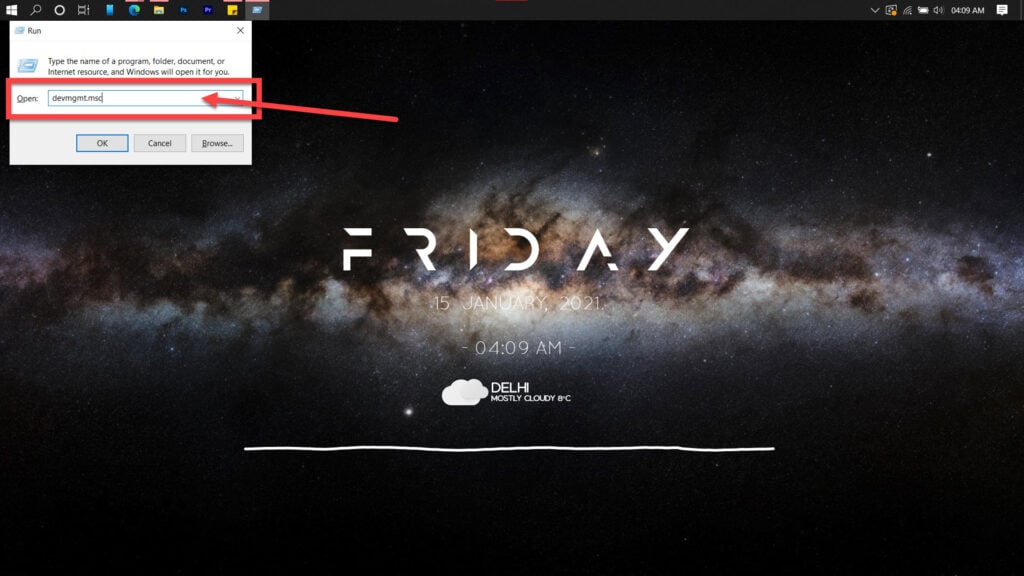
Step 1: Press Windows key + R, type in devmgmt.msc and hit enter.
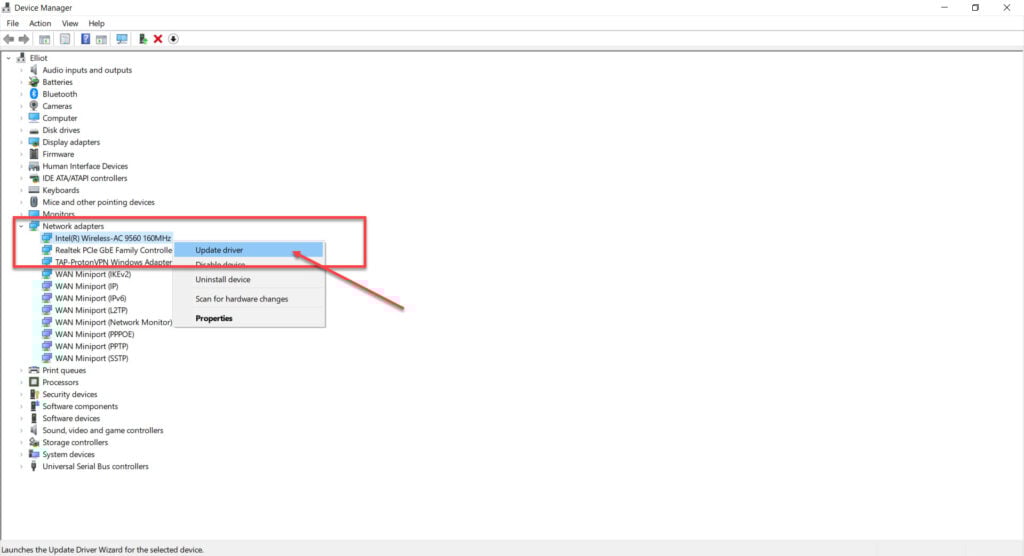
Step 2: Double-click Network adaptors to expand it and right-click your WiFi card or ethernet adaptor, depending upon what you need to fix. Click on Update driver.
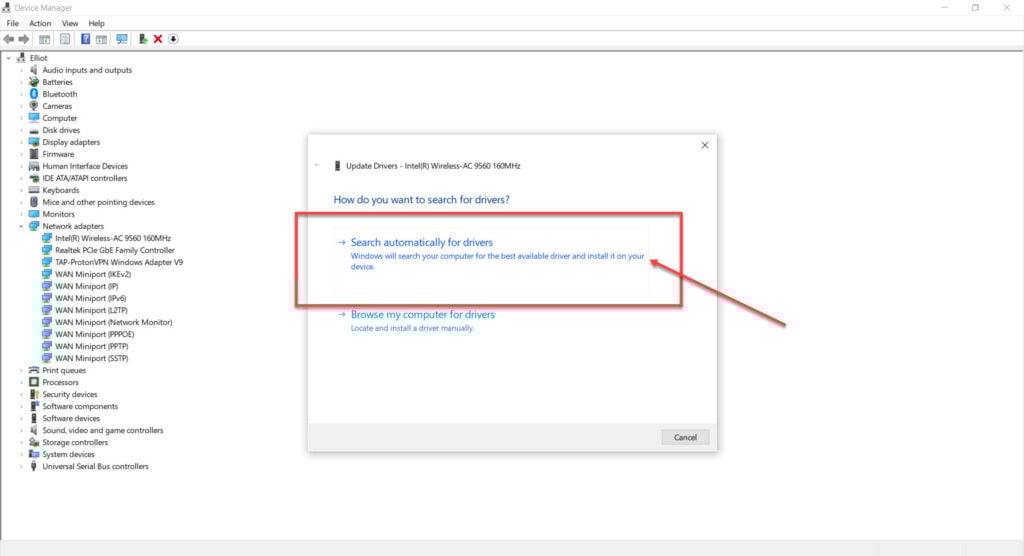
Step 3: Select Search automatically for drivers, and Windows will find and install any available updates.
Now restart your PC and try again.
Check the integrity of Steam game files
Luckily, Steam has a built-in feature that verifies your game files and reinstalls any files that might be damaged. Follow these steps.
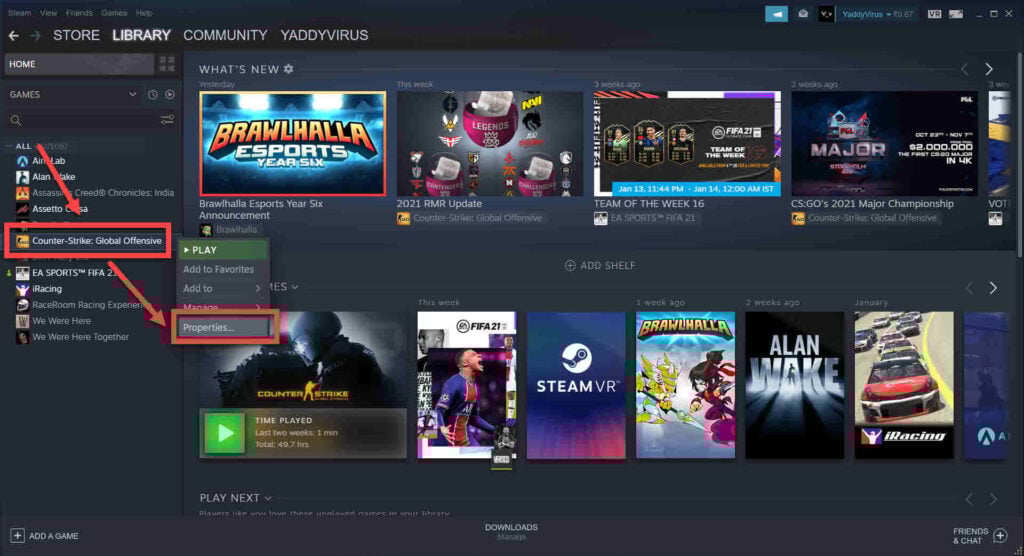
Step 1: Head over to your Steam Library, right-click on Ghost Watchers and select Properties.
Step 2: Head over to the Local Files tab.
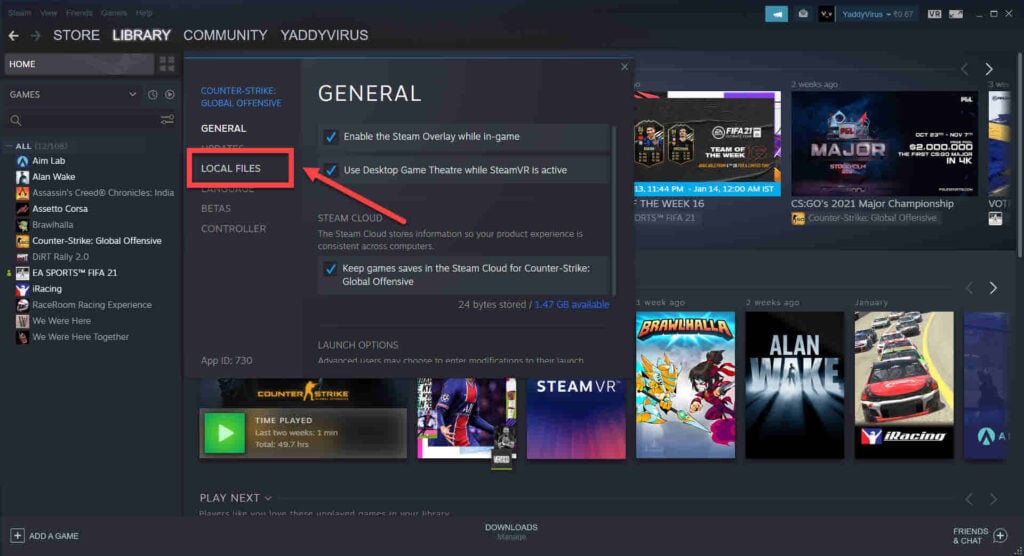
Step 3: Click on Verify integrity of local files… and let Steam do its thing.
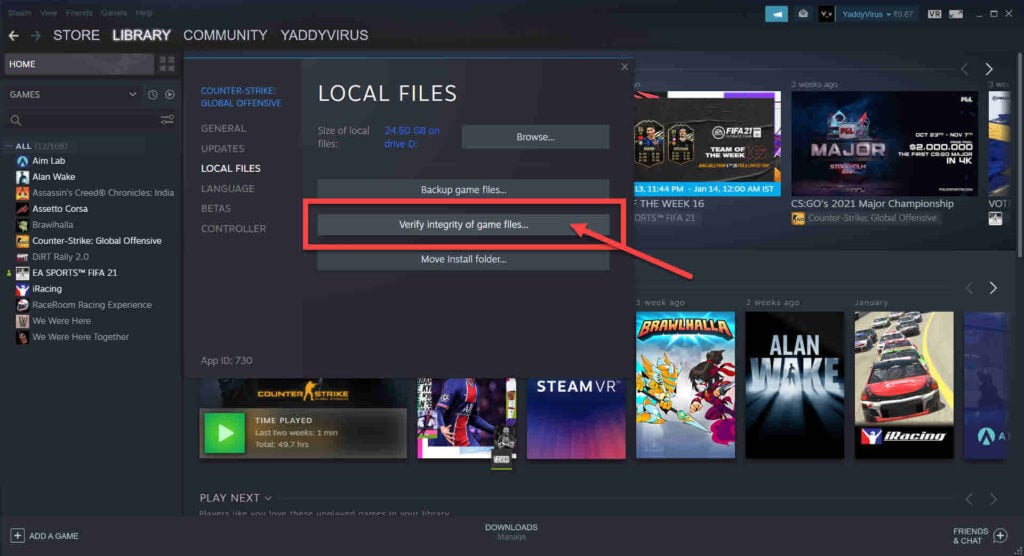
This should get the game running again.
Also read: How to fix Steam error: This item is currently unavailable in your region?
Ghost Watchers is an online horror game where you explore and hunt ghosts in abandoned houses. It is a multiplayer game you can play with friends online, most specifically on Steam. Because more and more games are incorporating multiplayer and co-op gameplay mechanics, they have become more fun to play with friends. But this also gives room to some issues, like errors occurring during gameplay; Ghost Watchers is not an exception.
The Ghost Watchers error joining lobby is one of such errors, players can’t join the lobby instead you are kicked out , or you get an error code while trying to join the lobby in Ghost Watchers.
Why Am I Seeing Ghost Watchers Error Joining Lobby Error
There are reasons for this error,
They are:
- Blocked ports.
- Issues with internet connectivity
- Using Proxy/VPN.
- Game region not correct
- Game version is outdated
The most foremost reason for ‘ghost watchers error joining the lobby is linked with the server. If the Ghost watcher server is offline, the error will appear indefinitely.
1. Restart your router
Restart router to eliminate any unseen network or connectivity issues you might be having. Simply turn off your router, wait some seconds, and turn it back on again. Check again, hopefully the error has stopped. If not, try some other fixes.
2. Check the in-game region
The server region is very important while playing multiplayer games. If your server region is very far, you will encounter issues based on high ping and latency as well as lobby connection issues. That’s why you have to choose a better region, while playing multiplayer games such as this
If you have issues connecting to your friends’ servers via the Steam Invite or Lobby Code, then change your region/server in the top left corner of the main menu to match the hosters, and try to connect from there.
Or another alternative, ask a friend to create a lobby and invite you, ask him to leave so you become the host and delete the lobby. Then try to create it yourself.
If you have symbols like #*)- or anything similar in your nickname, delete them. Then try to create or enter a game lobby in Ghost Watchers, to see if the error disappears.
3. Disabling any proxies or VPNs that you might be using
Trying to connect to a host through proxy or VPN connection, and they keep denying your connection request will bring this error. The reason is that high-profile sites, including video game sites, often block connections coming over VPN to ensure a consistent gameplay experience, therefore if you try to use a proxy server or VPN, the site will definitely block you from playing the game.
All you need to do is disable any proxy server or the VPN and try to reconnect to the game.
4. Check your drivers
The network adaptors driver you are using could be causing connectivity issues. Connect to the internet using either an ethernet connection or any other plausible alternative.
Then follow these steps to get your drivers in place.
- Press Windows key + R,and type in devmgmt.msc.
- Hit enter.
- Expand Network adaptors by Double-clicking
- Right-click your WiFi card or ethernet adaptor, depending on what you need to fix.
- Click on Update driver.
- Select Search automatically for drivers, Windows will find and install any updates available.
- Restart your PC and try again.
5. Check the integrity of Steam game files
Steam has inbuilt features meant to verify game files and reinstall any file that might be damaged. Follow these steps to check the integrity of Steam game files:
- Go Steam Library, right-click on Ghost Watchers and select Properties.
- Go to Local Files tab.
- And Click on Verify integrity of local files
Pro Tip To Fix This Error
- Ensure that nothing is blocking your WiFi router’s signal from coming to your device. Place in a position where it can spread the signal without any blockage
- Make sure you have stable internet connection
- Update Wifi adapters.
- Check for new Update on Ghost Watchers and install them
- Check for Windows Updates also
- Verify Game Files before installing.
Frequently Asked Questions
1. How do you fix ghost watchers error joining lobby?
These few methods listed will help you fix the error
Restarting your router,Disabling VPNs and proxies that you are using, Checking your in-game region, Checking the probity of the game files on Steam, and Checking the drivers.
2. How do you use items in ghost watchers?
you have to weaken ghosts and capture them, So use all items in such a way that you can weaken the ghosts and capture them easily.
3. How much does Ghost Watchers cost?
This game goes for $11.99.
We hope these few methods helps you fix the Ghost Watchers error joining lobby error, and you enjoy a seamless gaming experience.
Was this article helpful?
YesNo
If you want to fix the ghost watchers error joining the lobby, you can try a total of 5 methods. Those are –
- Restarting your router,
- Disabling VPNs and proxies that you are using,
- Checking your in-game region,
- Checking the probity of the game files on Steam, and
- Checking the drivers.
Ghost Watchers is the new sensation in the world of multiplayer games. Many players around the world have become fans of this wonderful game in recent times. But as technology is getting strong with newer innovations and games are becoming more and more exciting, the problems in playing these games are increasing simultaneously. And Ghost Watchers is not an exception.
So if you want to know more about solving ghost watchers’ error of joining the lobby, read this article till the last because here I am going to explain all methods of solving this error in detail.
Let’s start!
There are a few key reasons that are responsible for this error. So if you face this error while playing the game, remember these reasons so that you can fix this error easily.
The reasons behind this error are –
- Blocked ports.
- Internet connectivity problems.
- Active Proxy/VPN.
- Improper in-game region.
- Outdated version of the game.
Now let us talk about the methods by which you can resolve this annoying error.
How To Fix Ghost Watcher’s Error Joining Lobby
Here are the details of the 5 methods by which you can solve this annoying error. Read them carefully and apply them to solve the error.
Restarting Your Router
If you face the ghost watchers error of joining the lobby, the first method you should try to fix this error is to restart your router of yours. Restarting the router can resolve any kind of connectivity or network issues. Just switch off the router for a couple of seconds and turn it on back.
Fix 1. Restarting Your Router,
Simply disconnect your router from the power supply, wait around 30 seconds, and then plug it back in to restart it. Prior to trying to re-join the gaming lobby, let the router finish booting up. Any network congestion or connection problems that can be the root of the Ghost Watchers Error can be resolved with the use of this procedure.
Fix 2. Disabling VPNs And Proxies That You Are Using
As the second step, if you are using any proxy or VPN, then disable them.
Many high-profile websites often block the connections that are coming from a VPN server, and many gaming sites come in this list too. The sites do so to ensure constant game play. So if you are trying to play the game using any proxy server or VPN, the site can block you from playing the game.
To overcome this issue, you have to disable the proxy server or the VPN and try to reconnect to the game.
Fix 3. Checking Your In-Game Region
Another thing that can bother you while playing the game Ghost Watchers in multiplayer mode is the in-game region. If the players individually have chosen a region that is far away from each other, then you might face this error while playing the game.
That is why choosing a proper in-game region is recommended while playing the game in multiplayer mode.
Fix 4. Checking The Probity Of The Game Files On Steam
Sometimes, corrupted game files can trigger this annoying issue. So it is better to check the probity of the game files on Steam. If there are any corrupted game files, it will automatically reinstall them.
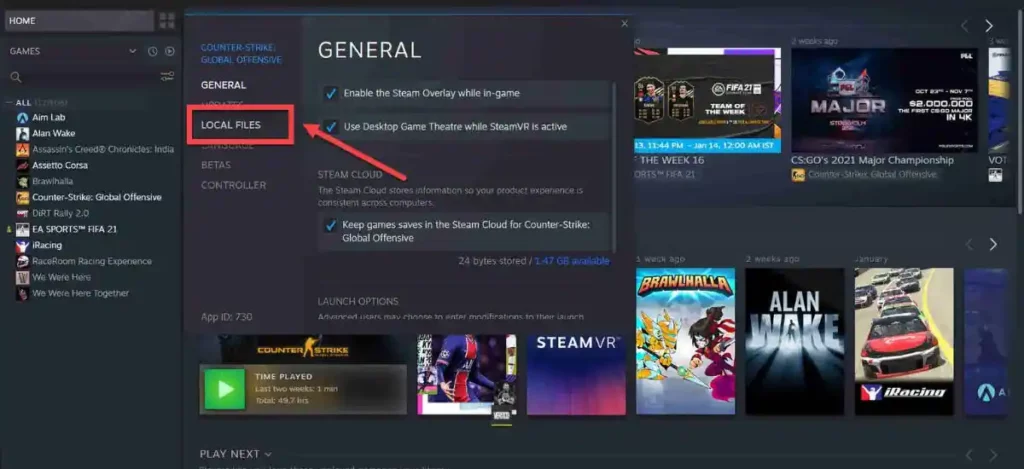
To check the probity of the game files on Steam –
- Open Steam Library.
- Select Properties of Ghost Watchers by right-clicking on Ghost Watchers.
- Go to the Local Files tab.
- Click Verify integrity of local files.
Fix 5. Checking The Drivers
A faulty network adaptor driver can trigger this issue. So it is better to get the drivers in place.
Use the following steps –
- Press the Windows key + R.
- Type devmgmt. MSC in the text box.
- Hit Enter.
- Expand Network Adapters.
- Right-click Ethernet Adapter/WiFi Card.
- Click Update Driver.
- Choose Search Automatically For Drivers.
- Restart PC.
Pro Tip To Fix This Error

Pro Tip: Try deleting your browser’s cache and cookies before reloading the game page to resolve the Ghost Watchers problem that appears when you attempt to join a lobby. If the problem still exists, try joining the lobby on a different computer or device. Additionally, make sure your device and browser fit the game’s system requirements and that your internet connection is steady. Contact the game’s support staff for additional help if none of these fixes work.
Frequently Asked Questions
Q1. How do you fix joining lobby ghost watchers?
You can try these methods – 1. Restarting your router, 2. Disabling VPNs and proxies that you are using, 3. Checking your in-game region, 4. Checking the probity of the game files on Steam, and 5. Checking the drivers.
Q2. How do you beat ghost watchers?
There are multiple levels in the game and you have to complete each of them to complete the game.
Q3. How do you use items in ghost watchers?
In the game, you have to weaken ghosts and capture them. So use all items in such a way that you can weaken the ghosts and capture them.
Q4. How much ghost watchers will cost?
You need to buy this game for $11.99.
The Final Words
In this article, I have thoroughly explained how you can solve the Ghost Watcher error joining the lobby. I hope this write-up will help you. All the best. Happy gaming!
See Also:
- Quickly Steps To Fix Windows 2000 Runtime Error?
- Quickly Steps To Fix Calamity Biome Chest Error