
Столкнулся вчера с такой грозной ошибкой на Anicubic Kossel. Пару раз запускал на печать — полминуты-минута и печать встает с этой ошибкой. Решил проверить что реально с температурой. Запустил печать и выяснил:
— разогрев идет нормально, до 200-201 (PLA, холодный стол)
— головка начинает опускаться и температура на глазах падает — 192 — 190 — 189
— начинается печать, температура не поднимается, держится на уровне 189-191 и через небольшое время принтер останавливается
Стал искать по 3DToday — ничего полезного не нашел, кроме советов заменить нагреватель, и термистор заодно. Нашел также советы по правке прошивки — увеличить термал протекшн:
#define WATCH_TEMP_PERIOD 40 // Seconds
#define WATCH_TEMP_INCREASE 4 // Degrees Celsius
Рядом с этими строками, чуть выше, нашлась и моя ошибка:
* If you get false positives for ‘Thermal Runaway’ increase THERMAL_PROTECTION_HYSTERESIS
* and/or THERMAL_PROTECTION_PERIOD
Только относилась она к другим переменным:
#if ENABLED(THERMAL_PROTECTION_HOTENDS)
#define THERMAL_PROTECTION_PERIOD 40 // Seconds — default 40
#define THERMAL_PROTECTION_HYSTERESIS 4 // Degrees Celsius — default 4
Попробовал увеличить до 6. Запускаю — Runaway. Увеличил до 10. Запускаю — Runaway. Попробовал увеличить WATCH_TEMP_INCREASE до 10. Runaway.
Оставил проблему на другой день — утро вечера мудренее.
Утром ошибка повторилась. И повторилась. Полез уже искать нагреватели на Алях, решив что мой таки дохнет. Для этого решил взглянуть на свой. Да не смог открутить. Ключи не подошли — тонкий проворачивается, потолще не лезет. Зато выяснил для себя (а собирал почти год назад и после этого не лез в него) что термистор, в отличие от прикрученного нагревателя — просто болтается в своей дырке (и не надо меня пинать ногами, что об этом все знают — я не волшебник, я только учусь). Ларчик просто открывался… Провод термистора при опускании головы чуть-чуть натягивался и термистор немного вылазил из своего убежища. Не настолько, чтобы совсем не определять температуру нагревателя, но достаточно, чтобы ее искажать. Нагреватель работал нормально. Но принтер об этом не знал. Поправил термистор, запустил печать — температура 202-200-198, всё печатается, без проблем.
Так как в тырнетах не нашлось с пол пинка решение моей проблемы — ни через поисковики, ни через 3D Today (может конечно плохо искал или невнятно разжевал поисковику, чего мне от него надо) — решил оставить для потомков решение этой проблемы здесь, вырубив ее топором… на пластике.
В общем. Квинтессенция мысли. Найдено на Эникубик Коссель, но возможно применимо и к другим принтерам, где термистор не фиксируется.
Если у вас вдруг начинает возникать ошибка Thermal Runaway или Heating failed, но пластик при этом течет нормально — это необязательно сдохший нагревательный элемент. Возможно у вас просто натянулся провод и термистор немного вылез — попробуйте засунуть его до центра отверстия и закрепить провода, чтобы он больше не вылазил.
Столкнулся вчера с такой грозной ошибкой на Anicubic Kossel. Пару раз запускал на печать — полминуты-минута и печать встает с этой ошибкой. Решил проверить что реально с температурой. Запустил печать и выяснил:
— разогрев идет нормально, до 200-201 (PLA, холодный стол)
— головка начинает опускаться и температура на глазах падает — 192 — 190 — 189
— начинается печать, температура не поднимается, держится на уровне 189-191 и через небольшое время принтер останавливается
Стал искать по 3DToday — ничего полезного не нашел, кроме советов заменить нагреватель, и термистор заодно. Нашел также советы по правке прошивки — увеличить термал протекшн:
#define WATCH_TEMP_PERIOD 40 // Seconds
#define WATCH_TEMP_INCREASE 4 // Degrees Celsius
Рядом с этими строками, чуть выше, нашлась и моя ошибка:
* If you get false positives for ‘Thermal Runaway’ increase THERMAL_PROTECTION_HYSTERESIS
* and/or THERMAL_PROTECTION_PERIOD
Только относилась она к другим переменным:
#if ENABLED(THERMAL_PROTECTION_HOTENDS)
#define THERMAL_PROTECTION_PERIOD 40 // Seconds — default 40
#define THERMAL_PROTECTION_HYSTERESIS 4 // Degrees Celsius — default 4
Попробовал увеличить до 6. Запускаю — Runaway. Увеличил до 10. Запускаю — Runaway. Попробовал увеличить WATCH_TEMP_INCREASE до 10. Runaway.
Оставил проблему на другой день — утро вечера мудренее.
Утром ошибка повторилась. И повторилась. Полез уже искать нагреватели на Алях, решив что мой таки дохнет. Для этого решил взглянуть на свой. Да не смог открутить. Ключи не подошли — тонкий проворачивается, потолще не лезет. Зато выяснил для себя (а собирал почти год назад и после этого не лез в него) что термистор, в отличие от прикрученного нагревателя — просто болтается в своей дырке (и не надо меня пинать ногами, что об этом все знают — я не волшебник, я только учусь). Ларчик просто открывался… Провод термистора при опускании головы чуть-чуть натягивался и термистор немного вылазил из своего убежища. Не настолько, чтобы совсем не определять температуру нагревателя, но достаточно, чтобы ее искажать. Нагреватель работал нормально. Но принтер об этом не знал. Поправил термистор, запустил печать — температура 202-200-198, всё печатается, без проблем.
Так как в тырнетах не нашлось с пол пинка решение моей проблемы — ни через поисковики, ни через 3D Today (может конечно плохо искал или невнятно разжевал поисковику, чего мне от него надо) — решил оставить для потомков решение этой проблемы здесь, вырубив ее топором… на пластике.
В общем. Квинтессенция мысли. Найдено на Эникубик Коссель, но возможно применимо и к другим принтерам, где термистор не фиксируется.
Если у вас вдруг начинает возникать ошибка Thermal Runaway или Heating failed, но пластик при этом течет нормально — это необязательно сдохший нагревательный элемент. Возможно у вас просто натянулся провод и термистор немного вылез — попробуйте засунуть его до центра отверстия и закрепить провода, чтобы он больше не вылазил.

Hi, I have a problem with temperature swinging and with error »E1 Err: MINTEMP / E1 THERMAL RUNAWAY (PRINTER HALTED Please reset)». I have SKR 1.3 board and 2208 UART driver on Ender 3. When turn on printer temperature works like normal. Then heated to working temperature (in this time works well) when starts printing (via USB or card) temperature swings a lot (like from 150°C to 210°C in range with less than second. When printing around one hour or less, printer beeps and I got error »E1 Err: MINTEMP PRINTER HALTED Please reset» or »E1 THERMAL RUNAWAY PRINTER HALTED Please reset». And I have a second problem with speed of printings. I print around 50mm/s and one straight line prints like 50mm/s, then one random line print like 100mm/s. Can I setup this in configuration.h?
What could be a problem for both situations?
I record video from this situation (link below)
https://drive.google.com/open?id=13DBjCPzpazk-YW4d8C1iu6ngvgbPMwuV
Primmson

changed the title
E1 Err: MINTEMP / E1 THERMAL RUNAWAY (PRINTER HALTED Please reset)
[BUG] E1 Err: MINTEMP / E1 THERMAL RUNAWAY (PRINTER HALTED Please reset)
Nov 10, 2019

It looks like you have a wiring issue with the thermistor, it’s unlikely to be just electrical noise with that much deviation caused by movement so check thoroughly that all the connections are sound and that there are no breaks in the wiring.
It looks like you have a wiring issue with the thermistor, it’s unlikely to be just electrical noise with that much deviation caused by movement so check thoroughly that all the connections are sound and that there are no breaks in the wiring.
I replace termistor one month ago and then works okay. Yesterday I do PID autotune and check resistance of termistor.

did you try and replace the thermistor again?
Configurations, please
Please ZIP up your Configuration.h and Configuration_adv.h files (as
requested in the Issue template) and drop them into your next reply.
We’ll check them over and see if anything is amiss.

I have a similar problem, the «THERMAL RUNAWAY» does not appear but actually the nozzle temperature keeps going from 215 ° to 209 ° as if the stabilization of the temperature was not stable.
@Gerggg What you describe sounds like a smooth curve on the temperature graphs, thats caused by PIDs not being tuned properly and is different from the instantaneous dodgy readings shown in this issue.
A resent PR changed the PID dT, but when PIDs are loaded from EEPROM this is not taken into account, so you may need to retune or reload the defaults.
Configurations, please
Please ZIP up yourConfiguration.handConfiguration_adv.hfiles (as
requested in the Issue template) and drop them into your next reply.
We’ll check them over and see if anything is amiss.
Marlin.zip
Hi, this is my configuration. I installed SKR 1.3 board with 2208 stepper drivers (UART) and BL touch.
Sorry @Primmson but at this point I have to assume it’s a hardware issue with your printer as the temperature readings jump around instantly and by large amounts showing huge amounts of noise, I’ve asked a few others with SKR 1.3 boards and I can’t find anyone else with a similar problem.
I’m hesitant to offer you a software solution because it would just hide the underlying hardware issue not fix it and that could cause more issues.
(If I do find anything in software that could be causing this, I’l let you know .. but it’s a lot more likely its hardware.)
Sorry @Primmson but at this point I have to assume it’s a hardware issue with your printer as the temperature readings jump around instantly and by large amounts showing huge amounts of noise, I’ve asked a few others with SKR 1.3 boards and I can’t find anyone else with a similar problem.
I’m hesitant to offer you a software solution because it would just hide the underlying hardware issue not fix it and that could cause more issues.
(If I do find anything in software that could be causing this, I’l let you know .. but it’s a lot more likely its hardware.)
Hi, I connect new thermistor and now is reads ok. But I have problem with acceleration when printing. I reduce speed and acceleration on ender (not on configuration.h). When printing with speed 40mm/s works great, and then just one straight line prints with abnormal speed and acceleration. Where can I set up this? Thanks for all answers!

This issue has been automatically locked since there has not been any recent activity after it was closed. Please open a new issue for related bugs.
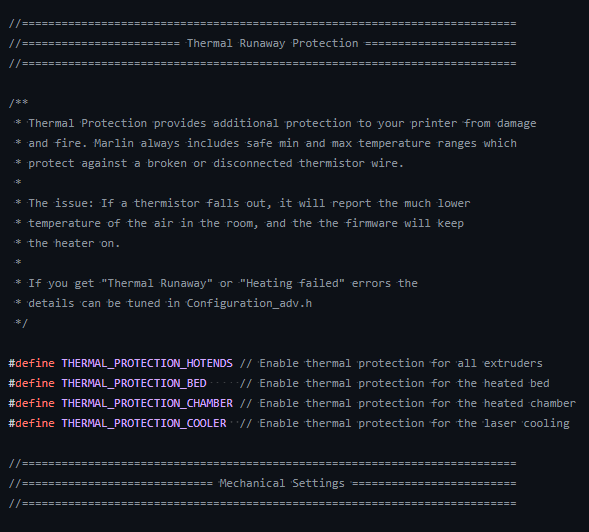
When you are getting the error such as Heating Failed or Thermal Runaway, you might be scratching your head and think why the printer is so poor and not able to finish the print. But reality, the printer is actually protecting you from resulting in fires in some cases, which is called Thermal Runaway Protection. E1 stands for Hotend number 1, which is default hotend number for most of the printer. If you have more than a hotend, you may face E2 or E3 Printer Halted.
What is Thermal Runaway Protection?
Most modern printers such as Ender 3, Artillery Sidewinder or Anycubic Kobra series, they are equip with newer Marlin firmware which has Thermal Runaway Safety feature. The feature designed to stop the printing process whether it detects the thermal no longer in the safe range.
Thermal Runaway: E1 Printer Halted during Printing
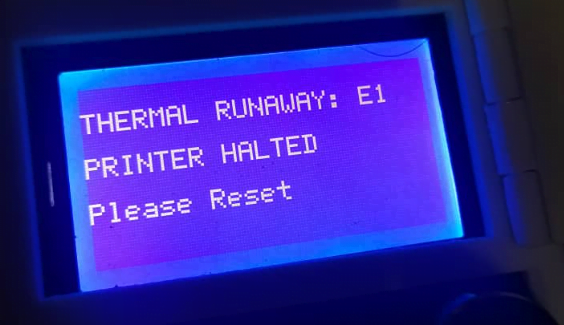
When you received this message during printing, it means the printer unable to maintain the temperature around the configured temperature. In this example we set the temperature at 200C. The main causes could be:
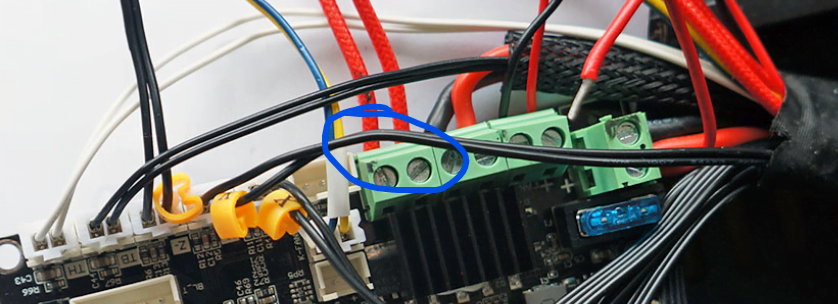
- Heater Cartridgeloose or disconnected, unable supply heat to maintain the temp at 200C
- Solution: Reconnect the wire from the board and also to the hotend.
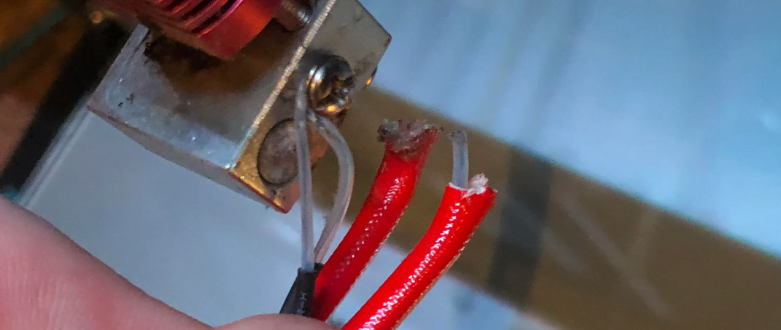
- Heater Cartridge wire broken, could be printer movement causing it to break
- Solution: Replace a heater cartridge, if change to different wattage, do perform PID tuning
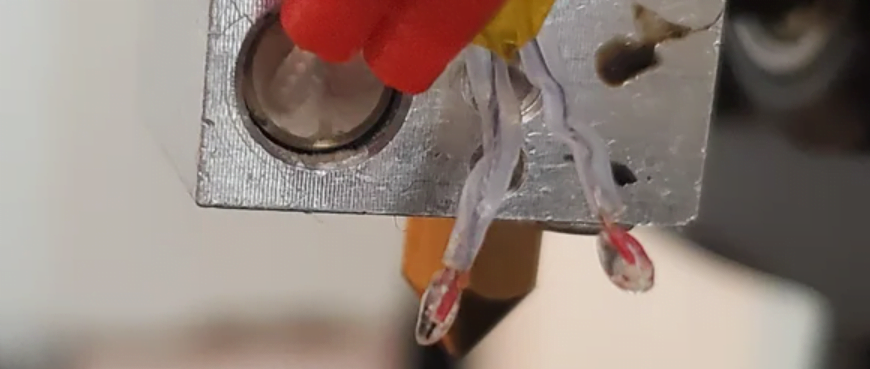
- Thermistor bulb broken or cartridge thermistor is dented
- Solution: Replace thermistor immediately, don’t try to fix it as some board does not have thermistor short protection, may cause the board to fry
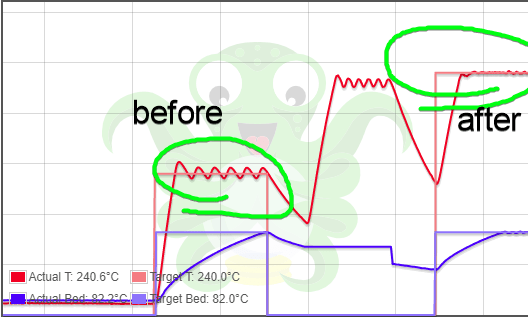
- Heater Cartridge wearing out, causing temperature fluctuation during printing. up and down +-10C.
- PID Tuning is required. Step by Step Guide
Thermal Runaway: E1 Printer Halted during Startup
In some cases, you might be getting thermal runaway during start of your printer, this means the thermistor already out of the temperature even heating is not here, normally acceptable range is from -15 to 260C. When it’s over 260C even during Start Up, it could means only 2 things, thermistor or motherboard need to be replaced. Heater Cartridge can be ruled out since this does not involve heating.
To identify which is the main causes,
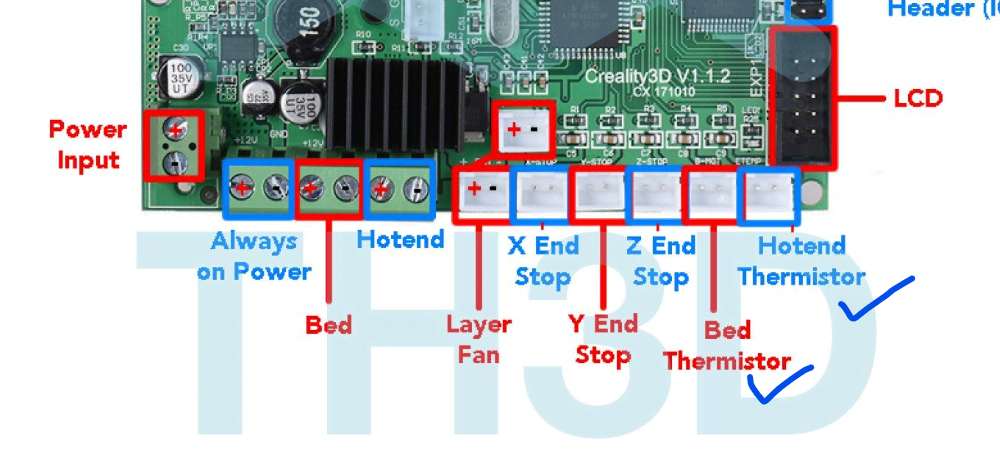
- Unplug both bed and hot end thermistor from the motherboard
- Boot up the printer. If only the printer running fine, replace thermistor.
- If printer still showing the same error, replace motherboard & thermistor as thermistor port shorted.
- REMEMBER to throw the existing thermistor together otherwise you will be shorting your new board.
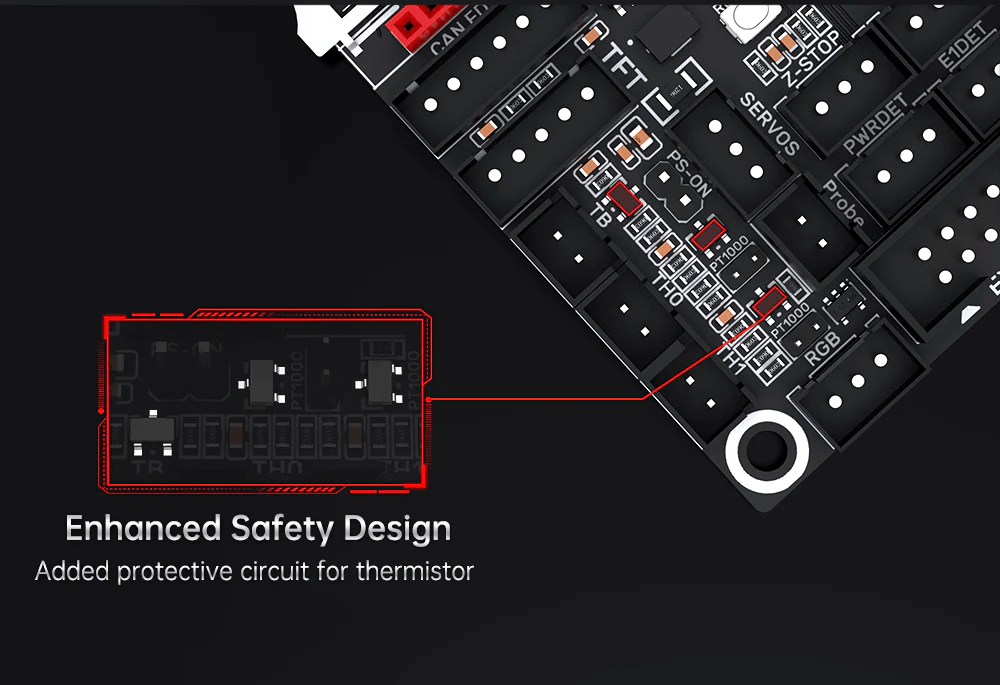
Some motherboard may have multiple thermistor port like SKR 1.4, but most of the time, when you shorted the port, all port will be malfunction together. The only solution is to change the board or even ugprade to a better board such as SKR 2 or SKR 3 which has thermistor short circuit protection.
Heating Failed: E1 Printer Halted during Heating
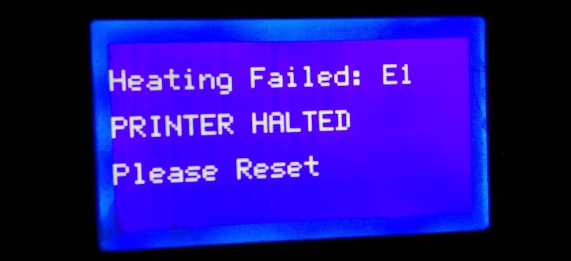
Heating fail usually happens during heating up the nozzle, and also before the printing start. Heating Failed highly related to the heater cartridge because the nozzle unable to reach the expected temperature. To identify the issue, Go the Menu > Temperature and set the temperature to 200C
- If temperature reached 190~195C and stay over there,
- do PID tuning Step by Step Guide
- If even after PID tuning still failed, replace heater cartridge.
- If temperature is not moving, remain at the room temperature,
- Heater cartridge broken, loose or disconnected, please do refer to the thermal runaway fixes above. Replace a heater cartridge is recommended.
- Mosfet of the motherboard burnt. Motherboard replacement is required.
- If your printer happen to have extra relay (PSU or module) for heating, check the relay if burnt. Try bypass the relay and see if heating up is working with direct current.
If you need to video guide, Thomas Sanladerer has a great video on explaining the thermal runaway issue
References: https://3dprinterly.com/how-to-fix-heating-fail-thermal-runaway-protection/
Topic: Ender 3 Pro: «THERMAL RUNAWAY: E1 PRINTER HALTED» error… (Read 7795 times)
0 Members and 1 Guest are viewing this topic.
This is almost surely not the right place for this post, but I have no idea where else to go (Creality’s own forum seems pretty languid…) and hoping long time users may have some good insight.
I’ve been getting consistent «THERMAL RUNAWAY: E1 PRINTER HALTED» errors starting this morning, always occurring about a few minutes into the print (barely at the second layer of the base), at what feels like the exact same time.
I was under Marlin 1.0.1, and upgraded to 1.0.3 (which I believe is the latest for my motherboard, v4.2.2).
Any ideas?…
Thanks.

Logged
If one of your thermocouples is loose, or the connection intermittent, this could trip the protection. Sometimes this can occur once things heat up enough, or if the cable or connection is poor, it could occur once the hot end or bed moves enough to put strain on the cable. It could be a combination of the two.
This describes it pretty well: https://3dprinting.stackexchange.com/questions/8466/what-is-thermal-runaway-protection/8467
This is just a pointer in the direction where I think the problem is. No guarantees, etc…
Good luck,
John
« Last Edit: January 04, 2022, 01:07:37 am by JohnG »
Logged
«Those who learn the lessons of history are doomed to know when they are repeating the mistakes of the past.» Putt’s Law of History
If one of your thermocouples is loose, or the connection intermittent, this could trip the protection. Sometimes this can occur once things heat up enough, or if the cable or connection is poor, it could occur once the hot end or bed moves enough to put strain on the cable. It could be a combination of the two.
This describes it pretty well: https://3dprinting.stackexchange.com/questions/8466/what-is-thermal-runaway-protection/8467
This is just a pointer in the direction where I think the problem is. No guarantees, etc…
Good luck,
John
John — thank you very much for pitching in. I managed to detach the fan shroud to look inside and tightened the thermistor (hopefully not too much…) and it seems this made the issue go away. Not sure why this was happening after a certain time of running, maybe heat and dilation of parts contributed to triggering the issue from a certain point on.
I’m printing! 
Logged
Yes the constant heating and cooling cycles will tend to loosen up parts. Differential thermal expansion, etc.
Logged
Profile -> Modify profile -> Look and Layout -> Don’t show users’ signatures
I get this on a Prusa Mini when it’s just too cold where I print. Taking it to a warm place always fixes the problem. Not sure where you are, but considering it’s January it may be relevant.
Logged
Doesn’t the thermocouple display maximum if the two wires are touching completely and it displays minimum if the wires are loose? I’d say the metal screw that holds the thermocouple is touching both it’s pins at the same time, intermittently, because of dilation coefficients and stepper impulses, else the thermocouple is faulty, change it they are cheap.
« Last Edit: January 06, 2022, 07:48:06 am by BatGroupCraft »
Logged
这个问题我遇到过。
如果硬件没问题,就检查打印设置。
cura软件的起始温度和打印温度设置要一致,第二层开启风扇的速度不要100%,改成50%。
意义就是把温度不要突变。有些硬件的PID性能不一定合适或没设置好。
I have encountered this problem.
If the hardware is OK, check the print settings.
The starting temperature of the cura software should be the same as the printing temperature setting, and the speed of turning on the fan on the second layer should not be 100%, but 50%.
The meaning is to keep the temperature from changing. The PID performance of some hardware may not be suitable or not set properly.
Logged
What is Thermal Runaway Protection? #
Thermal Runaway Protection is enabled in all Unified Firmware releases for all printers. This feature prevents the printer from operating when there is an issue with a heater or thermistor. Thermal Runaway errors occur when a thermistor fails to report a temperature properly, when a heater overshoots its target temperature or heats while it should be idle, or when a thermistor fails to register an increase in temperature when attempting to heat that device. In these cases, the firmware should present an error message and then immediately attempt to cut power to all functions of the printer, which prevents overheating, damage, and possible fire.
Thermal Runaway errors may NOT be able to control external devices that have their own power supplies or control units. When you encounter a Thermal Runaway error, you should ensure that you completely power down the printer and any additional devices or accessories attached to it.
E1 MaxTemp Error – Printer Halted #
The E1 MaxTemp error indicates that there is an issue with the “E1” device, which would be “Extruder 1” or the main hot-end on most 3D printers. An E2 error would indicate an issue on a second extruder/hot-end, and the bed has its own error as well. Typical causes of these errors include:
- Thermistor wire is pinched, damaged, unplugged, not fully seated, etc.
- Heater cartridge wire is pinched, damaged, unplugged, not fully inserted into the screw terminal, plugged into the wrong terminal, etc.
- Bed heater wire is pinched, damaged, de-soldered, unplugged, not fully inserted into the terminal, plugged into the wrong terminal, etc.
- Mainboard damage, including shorts to screw terminals, faulty wiring, blown components, incorrect wire configuration or polarity, etc.
The E1 MaxTemp error IS NOT a problem with the firmware itself in most cases. This instance is the firmware correctly displaying an error when there is a potentially dangerous situation, hence it is operating as intended. Once an error occurs, the printer must be reset by completely powering down the printer then powering it back on.
What do I do if this error occurs? #
- Unplug the printer and associated devices from power. This includes any other ancillary items, such as MOSFETS, SSRs, any third-party or external components that have separate power supplies or cables, etc. The printer and ALL accessories should be powered off and disconnected.
- Allow everything to cool before handling. Components may be hot, even if the error occurred while the printer was idle. Make sure to leave time for everything to cool while disconnected from power.
- Completely and thoroughly inspect ALL printer components, with an emphasis on the heaters and thermistors, their wiring, and their connectors. Check for any pinched or damaged wires, check for any loose or improper connections to the mainboard, check for any damaged components.
- Thoroughly examine the printer’s mainboard for damaged components, destroyed terminals, or any signs of an electrical short. The mainboard can also be the cause of the issue if there are electrical shorts, failed components, or improper installation.
- Depending on what component is causing the issue, you may consider replacing that component with a new one. Assuming nothing else on the printer is damaged, you can replace hot-end components as needed. If you can determine the cause of the problem, you can also ensure that the issue is corrected so that it does not occur repeatedly.
- If you are using a brand-new printer that is still under warranty, contact the manufacturer about exercising that warranty. Thermal Runaway errors SHOULD NOT occur on brand-new hardware from the factory. If you encounter this error while the printer is under warranty and still using stock components, immediately discontinue use and contact the manufacturer.
$begingroup$
My Ender 3 Pro started throwing the Thermal Runaway E1 error last week. Previous to that I had not modified or changed anything on the printer in months, other than move it’s location. I replaced the thermistor yesterday and set off a test print but got the same error.
Is this an issue with the motherboard? Or with the heater cartridge?
Printer specs:
- Ender 3 Pro
- Creality 4.2.7 silent motherboard
- all metal dual gear extruder
- Glass bed
- stock everything else

Trish
20.4k10 gold badges46 silver badges93 bronze badges
asked Nov 14, 2021 at 10:36

$endgroup$
9
$begingroup$
I solved this issue by using a multimeter to measure the resistance across both the thermistor and the heater cartridge. The resistance for the Ender 3 Pro are:
- Thermistor ~ 100k ohms
- Heater Cartridge ~ 14.4 ohms
My thermistor showed a resistance within the correct value, however my heater cartridge had a resistance of 0 ohms.
answered Nov 21, 2021 at 22:34
$endgroup$
You must log in to answer this question.
Not the answer you’re looking for? Browse other questions tagged
.
Not the answer you’re looking for? Browse other questions tagged
.
$begingroup$
My Ender 3 Pro started throwing the Thermal Runaway E1 error last week. Previous to that I had not modified or changed anything on the printer in months, other than move it’s location. I replaced the thermistor yesterday and set off a test print but got the same error.
Is this an issue with the motherboard? Or with the heater cartridge?
Printer specs:
- Ender 3 Pro
- Creality 4.2.7 silent motherboard
- all metal dual gear extruder
- Glass bed
- stock everything else
Trish
20.4k10 gold badges46 silver badges93 bronze badges
asked Nov 14, 2021 at 10:36
$endgroup$
9
$begingroup$
I solved this issue by using a multimeter to measure the resistance across both the thermistor and the heater cartridge. The resistance for the Ender 3 Pro are:
- Thermistor ~ 100k ohms
- Heater Cartridge ~ 14.4 ohms
My thermistor showed a resistance within the correct value, however my heater cartridge had a resistance of 0 ohms.
answered Nov 21, 2021 at 22:34
$endgroup$
You must log in to answer this question.
Not the answer you’re looking for? Browse other questions tagged
.
Not the answer you’re looking for? Browse other questions tagged
.
mozolis
Новичок
Решил присоеденится к обладателям 3д принтеров! купил ендер 3 про ,собрал ,захожу в мениу нажымаю ауто хоме принтер по моленку подвигаетса и выдаёт “THERMAL RUNAWAY, PRINTER HALTED, Please reset”!!!??? прошивка мерлин 0.0.8
как решить ???
спосибо!!!

Fockus
Администратор
Решил присоеденится к обладателям 3д принтеров! купил ендер 3 про ,собрал ,захожу в мениу нажымаю ауто хоме принтер по моленку подвигаетса и выдаёт “THERMAL RUNAWAY, PRINTER HALTED, Please reset”!!!??? прошивка мерлин 0.0.8
как решить ???
спосибо!!!
Проверь термистор, может быть он не надежно закреплен
Dimetresko
Новичок
Проверь термистор, может быть он не надежно закреплен
у меня вот такая же беда. Термистор цел и сидит плотно, я даже менял его, не помогло и сразу при включении Ender пищит и пишет тоже самое
Хочу настроить пид не знаю поможет ли, или надо в прошивку лезть
Fockus
Администратор
у меня вот такая же беда. Термистор цел и сидит плотно, я даже менял его, не помогло и сразу при включении Ender пищит и пишет тоже самое
Хочу настроить пид не знаю поможет ли, или надо в прошивку лезть
Можно попробовать откалибровать, видимо нагревательный блок что-то обдувает и нагреватель не может нагреться. Можно еще попробовать выключить обдув и откалибровать без него
What is Thermal Runaway Protection?
Thermal runaway protection is now enabled in all Marlin firmware releases. This feature prevents the printer from operating when there is an issue with a heater or thermistor. Thermal runaway errors occur when a thermistor fails to report a temperature properly, when a heater overshoots its target temperature or heats while it should be idle, or when a thermistor fails to register an increase in temperature when attempting to heat that device. In these cases, the firmware should present an error message and then immediately attempt to cut power to all functions of the printer, which prevents overheating, damage, and possible fire.
Thermal runaway errors may NOT be able to control external devices that have their own power supplies or control units. When you encounter a thermal runaway error, you should ensure that you completely power down the printer and any additional devices or accessories attached to it.
The E1 MaxTemp error indicates that there is an issue with the “E1” device, which would be “Extruder 1” or the main hot-end on most 3D printers. An E2 error would indicate an issue on a second extruder/hot-end, and the bed has its own error as well. Typical causes of these errors include:
- Thermistor wire is pinched, damaged, unplugged, not fully seated, etc.
- Heater cartridge wire is pinched, damaged, unplugged, not fully inserted into the screw terminal, plugged into the wrong terminal, etc.
- Bed heater wire is pinched, damaged, de-soldered, unplugged, not fully inserted into the terminal, plugged into the wrong terminal, etc.
- Mainboard damage, including shorts to screw terminals, faulty wiring, blown components, incorrect wire configuration or polarity, etc.
The E1 MaxTemp error IS NOT a problem with the firmware itself in most cases. This instance is the firmware correctly displaying an error when there is a potentially dangerous situation, hence it is operating as intended. Once an error occurs, the printer must be reset by completely powering down the printer then powering it back on.
What do I do if this error occurs?
- Unplug the printer and associated devices from power. This includes any other ancillary items, such as MOSFETS, SSRs, any third-party or external components that have separate power supplies or cables, etc. The printer and ALL accessories should be powered off and disconnected.
- Allow everything to cool before handling. Components may be hot, even if the error occurred while the printer was idle. Make sure to leave time for everything to cool while disconnected from power.
- Completely and thoroughly inspect ALL printer components, with an emphasis on the heaters and thermistors, their wiring, and their connectors. Check for any pinched or damaged wires, check for any loose or improper connections to the mainboard, check for any damaged components.
- Thoroughly examine the printer’s mainboard for damaged components, destroyed terminals, or any signs of an electrical short. The mainboard can also be the cause of the issue if there are electrical shorts, failed components, or improper installation.
- Depending on what component is causing the issue, you may consider replacing that component with a new one. Assuming nothing else on the printer is damaged, you can replace hot-end components as needed. If you can determine the cause of the problem, you can also ensure that the issue is corrected so that it does not occur repeatedly.
- If you are using a brand-new printer that is still under warranty, contact the manufacturer about exercising that warranty. Thermal Runaway errors SHOULD NOT occur on brand-new hardware from the factory. If you encounter this error while the printer is under warranty and still using stock components, immediately discontinue use and contact the manufacturer.
Ender 3 Pro, все в наличии, за исключением того, что я заменил магнитный лист на стеклянный стол.
Как говорится в банке, я получу эту ошибку примерно через полчаса после печати:
THERMAL RUNAWAY: E1
PRINTER HALTED
Please Reset
Я записал это во время акта, и вот некоторая информация, которую я собрал:
Температура экструдера непостоянна. Он установлен на 200 °C (по умолчанию Cura), но часто колеблется в диапазоне 197–202 °C.
Есть случайные сильные всплески, когда температура мгновенно поднимается с 200 °C до 190 °C, а затем поднимается до 205 °C.
Примерно за 5 минут до ошибки температура мгновенно упала с 200 °C до 170 °C, затем до 180 °C, затем до 190 °C, а затем снова упала до 200 °C.
Ошибка появлялась, когда температура экструдера составляла 190 °C.
Похоже, он странным образом прыгает, а не просто плавно переходит к более низкой температуре. Это заставляет меня подозревать, что проблема связана с датчиком.
Однако примерно в то время, когда происходили эти скачки, пластик не прилипал к пластине должным образом. Некоторые детали не приклеились:

Сравните нижнюю часть (напечатанную первой) с верхней (напечатанной последней). Много краев всплывает (хотя нижняя часть тоже не идеальна).
Это не было проблемой, пока я не перенес свой принтер в подвал (из моей спальни) для 30-часовой печати. У меня он работал ~ 14 часов прямо перед тем, как я впервые столкнулся с этой ошибкой. Разница температур между моей комнатой и подвалом минимальна.
Я также выровнял стол перед повторной попыткой, но это не решило проблему.
Я новичок в этом, я получил принтер 3 недели назад. Обширный гуглинг привел к множеству различных решений, но ни одно из них не соответствовало температурной ситуации моего принтера. Я публикую это в надежде найти разъяснения для себя и дать краткое описание проблемы, чтобы другим было проще найти решение.
Обычно это происходит из-за проблем с проводкой термистора (или, что менее вероятно, сам термистор может быть поврежден). Проверяйте целостность ваших проводов везде, особенно на конце термистора (легко повреждается при чистке хотэндов, смене насадок и т. д.).
Изолирующий силиконовый «носок»; не повредит и реальным колебаниям температуры, но они кажутся фантомными колебаниями, вызванными электричеством.
9 окт 22,
@Caleb Petersen PhD
Mature Content
This post contains mature content and may not be appropriate for certain viewers. To continue, confirm that you’re over 18.
Go to Home