

54
• Для установки прозрачного контейнера на место выполните
следующие действия:
– Установите основу на направляющую контейнера.
Закройте прозрачный контейнер, продвинув основание прозрачного
контейнера вверх до щелчка.
Прозрачный контейнер не предназначен для мытья в посудомоечной
машине, и при его очистке не рекомендуется применять моющие и
полирующие средства и освежители воздуха, поскольку они могут
повредить устройство.
ИНДИКАТОРЫ ФИЛЬТРА И ЗАСОРЕНИЯ
Устройство оснащено двумя световыми индикаторами, информирующими о
необходимости выполнения простых действий по обслуживанию.
• Индикатор фильтра мигает, если фильтр установлен неправильно.
Инструкции по установке фильтра см. в разделе «Промывка фильтра».
• Если фильтр нуждается в промывке, индикатор фильтра будет гореть
постоянно. Инструкции по промывке фильтра см. в разделе «Промывка
фильтра».
• В случае засорения загорается индикатор засорения. Следуйте инструкциям
по устранению засорений в разделе «Устранение засорений».
КОМПОНЕНТЫ ДЛЯ ОЧИСТКИ
Устройство содержит компоненты, которые необходимо регулярно
промывать. Следуйте инструкциям, приведенным ниже.
ПРОМЫВКА ВАЛИКОВ ЭЛЕКТРОЩЕТКИ
У Вашего устройства есть два требующих промывки валика, регулярно
осматривайте и промывайте их для поддержания эффективности работы в
соответствии со следующими инструкциями.
• Перед отсоединением щетки убедитесь, что устройство отключено от
зарядного устройства. Будьте осторожны, не переведите переключатель в
положение «ON» (Вкл.).
Порядок действий при отсоединении, промывке и замене валиков:
• Следуйте рисункам и инструкциям
≪Промывка валиков электрощетки≫,
приведенным выше.
• Переверните головку очистителя так, чтобы ее нижняя часть была обращена
к Вам. С помощью монеты поверните фиксатор на четверть оборота против
часовой стрелки, чтобы он защелкнулся в положении разблокировки.
• Поверните заглушку в положение открытия. отсоедините большой валик от
привода электрощетки.
• Снимите заглушку с большой щетки. Не мойте заглушку.
• Поднимите малый валик электрощетки за восьмиугольный конец и выньте его
из электрощетки.
• Держите валики под струей воды и осторожно протирайте для удаления
каких-либо волокон и грязи.
• Поставьте оба валика вертикально. Убедитесь, что большой валик стоит
вертикально, как показано. Оставьте их полностью высохнуть, хотя бы на
24 часа.
• Перед установкой на место убедитесь, что валики полностью высохли.
Установите на место сначала малый валик, а затем большой. Вставьте
закругленный конец малого валика на место. Нажимайте на восьмиугольный
конец, пока он не защелкнется на месте.
• Снова установите заглушку на щетку.
• Снова надвиньте большой валик на привод электрощетки, который
находится рядом сдвигателем. Заглушка должна быть в открытой позиции,
как показано на рисунке.
• Заглушка должна быть в открытой позиции, как показано на рисунке. Как
только она окажется на месте, поверните ее в закрытое положение.
• Заблокируйте фиксатор, повернув его на четверть оборота по часовой
стрелке. Убедитесь, что фиксатор полностью повернут и валики
надежно закреплены.
ПРОМЫВКА ФИЛЬТРА
Осмотрите и промойте фильтр в соответствии с инструкциями для
поддержания эффективности его работы.
• Снимите фильтр, повернув его против часовой стрелки в положение
разблокировки. Осторожно вытяните его из устройства.
• Сначала промойте внутреннюю часть фильтра; держите его вертикально
под струей холодной воды, слегка встряхивая вращательными движениями.
• Промойте наружную часть фильтра; наполните его холодной водой,
закройте ладонью открытую сторону и осторожно потрясите.
• Повторно промывайте фильтр внутри и снаружи, пока вода не станет чистой.
• Осторожно постучите по фильтру, чтобы стряхнуть воду, и положите
сушиться фильтрующей стороной вниз.
• Оставьте фильтр как минимум на 24часа до полного высыхания.
• Убедитесь, что фильтр полностью высох.
• Чтобы установить фильтр на место, вставьте и поверните его по часовой
стрелке до фиксации.
При использовании пылесоса для уборки мелкой пыли или при частом
включении режима максимальной мощности всасывания, возможно,
потребуется чаще промывать фильтр.
Не мойте фильтр в посудомоечной или стиральной машине, не сушите
в сушильном барабане, духовке, микроволновой печи или возле
открытого огня.
ЗАСОРЕНИЯ —
АВТОМАТИЧЕСКИЙ ВЫКЛЮЧАТЕЛЬ
• Данное устройство оснащено автоматическим выключателем.
• Засорение какой-либо части может привести к автоматическому
выключению устройства.
• Двигатель в течение некоторого времени работает прерывисто
(т.е. несколько раз быстро включается и выключается), и светится
индикатор засорения.
• Перед устранением засорений дайте двигателю охладиться.
• Перед устранением засорений убедитесь, что пылесос отключен
от зарядного устройства. В противном случае это может привести к
получению травм.
• Устраните засорения перед повторным использованием.
• Перед использованием устройства надежно закрепите все его части.
• Устранение засорений не входит в гарантийное обслуживание.
УСТРАНЕНИЕ ЗАСОРЕНИЙ
Если возникло засорение, двигатель работает прерывисто и включается
индикатор засорения. Следуйте инструкциям для поиска засорения:
• Перед устранением засорений убедитесь, что пылесос отключен от
зарядного устройства. Будьте осторожны, чтобы не нажать на кнопку
включения пылесоса во время очистки.
• Не включайте пылесос во время устранения засорений. В противном случае
это может привести к получению травм.
• Перед устранением засорений дайте двигателю охладиться.
• При проверке на наличие засорений следите, чтобы не пораниться об
острые предметы.
• Чтобы проверить наличие засорения в корпусе устройства, снимите
прозрачный контейнер в соответствии с инструкциями в разделе об очистке
прозрачного контейнера, затем устраните засорение.
• Если устранить засор не удается, возможно, потребуется снять щетки.
Выполните следующие действия:
– Чтобы снять щетки насадки Fluffy с мягким валиком, обратитесь к разделу
«Промывка щеток насадки Fluffy с мягким валиком». Удалите засор и
установите щетки на место, как показано в разделе «Промывка щеток
насадки Fluffy с мягким валиком». Перед использованием устройства
убедитесь, что фиксатор полностью повернут, а основание и щетки
надежно закреплены.
– Чтобы снять щетку с насадки с прямым приводом или с электрической
мини—насадки, разблокируйте фиксатор с помощью монеты и сдвиньте
щетки с головки очистителя. Удалите засорение. Поместите щетку
обратно и зафиксируйте ее, затянув фиксатор. Перед эксплуатацией
устройства убедитесь, что щетка надежно закреплена.
• Насадка данного пылесоса имеет валик со щетиной из углеродного волокна.
Будьте осторожны, касаясь ее руками. Это может вызвать незначительное
раздражение кожи. Рекомендуется вымыть руки после контакта с щетиной
валика насадки.
• Перед использованием устройства надежно закрепите все его части.
• Устранение засорений не входит в гарантийное обслуживание.
ЗАРЯДКА И ХРАНЕНИЕ
• Устройство автоматически отключается при падении температуры
аккумулятора ниже 3 °С. Эта функция предназначена для предохранения
двигателя и аккумулятора. Не заряжайте устройство, если оно будет
храниться при температуре ниже 3 °С.
• Для продления срока службы аккумуляторной батареи, рекомендуется не
производить зарядку сразу после полной разрядки аккумулятора. Дайте
аккумулятору остыть, прежде чем вновь заряжать его.
• Не прижимайте аккумулятор к поверхностям во время использования
устройства. Это позволит избежать перегрева и увеличить срок
службы аккумулятора.
ПРАВИЛА ТЕХНИКИ БЕЗОПАСНОСТИ ПО
ЭКСПЛУАТАЦИИ АККУМУЛЯТОРОВ
• Если аккумулятор требует замены, обратитесь в службу поддержки
компании Dyson.
• Используйте только зарядное устройство производства компании Dyson.
• Аккумулятор является герметичным устройством и в нормальных условиях не
представляет опасности. Вероятность утечки электролита из аккумулятора
крайне мала, но если это случилось, не трогайте электролит и соблюдайте
следующие меры предосторожности:
– При контакте с кожей возможно раздражение. Промойте пораженный
участок водой с мылом.
– Вдыхание электролита может привести к раздражению верхних
дыхательных путей. Выйдите на свежий воздух и обратитесь за
медицинской помощью.
– При попадании в глаза возможно раздражение. Немедленно тщательно
промойте глаза водой в течение как минимум 15 минут. Обратитесь за
медицинской помощью.
– Утилизация: при обращении с аккумулятором надевайте перчатки, а
затем немедленно утилизируйте их в соответствии с принятыми в вашей
местности правилами и нормами.
ПРЕДОСТЕРЕЖЕНИЕ
При неправильном обращении аккумуляторы, используемые в данном
устройстве, могут представлять опасность вследствие возгорания или
получения химического ожога. Не разбирайте, не пытайтесь закоротить
контакты и не нагревайте аккумуляторы до температуры выше 60˚C (140˚F),
а также не бросайте их в огонь. Своевременно производите утилизацию
аккумуляторов. Храните вдали от детей.
ПОДДЕРЖКА ЧЕРЕЗ ИНТЕРНЕТ
• Для получения помощи, общих рекомендаций, видеоматериалов и полезной
информации о Dyson через Интернет.
www.dyson.com.ru/support
ИНФОРМАЦИЯ ПО УТИЛИЗАЦИИ
• Изделия компании Dyson производятся из высококачественных материалов,
допускающих переработку. По возможности сдавайте устройство
на переработку.
• Перед утилизацией аккумулятор необходимо извлечь из устройства.
• Утилизация или переработка аккумулятора должна производиться в
соответствии с местными предписаниями или постановлениями.
DISCLOSURE: This post may contain affiliate links, meaning when you click the links and make a purchase, we receive a commission at no additional cost to you
The Dyson V10’s filter is meant to be thoroughly cleaned at least once a month. You will find yourself doing it more frequently if you use it very often or capture lots of fine dust. But what happens if you put the filter back after cleaning and your Dyson vacuum no longer works?
If your Dyson V10 doesn’t work after a filter clean, check that the filter unit attached correctly. It’s also possible that the filter is still wet after cleaning because it hasn’t been given enough time to dry thoroughly or that the motor-head has failed after sucking in water from that wet filter. There could also be a blockage elsewhere, or the filter could be worn out.
In the following sections, we’ll explore each of those possible reasons why your Dyson V10 isn’t working after you’ve cleaned the filter. We’ll also walk you through the solutions for each of those issues so you can get your Dyson V10 up and running again.
See Also: Why Is Dyson Vacuum Not Holding A Charge?
Possible Reasons For Why A Dyson V10 Is Not Working After Cleaning The Filter:
If your Dyson V10 isn’t working after you’ve cleaned the filter, it might be because the filter unit isn’t reinstalled correctly, the filter is still wet, or the motor head has failed. The filter may have also worn out, or there are other blockages that you did not clean out before.
Related: Dyson Vacuum Troubleshooting Guide
1. Incorrectly Installed Filter
Once you’ve cleaned your Dyson V10’s filter, you’re meant to reattach it to the vacuum by twisting the cap clockwise until it clicks. However, the vacuum will not work if it senses that the filter unit is not installed correctly.
Sometimes, the problem might not be a mistake on your part. Besides incorrectly twisting the unit into place, it’s also possible that debris has gotten stuck and is preventing the filter unit from fitting into place as it should. Without a total seal between the filter unit and the rest of the vacuum, the V10 will not work when you pull the trigger.
Another tell-tale sign that the filter unit isn’t installed correctly is a flashing blue light on the side of the unit when you pull the trigger. That is one of several warning lights designed to notify you when the vacuum is facing an issue that requires troubleshooting.
How to fix it:
To troubleshoot and fix this issue, first remove the filter unit from the vacuum. Inspect the sections where the filter unit comes into contact with the vacuum and ensure that there isn’t any debris that will prevent the filter from locking into place.
Next, push the filter unit into place and twist it clockwise until you hear a click. You might find that a bit challenging because of the rubber gasket used to form a very tight seal without any air gaps between the filter and the vacuum unit.

For additional guidance, you can refer to the sticker that’s on the back of the filter unit, which provides you with instructions on attaching it to the V10 correctly.
2. Filter Is Still Wet
Like most people, you’ve probably followed Dyson’s instructions to wash the filter under a cold water tap. Unfortunately, many people do not give the filter enough time to dry out thoroughly after that. Instead, they mistakenly reattach the filter unit onto the vacuum while it’s still wet.
A wet filter will not allow any air to travel through it, halting all airflow throughout the entire vacuum. When that happens, the Dyson V10 will not allow itself to work as a way of protecting itself against further damage.
How to fix it:
If your Dyson V10’s filter is still wet, you must remove it immediately and let it dry overnight. Trying to force the vacuum to work with a wet filter could be very damaging to the appliance and its motor, as you’ll see in the next section.
If this is the case, the water or some of the excess moisture could have found its way into other parts and attachments on the vacuum. So, be sure also to take the rest of your vacuum apart and dry up any parts or components that might have become wet because of that moisture from the filter.
Dyson recommends that you wash the filter thoroughly and then give it 24 hours to dry out entirely. That can be a very long time if you’re planning on using the vacuum to do more cleaning on the same day. So, be sure to plan ahead.
When drying the filter, you do not have to use a hairdryer, heat gun, or any other heat source to do so. It’s also not a good idea to dry it under direct, scorching sunlight, as that could cause more wear and tear to the filter as well.
Instead, the most effective way to dry the vacuum filter thoroughly is to put it in a place where there’s optimal airflow. Then, leave the filter to air dry for the next 24 hours, and you’ll be able to use your vacuum like normal again.
3. The Motorhead Has Failed
Another possibility is that the motor head on your Dyson V10 has failed completely. If this happens after you’ve just cleaned the filter, then it’s likely that the filter was still wet when you reattached it to the vacuum.

The water from the wet filter would have been sucked in by the motor and damaged it to the point that it can no longer function correctly. That happens when the water finds its way into the electrical parts of the motor, causing a short circuit that damages the motor and makes it completely unusable.
How to fix it:
If the motor head on your Dyson V10 has suffered from water damage, then the only solution here is to replace the motor entirely. The best way to do that is to contact Dyson’s customer support to see if they can do that for you. If not, they should be able to tell you what your options are for getting it fixed.
Another option is to go directly to your local appliance repair specialist. They would be able to source the replacement motor and fix it for you as well.
Once the motorhead has been replaced with a new one that functions correctly, you’ll be able to continue using your Dyson V10 vacuum like you usually do.
4. The Filter Has Worn Out
The filters on Dyson V10 vacuums are designed to last only two years. The filters will last longer if you rarely use your vacuum, or it’ll wear out quicker if you use it more than the average user. That’s especially true if you use it to capture lots of very fine dust, which saturates the filters much quicker.
When these Dyson vacuum filters catch large pieces of dust and debris, they’re easy to clean. If you wash these filters regularly under a cold tap, most of the dust and debris will be removed without any problems.
However, the same filters also have very tiny pores that capture fine dust. That fine dust is not so easy to remove even after repeated washing.

That means that over time and especially after regular washing, the filter will become worn out as part of its regular wear and tear. The filter will become saturated with dust, reducing the amount of airflow that can easily pass through the filter.
How to fix it:
If your Dyson V10 has been using the same filter for two years or more, then it’s time to purchase a replacement. It’s always best to buy replacement filters directly from Dyson instead of third-party sellers. That way, you can rest assured that the filter is compatible with your Dyson V10 and that it is highly reliable.
5. There Are Blockages Elsewhere
Even though you’ve cleaned the Dyson V10’s filter, it’s possible that you may have overlooked a blockage elsewhere in the vacuum. When this happens, the vacuum will pulsate whenever you pull the trigger.

The Dyson V10 is designed sometimes to pulsate when you pull the trigger as a way to notify you that there’s a problem. It does that in order to prevent the motor from running continuously in a way that might damage itself.
If the vacuum is pulsating, then there might be a blockage in the brush bar, the wand, or the inlet. These sections should also be cleaned thoroughly whenever you clean the vacuum’s filter.
How to fix it:
To fix this problem:
- Remove all of the Dyson V10’s parts and attachments after you’ve cleaned the filter.
- Inspect the brush bar, the wand, and the inlet (where the wand meets the vacuum) for any blockages.
- Clean them out and ensure that air can flow through each part without any obstructions.
- Doing so will ensure that air can flow from the bottom of the vacuum (at the brushbar) all the way to the top (at the filter) without any obstructions.
When the filter light on your Dyson V10 appears, there may be a blockage in the vacuum. If the warning light is flashing, it’s probably time to clean the filter. If the warning does not go away after cleaning, it may be a problem with the motor. To resolve this, you can contact Dyson service. It is easy to clean the filter by hand, but if you’re having trouble, call a professional technician right away.

If you’re looking for a way to fix a Dyson V10 filter light, there are a couple of different options. First, you can use the cold water faucet to clean the filter. You’ll want to give it a few hours to dry before using it again. Obviously, a wet filter will not work. It’s a good idea to clean the filter at least once a year, or if it’s been a while.
If your Dyson V10 has a solid amber light, you should replace it. Otherwise, it’s a temporary problem. A problem with the battery will cause the filter to stop working properly. If it’s a blockage, replace it with a new one. The filter will only cost you $20 and is easy to replace. Just make sure you check the vacuum’s filter before you attempt to clean it.
If you see the Dyson V10 filter light on, you’ve probably plugged it in the wrong way or that the filter has been over-discharged. If the filter has become wet, you’ll have to replace it. This is easy to do, and it’s the best option to ensure that your Dyson is working correctly. You can follow the steps below to get it back in working condition.
Another common problem with the Dyson V10 filter light is that it’s not screwed on properly. Make sure the rear HEPA filter is screwed on securely. If you find that the light flashes, you’ll need to replace the filter. Fortunately, replacement filters are cheap and easily available. They’re also easy to replace. Just make sure you have a spare on hand before using the Dyson vacuum cleaner.
The filter light on a Dyson V10 vacuum should be flashing. If you notice a solid red light, this is a sign that the filter is dirty. If the light is flashing, it may be a battery problem, and you’ll need to replace it. Luckily, the replacement filter will cost you under $20. You can also find a replacement pre-filter by searching online.

The filter light on a Dyson V10 vacuum should be solid and not flashing. However, if it is flashing, it means the filter needs to be replaced. The warning light on the Dyson V10 vacuum is the filter’s internal light. If you see a solid red or no blue LED, it means that the filter is in need of replacement. If it is flashing, you need to replace the filter.
If the filter light on your Dyson V10 vacuum is flashing, it’s possible that the lid has not been closed properly. You can also have a flat battery. You can clean the vacuum by using cold water and then replace the filter. The Dyson V10 filter should be replaced every six months. If you are unsure of whether it is time to replace the filter, consult a Dyson expert.
A blue Dyson filter light on the V10 indicates that it is plugged into the vacuum. The filter should not be inserted if the filter is flashing or is missing. If the light is blinking, the filter isn’t working properly. If the blue light is on, the filter is too dirty or isn’t inserted properly. If you see the red light, clean it and try again.
The filter on the Dyson V10 vacuum is designed to last about two years. If you use your vacuum sparingly, the filter will last longer. If you use the vacuum frequently, it will wear out quicker. The pulsating sound may be caused by the filter being jammed. If the filter is plugged in, it is time to change it. If the light is on, you can continue to vacuum.
Let’s start with Reading the Warning Lights in Your Dyson V10. From the bedroom to the drawing cum dining, the cord-free vacuum cleaners do come in handy. And when you own a Dyson V10, you can achieve optimum cleaning with minimum effort. However, while using it on a day-to-day basis, you also have to learn how to read its warning lights, especially the Dyson V10 blockage light, to keep it functional for a long time.
In vacuum cleaning, one name that has been accepted worldwide is Dyson V10. Available in three models—Total Clean, Absolute Clean, and Animal, they are known for their powerful suction power. Indeed, there are reasons why people tend to choose this particular brand over others:
- They are built with cyclone technology that captures even the most minute particles.
- The vacuums come with additional tools, such as the crevice tool, combination tool, dusting brush, mini motorized tool, etc.
- They have up to 60 minutes of run time.
- They are aided with an LCD screen to monitor performance and run time.
- Indicators to ease the appliance maintenance
How to Read the Warning Lights in Your Dyson V10?
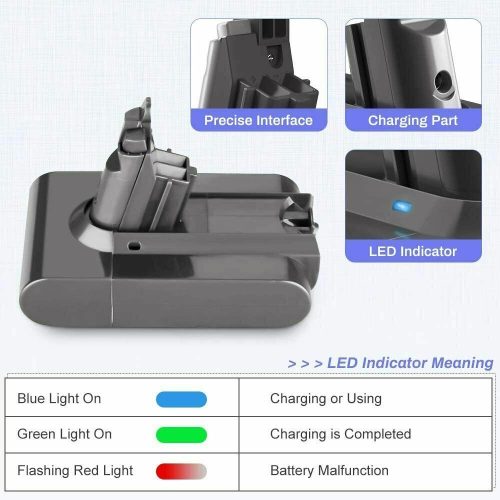
The Dyson V10 models have different warning lights: red, green and blue. First, if there is a flashing green light, it means the battery is being charged or needs to be charged.
Second, you may see one, two or three blue lights in a row. These will tell you the battery charge level: low, medium or full. You may also experience flashing red lights. This means the battery is not charged. If the battery does not charge, it will need to be replaced.
Third, the light may flicker, alternating between red and blue. This warns you that the battery is not being charged properly. Make sure your power cord is fully plugged in and that the pins are not attached to the docking station.
The blue, red or green light on your Dyson V10 may appear during charging as well as during use. They indicate charging, battery, temperature and malfunction issues. Whether the lights are solid or flashing will be another sign of the problem.
Not all models have exactly the same warning system. Some models have more lights and colors than others, but they will all alert you to different problems. Keep reading to learn the reasons behind your warning lights, as well as how to fix them.
Blue Light – Warning Lights in Your Dyson V10
You may notice a blue light while charging. It just tells you that your battery is charging properly. When the light is off, your battery is fully charged.
A blue light indicates a charging problem. Unlike red lights, the problem is caused by something temporary. Your vacuum may be too cold, too hot, or there is a power problem.
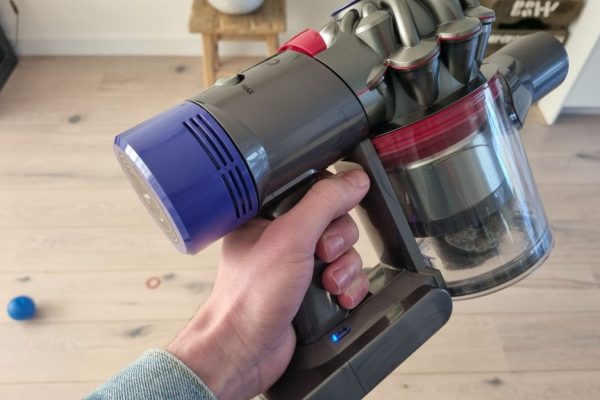
How to fix the Blue Warning Light?
If you use the maximum setting a lot, it may cause your Dyson V10 to overheat. You need to let the vacuum rest and return to room temperature. Try to use the maximum setting sparingly if this is a general problem for you.
To fix temperature issues, you’ll need to bring your Dyson V10 back to operating temperature. This temperature ranges from 37°F (3°C) to 104°F (40°C). If the temperature is correct, you may have a power cord problem.
To troubleshoot your power cord, first make sure everything is fully plugged in. After that, if the light does not turn blue, you should try a different electrical outlet. The last resort is to buy a new power cord.
Green Light – Warning Lights in Your Dyson V10
In your Dyson V10, a common indicator you might see is a green light. The green lights warn about battery and charging issues. When the green light is on while charging, it means that the battery of your Dyson V10 is charging properly and there is no problem.
But if the light turns green during use, there is a problem. Your Dyson V10 may turn off as soon as the light comes on. This can happen for two main reasons: a blockage or a battery problem.
If the green light starts flashing rapidly on your Dyson V10, your vacuum cleaner is overheating. You will need to place it somewhere that can cool down to room temperature before attempting to vacuum again.
Dyson V10 is designed to generate pulses. This is an acoustic feature that indicates airflow restriction and prevents engine damage. This is usually due to a blockage in the machine or a clogged filter.
How to fix the Green Warning Light?
After flashing green light in your Dyson V10, you should check blockage of your Dyson. If you have not cleaned the vacuum cleaner for a while, dust may accumulate and the vacuum will automatically turn off. Check the filter, brush roll, hose, and dirt tray and clean any accumulated dirt.
If your Dyson V10 is clean, you most likely have a battery problem. If your battery is relatively new, check your charging cord or dock. Something may be blocking the connection or it may not be connecting at all.
If none of these solutions work, then your battery is completely dead and won’t charge. In this case, you will need to replace the battery.
Red Light – Warning Lights in Your Dyson V10
When you see a flashing red light, it means there is a voltage or battery problem. Red warning lights in your Dyson V10, the problem is caused by something temporary. Your vacuum cleaner may be too cold, too hot, or there is a power problem.
A red light on your Dyson means the vacuum is too hot or too cold. It works like blue light on other models. The best solution to this problem is to leave the vacuum alone for a while.
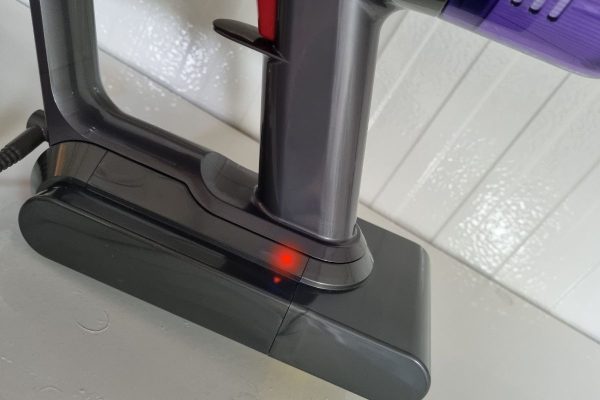
In order to maintain your Dyson V10, you need to watch out for the two important warning lights—the blockage light and the filter light. If you take a close look at your cleaner, you will find the lights located near the trigger on the battery pack. Now, in the normal state, these lights won’t flash. In case you see them flashing, do remember that your Dyson V10 is not in working condition or won’t work.
So what you would need is a fix, which is pretty easy.
Blockage Light – Warning Lights in Your Dyson V10
Just follow the below steps if you observe the blockage light is flickering:
- Detach any tools and the wand from the vacuum.
- Hold the trigger for about 10 seconds.
- Next, if you see the blockage light turning off, then be certain that there is some blockage in the tools or the wand. Therefore, check both ends of the wand carefully. If you notice any congestion, clear that right away.
- After that, check the cleaning head. You can use a coin to open the end cap. Take a look at the neck of the cleaning head thoroughly, and cleanse the brush bar.
- If the blockage light still stays on, then the blockage must be in the bin inlet or the cyclones.
- Remove the bin, open its door, and if you observe any blockage, tap it against any hard surface to force out the dust or debris.
- Now, clean the cyclone in the same manner.
- Reattach all the vacuum parts, press the trigger once again for 10 seconds, and confirm whether the blockage light is still flashing. If yes, then it concerns your filter section.
Filter Light – Warning Lights in Your Dyson V10
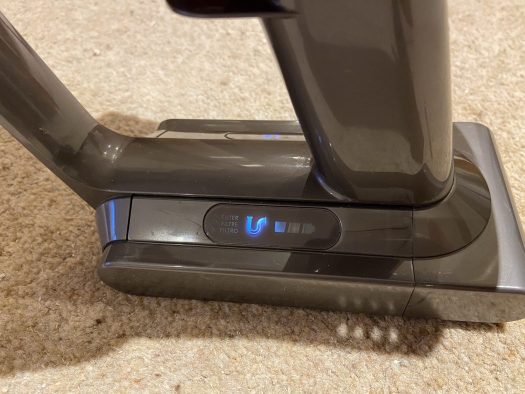
A glaring filter light suggests you are required to clean the filter. Once done, you can:
- Attach it to the vacuum and run the device for about 2 minutes. The light should stop flashing by now.
- Intermittent flashing means the filter hasn’t been fitted correctly. Try pulling it out anti-clockwise, and then again fit it by turning it clockwise.
- If the light still stays on, then probably, you need to replace the filter.
Other Indications Dyson V10 not working
- If you notice one flashing blue light, charge it for 3.5 hours.
- For three flashing blue lights, follow the same procedure.
- If there is one solid red light or no lights at all, report the issue, you might need a replacement.
If the filter warning persists, the filter should be removed and cleaned. The filter can be washed with water. You must never use soap on the filter of the vacuum cleaner.
Use cold water to wash your filter. If you have a Dyson V10 model fill the filter with water first. Once full, cover the top and shake to remove debris. Then drain the water and repeat until the water is clear.
It is very important not to change the filter if it gets wet. Moisture can damage the vacuum motor and cause mold. After properly cleaning and installing the filter, the filter warning should disappear. Otherwise, there may be a blockage affecting the sensor.
Conclusion:
These different warning lights is a handy tool for diagnosing warning Lights in Your Dyson V10. It can also let you know when it’s time to clean or replace the filter. To solve the problem quickly, you should familiarize yourself with the warning lights in Your Dyson V10.
Proper care and maintenance are key to getting the most out of your Dyson V10 vacuum. If the warning light comes on frequently, we recommend emptying and cleaning the Dyson regularly to maintain peak performance.
If you cannot find a solution about warning lights in your Dyson V10 in this guide, we recommend contacting Dyson for service or repair.
DISCLOSURE: This post may contain affiliate links, meaning when you click the links and make a purchase, we receive a commission at no additional cost to you
The Dyson V10’s filter is meant to be thoroughly cleaned at least once a month. You will find yourself doing it more frequently if you use it very often or capture lots of fine dust. But what happens if you put the filter back after cleaning and your Dyson vacuum no longer works?
If your Dyson V10 doesn’t work after a filter clean, check that the filter unit attached correctly. It’s also possible that the filter is still wet after cleaning because it hasn’t been given enough time to dry thoroughly or that the motor-head has failed after sucking in water from that wet filter. There could also be a blockage elsewhere, or the filter could be worn out.
In the following sections, we’ll explore each of those possible reasons why your Dyson V10 isn’t working after you’ve cleaned the filter. We’ll also walk you through the solutions for each of those issues so you can get your Dyson V10 up and running again.
See Also: Why Is Dyson Vacuum Not Holding A Charge?
Possible Reasons For Why A Dyson V10 Is Not Working After Cleaning The Filter:
If your Dyson V10 isn’t working after you’ve cleaned the filter, it might be because the filter unit isn’t reinstalled correctly, the filter is still wet, or the motor head has failed. The filter may have also worn out, or there are other blockages that you did not clean out before.
Related: Dyson Vacuum Troubleshooting Guide
1. Incorrectly Installed Filter
Once you’ve cleaned your Dyson V10’s filter, you’re meant to reattach it to the vacuum by twisting the cap clockwise until it clicks. However, the vacuum will not work if it senses that the filter unit is not installed correctly.
Sometimes, the problem might not be a mistake on your part. Besides incorrectly twisting the unit into place, it’s also possible that debris has gotten stuck and is preventing the filter unit from fitting into place as it should. Without a total seal between the filter unit and the rest of the vacuum, the V10 will not work when you pull the trigger.
Another tell-tale sign that the filter unit isn’t installed correctly is a flashing blue light on the side of the unit when you pull the trigger. That is one of several warning lights designed to notify you when the vacuum is facing an issue that requires troubleshooting.
How to fix it:
To troubleshoot and fix this issue, first remove the filter unit from the vacuum. Inspect the sections where the filter unit comes into contact with the vacuum and ensure that there isn’t any debris that will prevent the filter from locking into place.
Next, push the filter unit into place and twist it clockwise until you hear a click. You might find that a bit challenging because of the rubber gasket used to form a very tight seal without any air gaps between the filter and the vacuum unit.
For additional guidance, you can refer to the sticker that’s on the back of the filter unit, which provides you with instructions on attaching it to the V10 correctly.
2. Filter Is Still Wet
Like most people, you’ve probably followed Dyson’s instructions to wash the filter under a cold water tap. Unfortunately, many people do not give the filter enough time to dry out thoroughly after that. Instead, they mistakenly reattach the filter unit onto the vacuum while it’s still wet.
A wet filter will not allow any air to travel through it, halting all airflow throughout the entire vacuum. When that happens, the Dyson V10 will not allow itself to work as a way of protecting itself against further damage.
How to fix it:
If your Dyson V10’s filter is still wet, you must remove it immediately and let it dry overnight. Trying to force the vacuum to work with a wet filter could be very damaging to the appliance and its motor, as you’ll see in the next section.
If this is the case, the water or some of the excess moisture could have found its way into other parts and attachments on the vacuum. So, be sure also to take the rest of your vacuum apart and dry up any parts or components that might have become wet because of that moisture from the filter.
Dyson recommends that you wash the filter thoroughly and then give it 24 hours to dry out entirely. That can be a very long time if you’re planning on using the vacuum to do more cleaning on the same day. So, be sure to plan ahead.
When drying the filter, you do not have to use a hairdryer, heat gun, or any other heat source to do so. It’s also not a good idea to dry it under direct, scorching sunlight, as that could cause more wear and tear to the filter as well.
Instead, the most effective way to dry the vacuum filter thoroughly is to put it in a place where there’s optimal airflow. Then, leave the filter to air dry for the next 24 hours, and you’ll be able to use your vacuum like normal again.
3. The Motorhead Has Failed
Another possibility is that the motor head on your Dyson V10 has failed completely. If this happens after you’ve just cleaned the filter, then it’s likely that the filter was still wet when you reattached it to the vacuum.
The water from the wet filter would have been sucked in by the motor and damaged it to the point that it can no longer function correctly. That happens when the water finds its way into the electrical parts of the motor, causing a short circuit that damages the motor and makes it completely unusable.
How to fix it:
If the motor head on your Dyson V10 has suffered from water damage, then the only solution here is to replace the motor entirely. The best way to do that is to contact Dyson’s customer support to see if they can do that for you. If not, they should be able to tell you what your options are for getting it fixed.
Another option is to go directly to your local appliance repair specialist. They would be able to source the replacement motor and fix it for you as well.
Once the motorhead has been replaced with a new one that functions correctly, you’ll be able to continue using your Dyson V10 vacuum like you usually do.
4. The Filter Has Worn Out
The filters on Dyson V10 vacuums are designed to last only two years. The filters will last longer if you rarely use your vacuum, or it’ll wear out quicker if you use it more than the average user. That’s especially true if you use it to capture lots of very fine dust, which saturates the filters much quicker.
When these Dyson vacuum filters catch large pieces of dust and debris, they’re easy to clean. If you wash these filters regularly under a cold tap, most of the dust and debris will be removed without any problems.
However, the same filters also have very tiny pores that capture fine dust. That fine dust is not so easy to remove even after repeated washing.
That means that over time and especially after regular washing, the filter will become worn out as part of its regular wear and tear. The filter will become saturated with dust, reducing the amount of airflow that can easily pass through the filter.
How to fix it:
If your Dyson V10 has been using the same filter for two years or more, then it’s time to purchase a replacement. It’s always best to buy replacement filters directly from Dyson instead of third-party sellers. That way, you can rest assured that the filter is compatible with your Dyson V10 and that it is highly reliable.
5. There Are Blockages Elsewhere
Even though you’ve cleaned the Dyson V10’s filter, it’s possible that you may have overlooked a blockage elsewhere in the vacuum. When this happens, the vacuum will pulsate whenever you pull the trigger.
The Dyson V10 is designed sometimes to pulsate when you pull the trigger as a way to notify you that there’s a problem. It does that in order to prevent the motor from running continuously in a way that might damage itself.
If the vacuum is pulsating, then there might be a blockage in the brush bar, the wand, or the inlet. These sections should also be cleaned thoroughly whenever you clean the vacuum’s filter.
How to fix it:
To fix this problem:
- Remove all of the Dyson V10’s parts and attachments after you’ve cleaned the filter.
- Inspect the brush bar, the wand, and the inlet (where the wand meets the vacuum) for any blockages.
- Clean them out and ensure that air can flow through each part without any obstructions.
- Doing so will ensure that air can flow from the bottom of the vacuum (at the brushbar) all the way to the top (at the filter) without any obstructions.
So back in January my one year old Dyson V10 started pulsing and flashing the filter icon. I clean it regularly so did the normal clean. Still pulsing the next day after the filter and everything was clean and dry. Took the whole thing apart and cleaned it all, dried, same thing. Filter visibly looks fine. Reached out to Dyson support who said I needed a new head but not in stock. No biggie. After a month, still nothing about the replacement so reached out again. This time they said just replace the filter. Also not in stock. After a month I just bought a new filter (genuine Dyson one, not a knock off). Same error. Reached out again and now they are saying it’s the battery and I have to buy it myself.
I’m not super interested in playing guess the part with them anyone, especially since it’s a hassle to find any parts in stock online.
Does anyone know what else I should try? It’s still in warranty but they seem to be giving me the runaround on what my issue is and what my next step is. This was the first time the filter icon ever flashed at me as I normally clean it weekly and empty it after each use but I can’t seem to get it to work now.