
Git uses index.lock to know that some Git process—perhaps this one, if it just created index.lock itself, or perhaps some other Git process—is busy doing things with the repository that require locking Git’s index. When a Git successfully creates this lock file, it then goes about its business, updating various internal databases, until it is done. It then deletes this lock file to indicate that it is done, and other Git commands can now get started, do their things, and finish.
If there is a bug in your Git system, it’s possible for a Git command to create index.lock, start doing its work, and then crash, leaving the lock file behind. In this case, the correct thing to do is to upgrade to a non-buggy Git so that the problem does not recur, and also to remove the index.lock file. (You can do this in either order but if the bug remains, some Git command(s) may leave the bogus lock behind.) Due to a fairly extensive test suite, this kind of bug is rare in Git these days—in the bad old days, it was more common, but now it should hardly ever occur.
If your computer itself crashes (due to a non-Git bug, or the power failing, or whatever) while Git is in the middle of one of these operations, it’s possible that Git never gets a chance to remove the index.lock file. In this case, you just need to remove the index.lock file manually. However, after a computer crash, other parts of Git’s internal databases might have been damaged by the crash, so it’s wise to run git fsck. The git fsck program prints a number of messages even on healthy systems so don’t be too alarmed about various «dangling commit» or «dangling blob» messages: these are just informative. (In general and ideally, your computer itself should never crash at all and your power should never fail, and people should not have frozen to death in Texas in February 2021, but the world is not always ideal.)
(Windows systems sometimes see bad behavior from some antivirus software. This might go away on its own in some cases. I avoid Windows, so I have no specific recommendations here, other than «avoid Windows».)
Last, there’s a problem that has become a common issue lately for some people because Cloud Storage is so attractive.1 Specifically, if you store a Git repository (the .git directory) in some sort of cloud-storage system, or even in a shared-disk or shared-file-system setup across a virtual machine, the competition between different agents that are attempting to synchronize this storage area can corrupt your Git repository, including resurrecting bogus index.lock files or even damaging Git’s internal databases. Don’t do this! Keep the Git repository in an un-shared, local-disk area.
1Well, at least superficially. There really are advantages, but personally I subscribe to the Lamport definition of a distributed system: A distributed system is one in which the failure of a computer you didn’t even know existed can render your own computer unusable.
I seem to have the same issue. I can’t find a lock file and I can’t add a file via terminal or the github application. i get the same error — below is the log file.
2019-01-22T13:17:45.456Z — info: [ui] [AppStore] loading 1 repositories from store
2019-01-22T13:17:45.457Z — info: [ui] [AppStore] found account: cwbiggs (cwbiggs)
2019-01-22T13:17:46.233Z — info: [ui] launching: 1.5.1 (Mac OS 10.14.0)
2019-01-22T13:17:46.234Z — info: [ui] execPath: ‘/Applications/GitHub Desktop.app/Contents/Frameworks/GitHub Desktop Helper.app/Contents/MacOS/GitHub Desktop Helper’
2019-01-22T13:17:46.426Z — info: [ui] [AppStore.withAuthenticatingUser] account found for repository: PerceptionIsPresumption — cwbiggs (has token)
2019-01-22T13:17:46.428Z — info: [ui] [AppStore.withAuthenticatingUser] account found for repository: PerceptionIsPresumption — cwbiggs (has token)
2019-01-22T13:17:46.510Z — info: [ui] Stats reported.
2019-01-22T13:17:57.911Z — info: [ui] Executing fetch: git -c credential.helper= fetch —progress —prune origin (took 11.481s)
2019-01-22T13:18:01.520Z — info: [ui] Executing fetch: git -c credential.helper= fetch —progress —prune origin (took 15.085s)
2019-01-22T13:18:01.522Z — error: [ui] git -c credential.helper= fetch --progress --prune origin exited with an unexpected code: 1.
remote: Enumerating objects: 3, done.
remote: Counting objects: 33% (1/3)
remote: Counting objects: 66% (2/3)
remote: Counting objects: 100% (3/3)
remote: Counting objects: 100% (3/3), done.
remote: Total 15 (delta 3), reused 3 (delta 3), pack-reused 12
error: cannot lock ref ‘refs/remotes/origin/gh-pages’: is at b1e5a83babab9f932c9b8c03aa6dab2a9b5cc5aa but expected 6bd01fc9a3cdd355245d78311dfe6cdcf0e5b8a3
From https://github.com/cwbiggs/PerceptionIsPresumption
! 6bd01fc..b1e5a83 gh-pages -> origin/gh-pages (unable to update local ref)
2019-01-22T13:18:43.928Z — error: [ui] git reset -- . exited with an unexpected code: 128.
fatal: Unable to create ‘/Users/christopherbiggs/Google Drive/StephenCollaboration/PerceptionIsPresumption/.git/index.lock’: File exists.
Another git process seems to be running in this repository, e.g.
an editor opened by ‘git commit’. Please make sure all processes
are terminated then try again. If it still fails, a git process
may have crashed in this repository earlier:
remove the file manually to continue.
(The error was parsed as 34: A lock file already exists in the repository, which blocks this operation from completing.)
2019-01-22T13:21:07.335Z — error: [ui] git reset -- . exited with an unexpected code: 128.
fatal: Unable to create ‘/Users/christopherbiggs/Google Drive/StephenCollaboration/PerceptionIsPresumption/.git/index.lock’: File exists.
Another git process seems to be running in this repository, e.g.
an editor opened by ‘git commit’. Please make sure all processes
are terminated then try again. If it still fails, a git process
may have crashed in this repository earlier:
remove the file manually to continue.
(The error was parsed as 34: A lock file already exists in the repository, which blocks this operation from completing.)
2019-01-22T13:21:15.191Z — error: [ui] git reset -- . exited with an unexpected code: 128.
fatal: Unable to create ‘/Users/christopherbiggs/Google Drive/StephenCollaboration/PerceptionIsPresumption/.git/index.lock’: File exists.
Another git process seems to be running in this repository, e.g.
an editor opened by ‘git commit’. Please make sure all processes
are terminated then try again. If it still fails, a git process
may have crashed in this repository earlier:
remove the file manually to continue.
(The error was parsed as 34: A lock file already exists in the repository, which blocks this operation from completing.)
Improve Article
Save Article
Like Article
Improve Article
Save Article
Like Article
Here we will create a new repository with GitHub desktop in a small illustrative react app. Here when we commit we are supposed to get an error in order to illustrate via error message as a lock file already exists in the repository, which blocks this operation from completing. Do check here we are demonstrating GitHub Desktop version1.3.4 on Windows OS.
Steps to Reproduce
- Add Local Repository. Choose Repository. Get redirected to create a new repository.
- Create a new repository in the project folder
- Commit(Try to) and get the error message: A lock file already exists in the repository, which blocks this operation from completing.
Expected Behavior: Commit goes through
Actual Behavior: Get Error Message: A lock file already exists in the repository, which blocks this operation from completing.

Error: If you go to commit your file in GitHub Desktop then you get this error.
We need to follow the below steps in order to solve the above ambiguity that is as follows depicted through visual aid for better understanding as here we are using GitHub Desktop:
Step 1: Open the folder in your system.

Step 2: Click on { 3. (…) after options }.
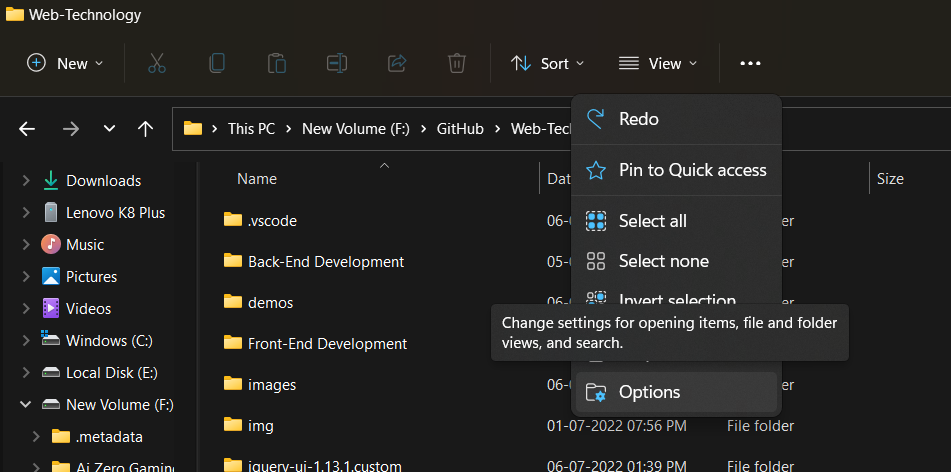
Step 3: Click view

Step 4: Hidden file and folder > Show hidden file and folder ( click on ) and click on ok.
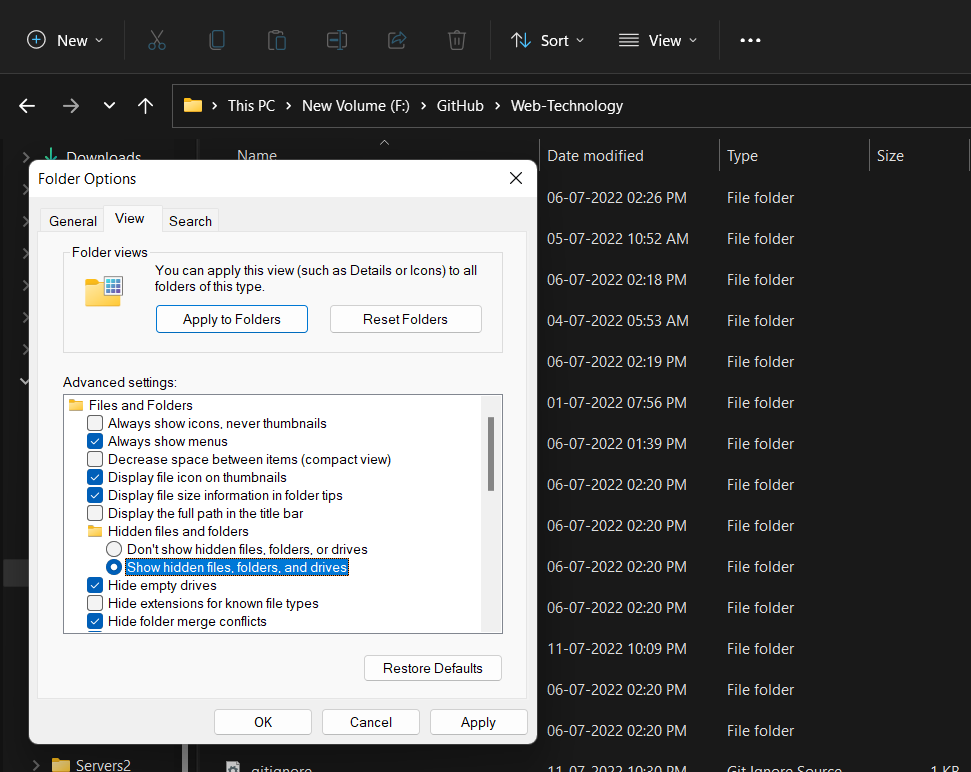
Step 5: Open the .git folder and delete the index.lock.

Step 6: Now, open GitHub Desktop

Step 7: Click on the commit.
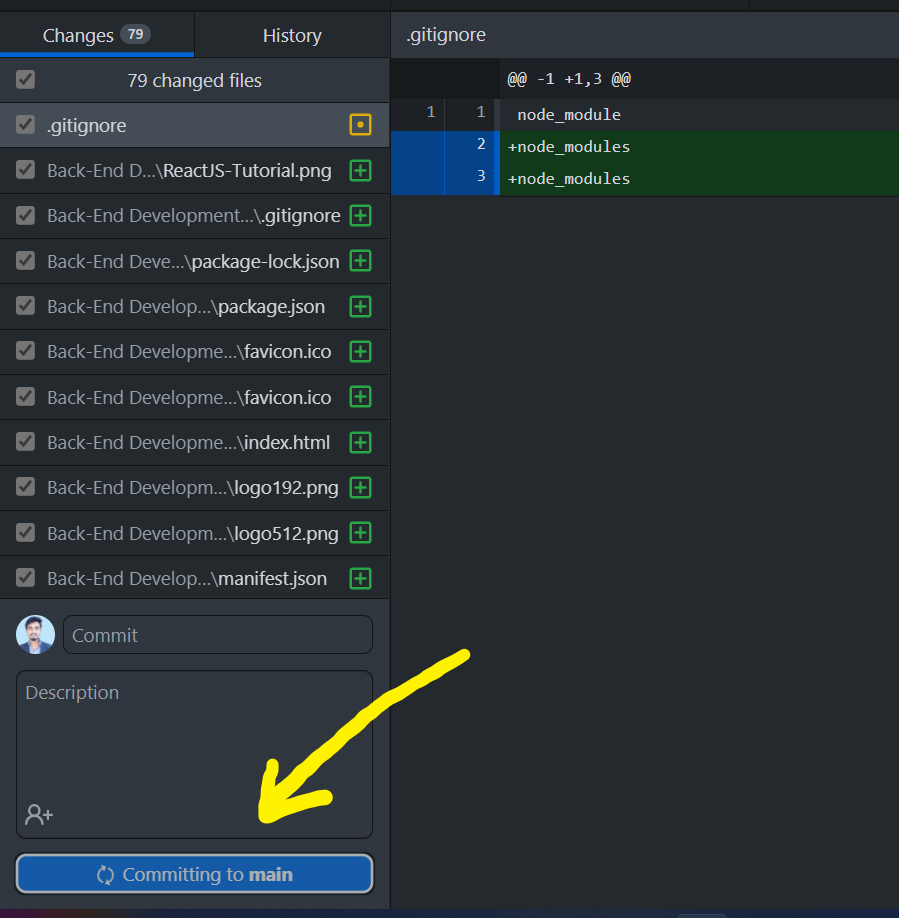
As seen from the above media Commit goes through and our problem is solved earlier where we were getting an error message.
Last Updated :
18 Aug, 2022
Like Article
Save Article
Here we will create a new repository with GitHub desktop in a small illustrative react app. Here when we commit we are supposed to get an error in order to illustrate via error message as a lock file already exists in the repository, which blocks this operation from completing. Do check here we are demonstrating GitHub Desktop version1.3.4 on Windows OS.
Steps to Reproduce
- Add Local Repository. Choose Repository. Get redirected to create a new repository.
- Create a new repository in the project folder
- Commit(Try to) and get the error message: A lock file already exists in the repository, which blocks this operation from completing.
Expected Behavior: Commit goes through
Actual Behavior: Get Error Message: A lock file already exists in the repository, which blocks this operation from completing.
Error: If you go to commit your file in GitHub Desktop then you get this error.
We need to follow the below steps in order to solve the above ambiguity that is as follows depicted through visual aid for better understanding as here we are using GitHub Desktop:
Step 1: Open the folder in your system.
Step 2: Click on { 3. (…) after options }.
Step 3: Click view
Step 4: Hidden file and folder > Show hidden file and folder ( click on ) and click on ok.
Step 5: Open the .git folder and delete the index.lock.
Step 6: Now, open GitHub Desktop
Step 7: Click on the commit.
As seen from the above media Commit goes through and our problem is solved earlier where we were getting an error message.
Git uses index.lock to know that some help uvdos github-desktop Git process—perhaps this one, help uvdos github-desktop if it just created index.lock itself, or help uvdos github-desktop perhaps some other Git help uvdos github-desktop process—is busy doing things help uvdos github-desktop with the repository that require locking help uvdos github-desktop Git’s index. When a Git successfully help uvdos github-desktop creates this lock file, it then goes help uvdos github-desktop about its business, updating various help uvdos github-desktop internal databases, until it is done. help uvdos github-desktop It then deletes this lock file to help uvdos github-desktop indicate that it is done, and other Git help uvdos github-desktop commands can now get started, do their help uvdos github-desktop things, and finish.
If there is a bug in your Git system, help uvdos github-desktop it’s possible for a Git command to help uvdos github-desktop create index.lock, start doing its work, help uvdos github-desktop and then crash, leaving the lock file help uvdos github-desktop behind. In this case, the correct thing help uvdos github-desktop to do is to upgrade to a non-buggy Git help uvdos github-desktop so that the problem does not recur, and help uvdos github-desktop also to remove the index.lock file. help uvdos github-desktop (You can do this in either order but if help uvdos github-desktop the bug remains, some Git command(s) may help uvdos github-desktop leave the bogus lock behind.) Due to a help uvdos github-desktop fairly extensive test suite, this kind help uvdos github-desktop of bug is rare in Git these help uvdos github-desktop days—in the bad old days, it help uvdos github-desktop was more common, but now it should help uvdos github-desktop hardly ever occur.
If your computer itself crashes (due to help uvdos github-desktop a non-Git bug, or the power failing, or help uvdos github-desktop whatever) while Git is in the middle of help uvdos github-desktop one of these operations, it’s possible help uvdos github-desktop that Git never gets a chance to remove help uvdos github-desktop the index.lock file. In this case, you help uvdos github-desktop just need to remove the index.lock file help uvdos github-desktop manually. However, after a computer help uvdos github-desktop crash, other parts of Git’s internal help uvdos github-desktop databases might have been damaged by the help uvdos github-desktop crash, so it’s wise to run git fsck. help uvdos github-desktop The git fsck program prints a number of help uvdos github-desktop messages even on healthy systems so help uvdos github-desktop don’t be too alarmed about various help uvdos github-desktop «dangling commit» or «dangling blob» help uvdos github-desktop messages: these are just informative. help uvdos github-desktop (In general and ideally, your computer help uvdos github-desktop itself should never crash at all and help uvdos github-desktop your power should never fail, and people help uvdos github-desktop should not have frozen to death in Texas help uvdos github-desktop in February 2021, but the world is not help uvdos github-desktop always ideal.)
(Windows systems sometimes see bad help uvdos github-desktop behavior from some antivirus software. help uvdos github-desktop This might go away on its own in some help uvdos github-desktop cases. I avoid Windows, so I have no help uvdos github-desktop specific recommendations here, other help uvdos github-desktop than «avoid Windows».)
Last, there’s a problem that has become help uvdos github-desktop a common issue lately for some people help uvdos github-desktop because Cloud Storage is so attractive.1 help uvdos github-desktop Specifically, if you store a Git help uvdos github-desktop repository (the .git directory) in some help uvdos github-desktop sort of cloud-storage system, or even in help uvdos github-desktop a shared-disk or shared-file-system help uvdos github-desktop setup across a virtual machine, the help uvdos github-desktop competition between different agents help uvdos github-desktop that are attempting to synchronize this help uvdos github-desktop storage area can corrupt your Git help uvdos github-desktop repository, including resurrecting bogus help uvdos github-desktop index.lock files or even damaging Git’s help uvdos github-desktop internal databases. Don’t do this! help uvdos github-desktop Keep the Git repository in an un-shared, help uvdos github-desktop local-disk area.
1Well, at least superficially. There help uvdos github-desktop really are advantages, but personally I help uvdos github-desktop subscribe to the Lamport definition of a help uvdos github-desktop distributed system: A distributed system help uvdos github-desktop is one in which the failure of a help uvdos github-desktop computer you didn’t even know existed help uvdos github-desktop can render your own computer unusable.